
FREE
Loading…
Upload a photo of an empty room, pick the room and a style, and get a staged listing photo in about a minute. The walls, floor, windows, doors and fixtures stay exactly as you shot them; only furniture and decor are added, and doorways are kept clear.
Room
Style
Last updated:
Unretouched results from this tool: the empty room on the left, the staged photo on the right. The rooms are AI-generated stand-ins; we never publish customers’ listings.
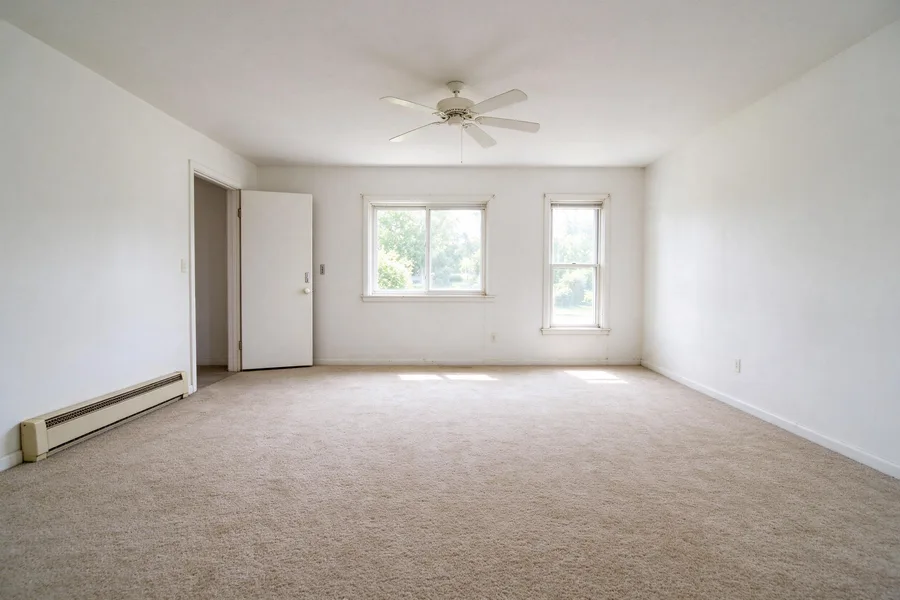
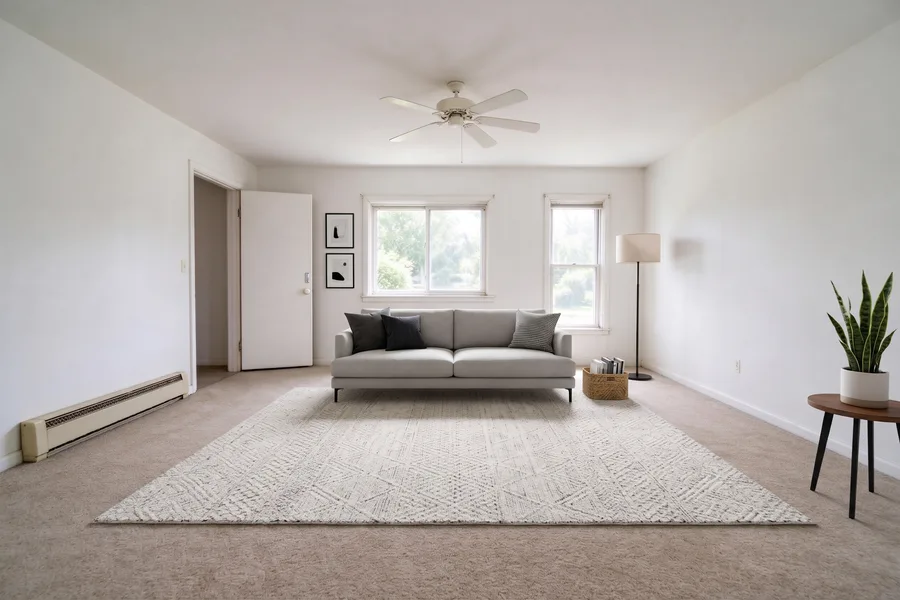
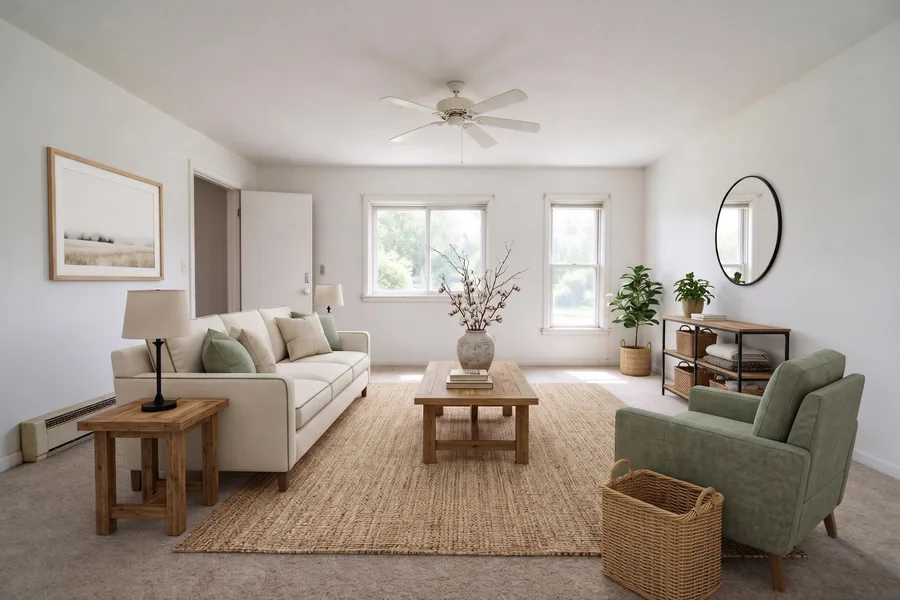
A carpeted living room in a 1990s house, photographed empty. "Detect the room" was left on, and the tool read it as a living room from its size, the two windows and the ceiling fan.
Everything structural is where it was: the door on the left still opens, the baseboard heater, outlets and fan are untouched, and the carpet is the same carpet.
In the editor: Room · Detect the room · Style · Modern
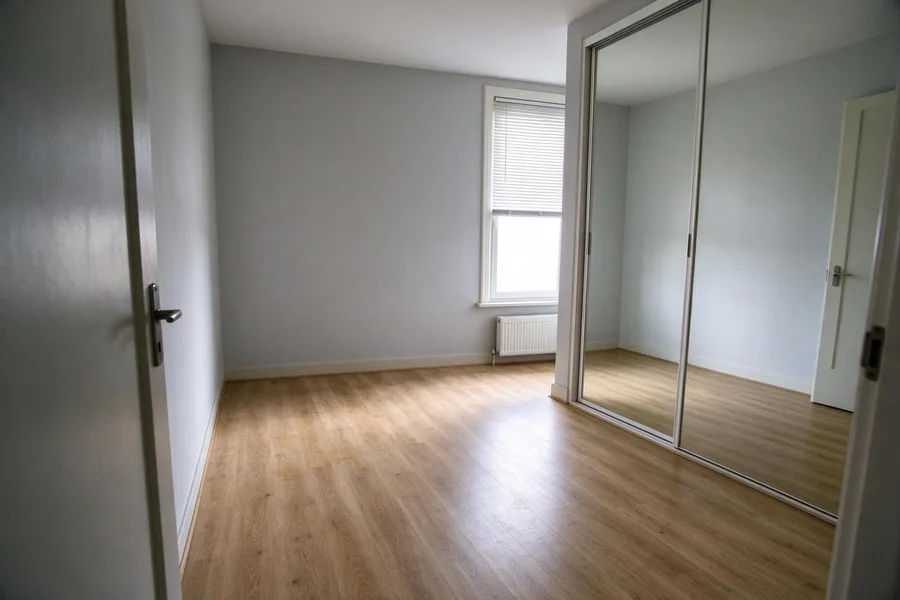
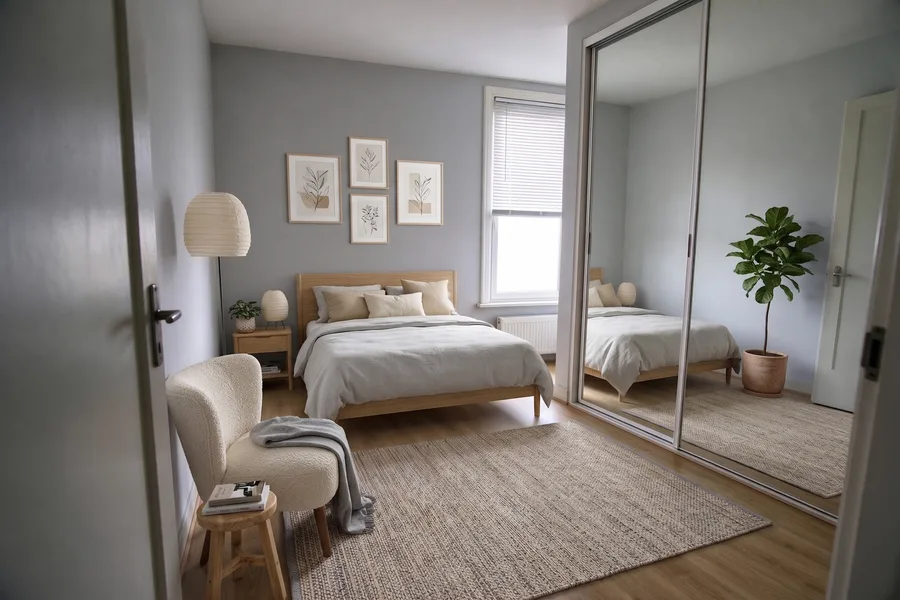
Mirrored closet doors are where staging usually gives itself away: the reflection has to show the furniture too. Here the bed and plant appear in the mirror from the right angle.
The bed sits against the far wall, the closet and the bedroom door are both left clear, and the blinds and radiator stay as they were.
In the editor: Room · Bedroom · Style · Scandinavian
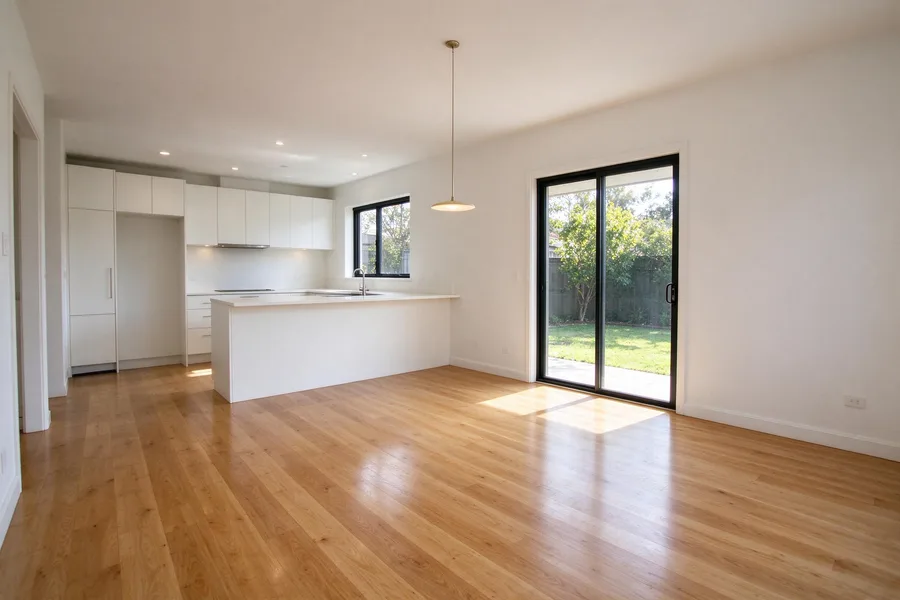
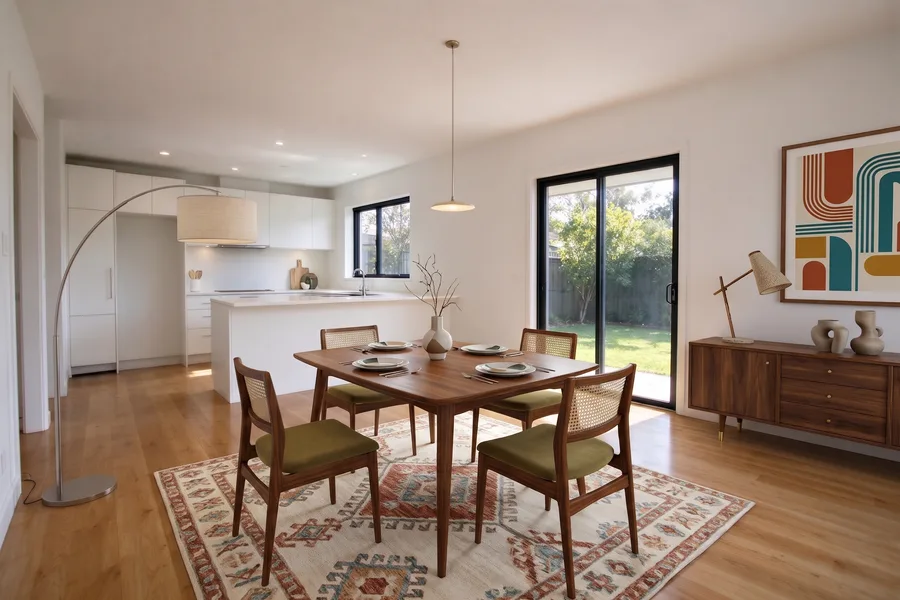
With Room set to Dining room, the table lands under the existing pendant light, and the kitchen beyond is left exactly as it was: no stools, no extra counters.
The sliding door to the yard stays clear, which matters for buyers who want to see how the space flows outside.
In the editor: Room · Dining room · Style · Mid-century
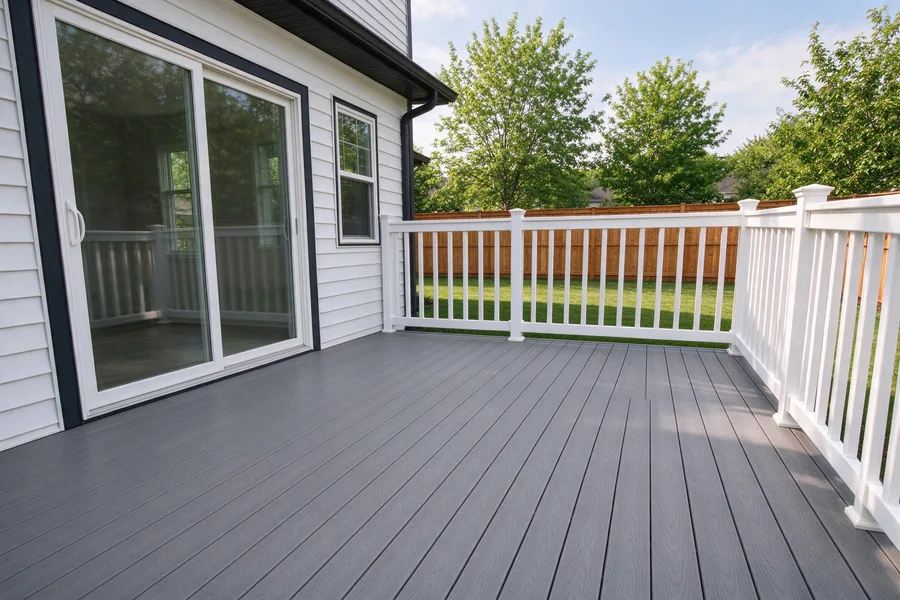
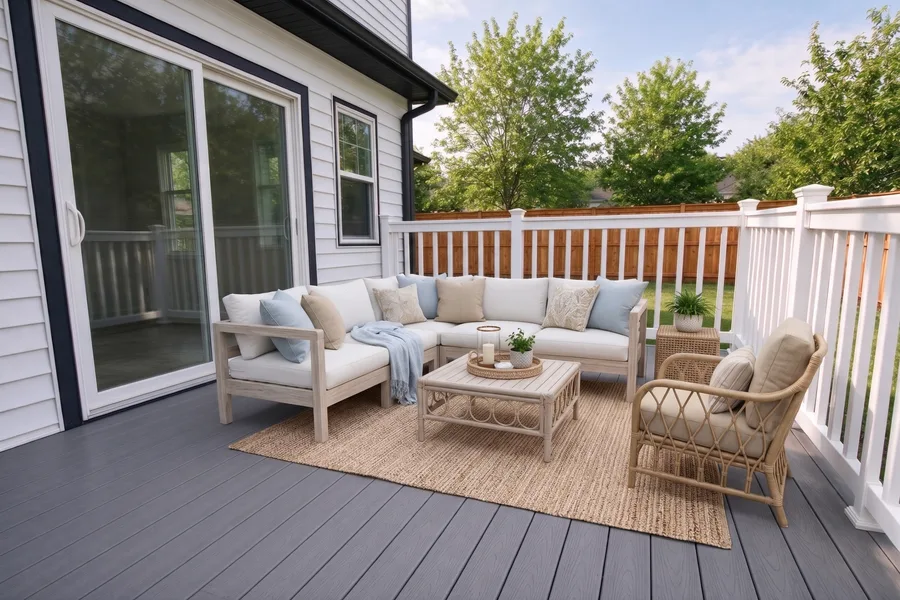
Outdoor spaces sell square footage too. Room set to Patio or deck adds weather-proof furniture sized to the deck: a sectional, a low table and one chair, with room left to walk.
The railing, the siding, the sliding door and the yard behind are the original photo.
In the editor: Room · Patio or deck · Style · Coastal
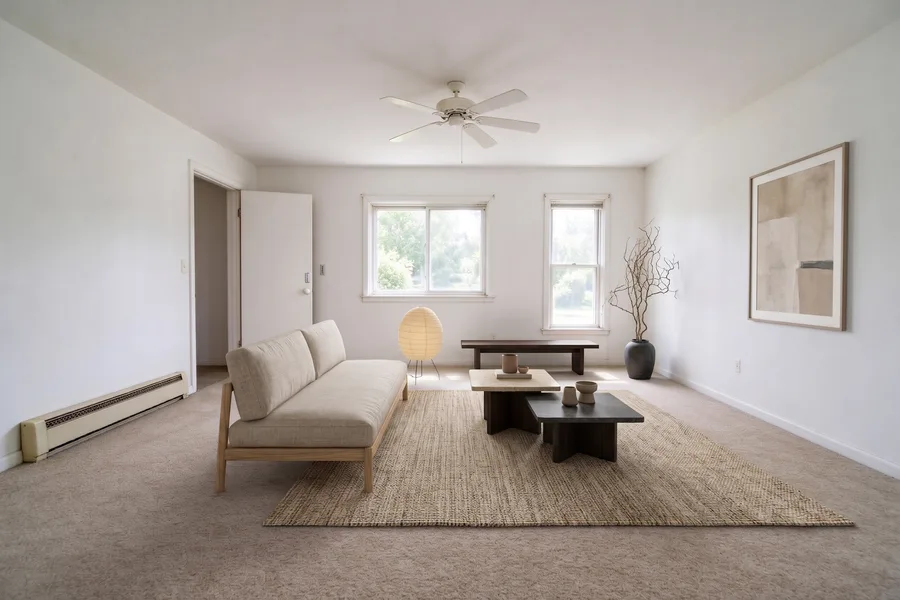
The same photo staged as Modern, Modern farmhouse and Japandi. Each version took one click and 5 credits, and the door, windows, heater and fan are identical in all three.
Use it to show buyers what a room could be, to match the style to the neighbourhood, or to pick the look for the rest of the house before staging every room.
sparkpix.ai Virtual Staging AI is a browser tool that furnishes a photo of an empty room. You upload one photo, choose the room (or let it detect the room) and one of eight styles, and in about a minute you get a 2K staged photo in the same shape as the original. It only adds movable furniture and decor: the camera angle, walls, floor, windows, doors and fixtures stay as photographed, and doors and windows are kept clear. Each photo costs 5 credits, about $0.14 on the $9.99 monthly plan, and the first one is free.
| Virtual staging AI (here) | A virtual staging service | Physical staging | |
|---|---|---|---|
| What you send | One photo; pick the room and a style | Photos plus a written brief | The keys to the house |
| Turnaround | About a minute per photo | Usually one to two business days | Days to plan, deliver and set up |
| Cost | 5 credits, about $0.14 per photo | A fee per photo | Furniture rental and labour for the whole home |
| Several styles for one room | Pick another style and run it again | Usually charged as another photo | Not practical |
| The room itself | Never changed: walls, floors, windows and fixtures stay as shot | Up to the editor | Real |
| Best for | Listings, rentals, pre-sale marketing, trying layouts | High-end listings that need hand retouching | Open houses and luxury homes |
A landscape photo of one room, shot from a corner at chest height, with the lights on and the blinds open.
Leave Room on "Detect the room" or choose it, then pick one of eight styles. The line in the box is editable.
In about a minute you get the staged photo at 2K. Large or wide rooms can take up to three minutes.
Check that doors and windows are clear, download it, and mark it "Virtually staged" in your listing.
Staging is there to help the most buyers picture themselves in the home, so neutral styles are the default. These are the eight styles in the editor and the homes they usually suit.
| Style | What it looks like | Usually suits |
|---|---|---|
| Modern | Clean lines, grey upholstery, walnut and black metal | Most listings; the safest neutral choice |
| Scandinavian | Light oak, white and soft grey, bouclé, linen | Condos and small apartments: light colours make rooms read bigger |
| Modern farmhouse | Warm wood, cream and sage, jute, black iron | Suburban family homes |
| Coastal | White and sand, rattan, washed wood, soft blue | Beach, lake and vacation homes |
| Mid-century | Teak and walnut on tapered legs, olive or rust, geometric rug | 1950s–60s ranches, urban flats |
| Luxury | Velvet, marble, brushed brass, layered taupe | High-end listings |
| Japandi | Low ash and dark wood, linen, stone, very little clutter | Minimal new builds |
| Industrial | Cognac leather, black steel, reclaimed wood | Lofts and converted buildings |
Virtual staging is widely used, but a listing photo still has to show the property honestly. Listing rules generally forbid photos that misrepresent the home, so the usual practice is to label staged photos as "Virtually staged" and to include the empty original as well. Rules differ between MLSs and portals, so check yours.
That is why this tool only adds things a buyer would expect to be removed: furniture, rugs, lamps, plants, art and decor. It is told never to repaint walls, replace floors, change windows or fixtures, hide damage or alter the view, so what the buyer sees in the staged photo is the room they will walk into, minus the furniture.
A wide shot from one corner at chest height shows the floor area the furniture needs. A close-up of one wall leaves the tool nowhere to put a sofa.
Anything already in the room is kept, so a box or a ladder stays in the staged photo. Clear the room first, or use the clutter remover on the photo before staging it.
"Detect the room" works for obvious spaces. For a small spare room, a bonus room or a loft, pick the room yourself, or type it: "Stage it as a nursery."
The rules keep doors and closets clear, but in a small room the model sometimes squeezes a chair or shelf in front of a closet. Run it again if that happens.
Buyers scroll through every photo. Pick one style for the whole house so the rooms look like the same home.
Put the original next to the staged one. Buyers like to see both, and many MLS rules expect it.
Vacant homes and new builds going on the market
Rentals and short-term rentals between tenants
Showing one room as two possible uses
Pre-sale marketing before the furniture arrives
Hiding damage, stains or repairs the buyer should know about
Changing paint, flooring or fixtures in a listing photo
Photos so dark or tight that the floor is not visible
Floor plans and 3D renders (it works on photographs)
Virtual staging AI adds furniture and decor to a photo of an empty room, so buyers can see how the space could be used. On sparkpix.ai you upload one photo, pick the room and a style, and the AI furnishes it in about a minute while the walls, floor, windows, doors and fixtures stay exactly as photographed.
Each staged photo costs 5 credits. New accounts get 5 free credits, so your first room is free. After that, the $9.99 monthly plan includes 350 credits (70 staged photos, about $0.14 each), or you can buy 500 credits once for $19.99. Results have no watermark.
Usually about a minute per photo. Large rooms and wide shots can take up to three minutes.
No. Every request tells the model to keep the camera angle, walls, wall colour, floor, ceiling, windows, doors, closets, built-ins, radiators, fixtures and the view through the windows, and to add only movable furniture and decor. If you want new paint or flooring, that is the AI interior design tool.
Yes. Keep the same photo, pick another style and press Generate again; each version costs 5 credits. It is a quick way to show one empty room as a family living room and as a home office, or in two colour schemes.
In most markets, yes. Listing rules generally say photos must not misrepresent the property, so the common practice is to label staged photos "Virtually staged" and show the empty original as well. Check the rules of your MLS or listing site. This tool only adds furniture and never hides or changes the property itself.
Living rooms, bedrooms, dining rooms, kitchens (stools and styled counters), home offices, kids’ rooms, and outdoor patios, decks and balconies. Leave Room on "Detect the room" or pick it yourself.
It keeps whatever is already there and adds around it. To replace existing furniture with a new look, use the AI interior design tool; to clear out clutter first, use the real estate clutter remover.
2K: a 3:2 listing photo comes back at about 2,500 × 1,690 pixels, in the same shape as the photo you uploaded. That is larger than most listing sites display.
Yes. They are your listing photos: use them on the MLS, Zillow-style portals, flyers, social posts and your own site.
Uploaded photos are deleted within 3 days. Staged results are saved to your account so you can download them again, and you can delete them at any time.
One empty room, one style, about a minute.
About a minute
No watermark
All of these are part of the sparkpix.ai AI photo editor, so one account works across every tool.
Restyle a furnished room: new furniture, paint and flooring.
Clear personal items out of a listing photo.
Erase one thing from any photo.
Turn a dull shot into golden-hour light.
Enlarge photos for flyers and signs.
Change a photo’s ratio without cropping.
Change one thing in a photo by describing it.
Take out tourists, strangers, or anyone you don’t want.
Clear text, watermarks, emojis, and date stamps.
Erase clutter, power lines, fences, reflections, shadows.
Describe any change in words, or draw over the area to edit.
Add a missing friend, a late relative, or your younger self.
All of these are part of the sparkpix.ai AI photo editor, so one account works across every tool.