
FREE
Loading…
Upload an image to transform or edit
Upload an image and describe your transformation to generate
Credits per Photo
Output Resolution
Processing Time
Max Upload Size
Last updated:
Each pair is a real output of this tool — the left image went in with the built-in instruction, the right image came back. Same person, same pose, the filter gone.
The classic beauty-cam look — waxy smoothed skin, whitened cast, enlarged eyes — re-rendered as a real phone selfie: natural skin tone and texture, ordinary proportions, same cafe, same pose.
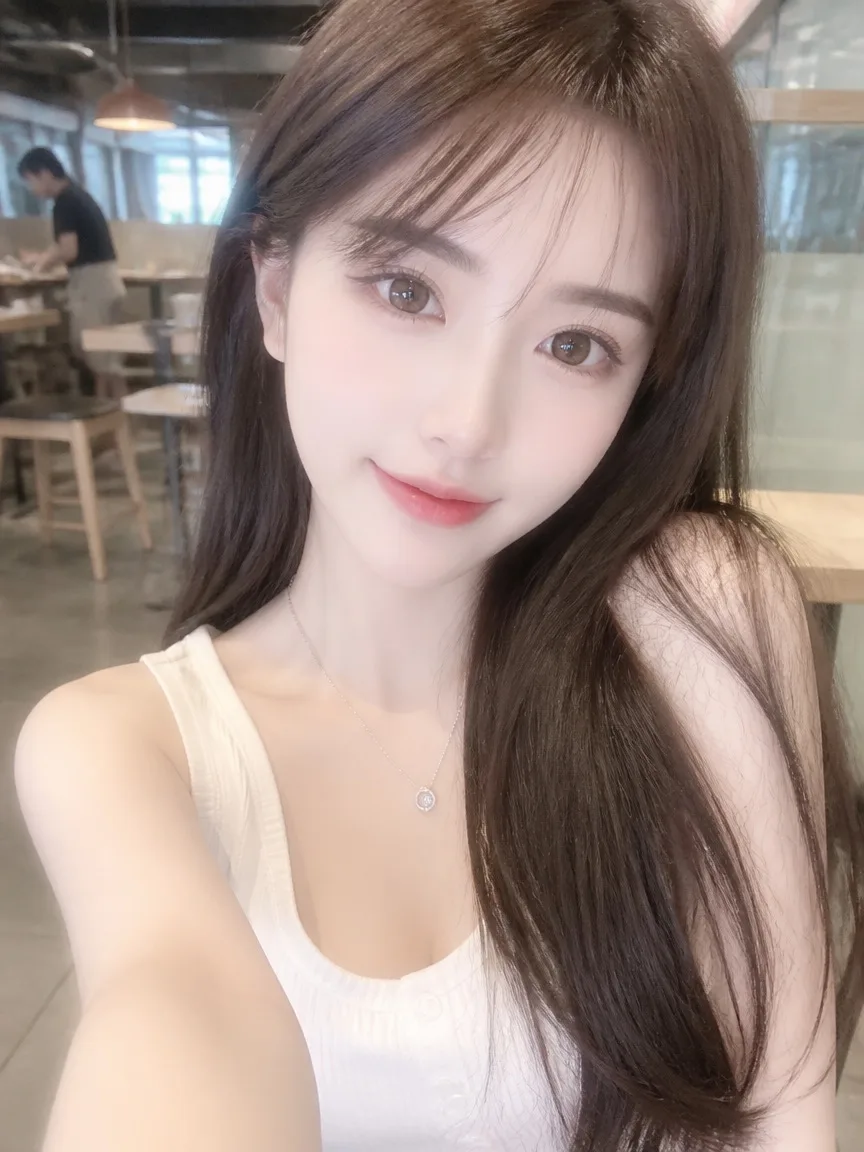 Before
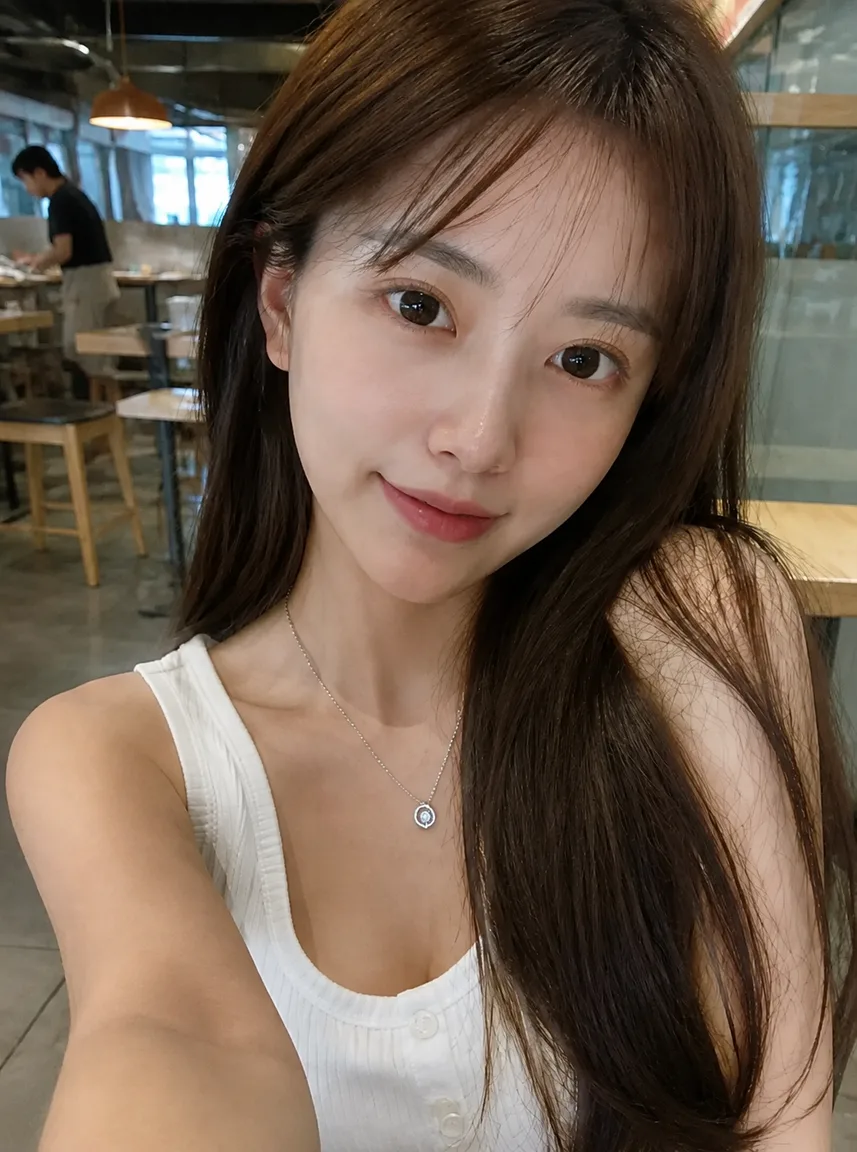 AI Result
An AI portrait with the full render gloss — poreless skin, cinematic rim light, over-clean colour — brought down to phone-camera reality. Same man, same framing; only the rendering changed.
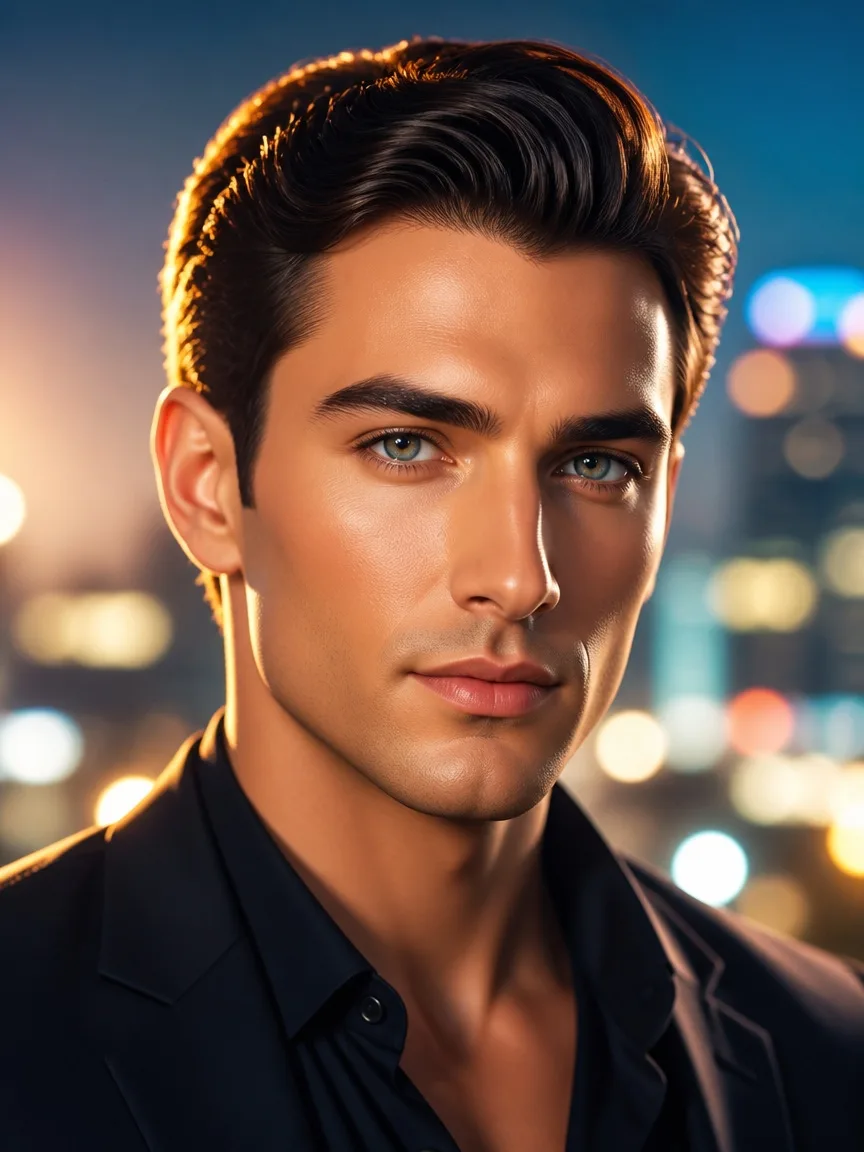 Before
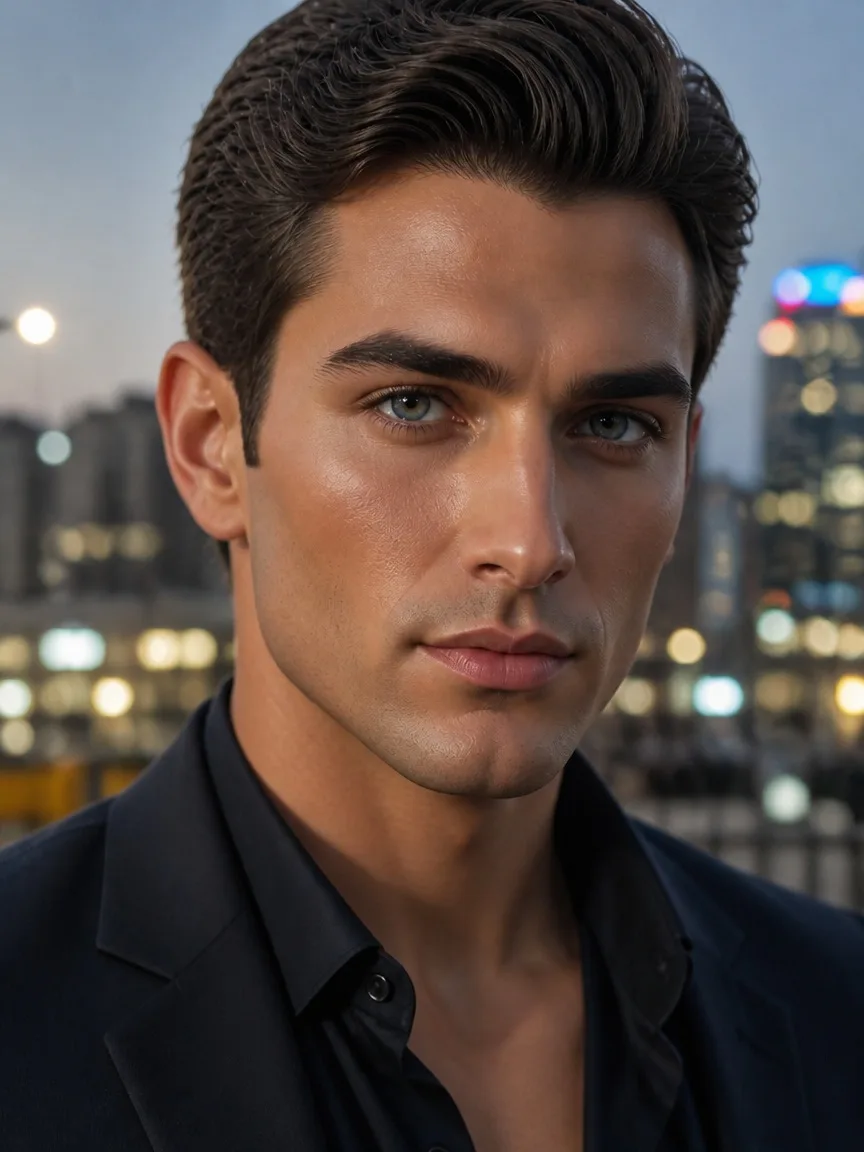 AI Result
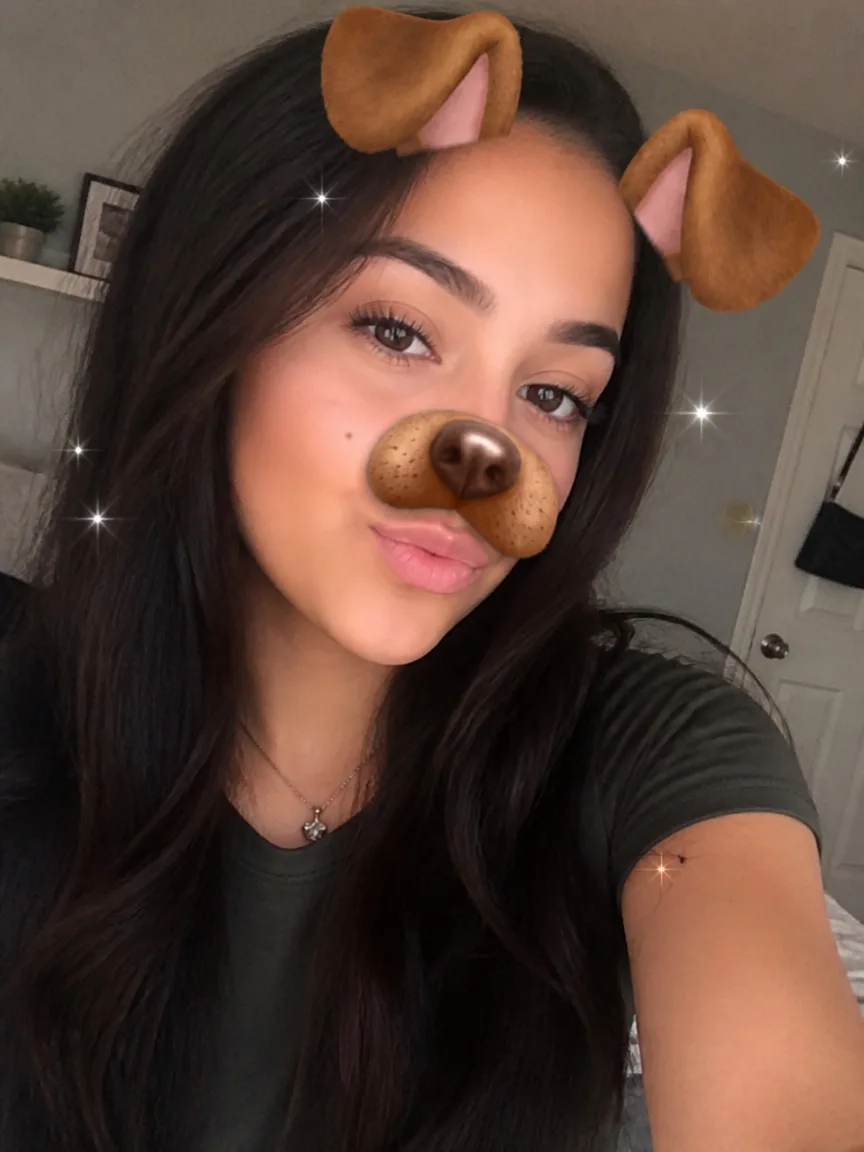
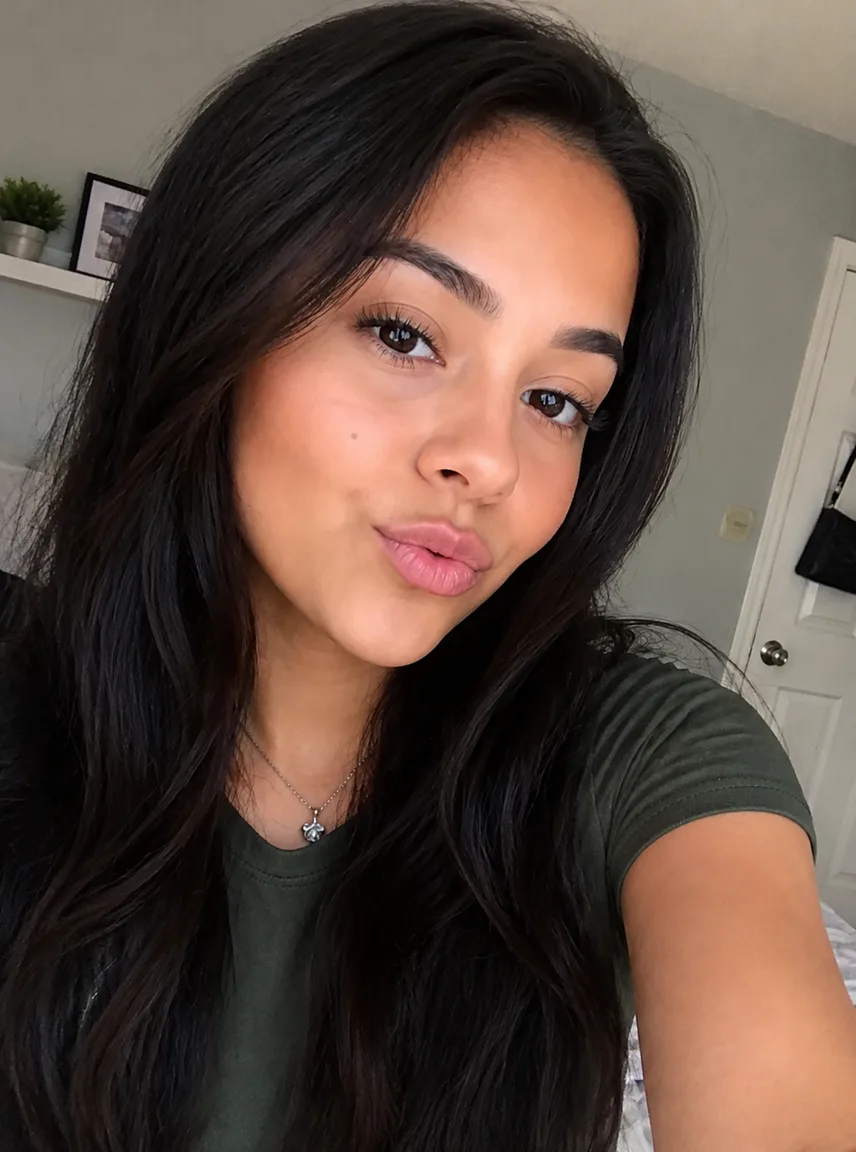
AR overlay removal at its cleanest: the dog ears, nose graphic and sparkle stickers come off, and the hairline and nose they covered are painted back to match the light. The selfie underneath, recovered.
 Before
 AI Result
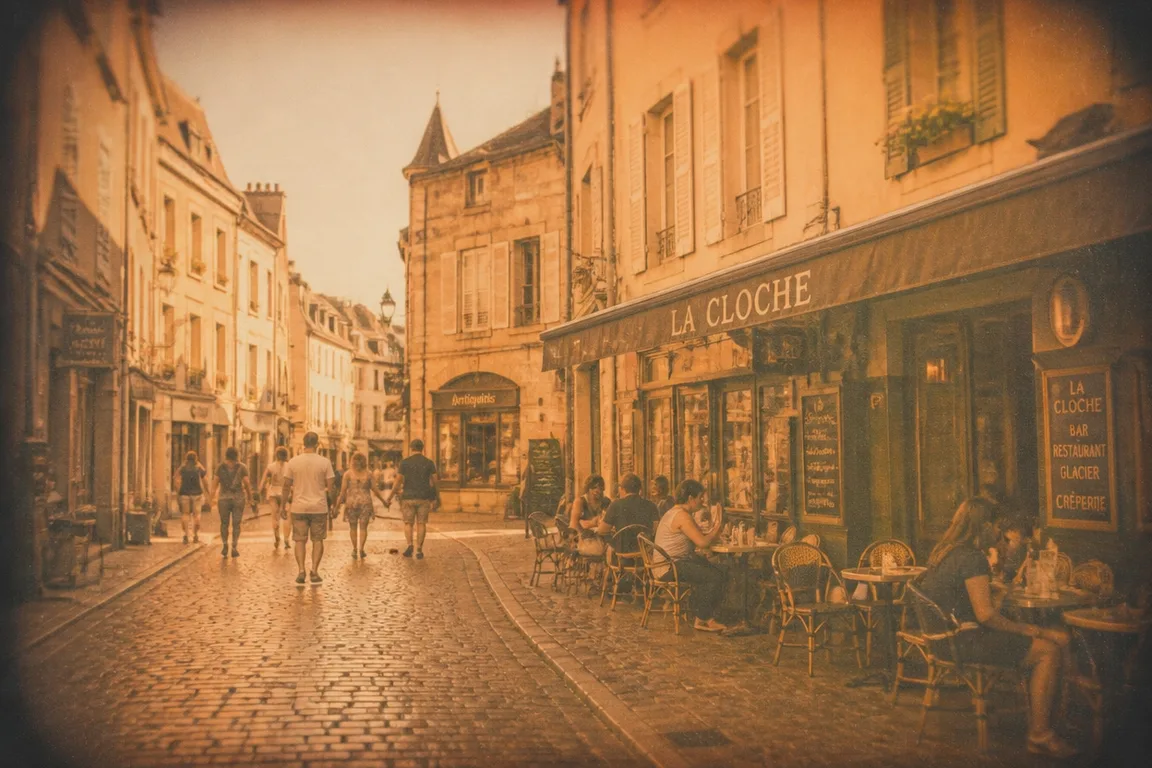
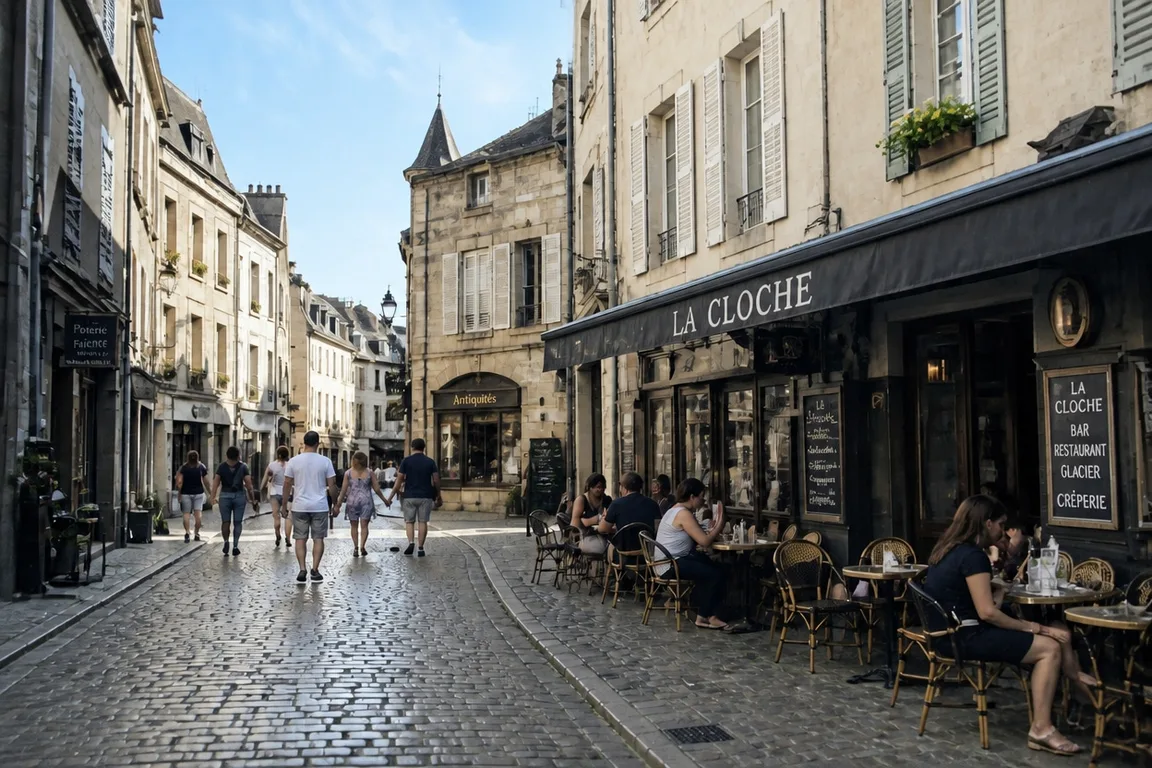
A travel shot buried under a heavy retro preset — sepia cast, faded blacks, vignette — re-rendered at the colours the camera saw: blue sky, real stone, clean daylight. The scene, ungraded.
 Before
 AI Result
Same person, same pose — the filter comes off and the photo reads like a camera took it. Here is what that looks like on the four photos people actually bring here.
A photo filter remover is an AI tool that takes a filtered photo and re-renders it as a real, unfiltered one — no AR overlay, no beauty smoothing, no colour grading, just an image that reads like an ordinary phone-camera capture. You upload the photo, the tool applies one written instruction, and about 30 to 60 seconds later you get a 2K image back. The target is not "less filter"; it is a photo that looks like it was never filtered at all.
It is worth being precise about what happens under the hood, because most pages on this topic are not. This tool does not calculate the inverse of the filter that was applied, and there is no archive of your original file to fetch. It runs on Nano Banana 2.1, a generative image model: it reads the instruction, understands which parts of the picture are the filter, and paints those parts again the way a real camera would have recorded them — natural skin texture, true-to-life colour, believable light. The person's face, expression, pose and framing are carried through unchanged.
That framing matters for what you should expect. Where a filter merely sat on top of the photo, such as a flower crown or a colour tint, the result is close to a true recovery. Where the filter destroyed information, such as skin texture that was smoothed away, the realistic detail in the result is generated rather than recovered. The promise is a photo that reads as real — not forensic recovery of the file that existed before the filter.
The everyday case: a selfie shot through a beauty camera or an Instagram effect, with the smoothing, whitening and face-slimming baked in — and that filtered file is the only copy that exists. It hurts most exactly where photos of you matter: a dating profile, a work avatar, anywhere you will eventually be seen in person. A filtered face reads as filtered, and it sets an expectation the real you then has to argue with.
The tool re-renders the selfie as a real phone photo: pore texture back in the skin, your actual skin tone instead of the whitened cast, features at their ordinary proportions. The built-in instruction carries a guard against over-correction — asked to undo smoothing, an image model will happily invent blemishes that were never on your face, so the wording explicitly forbids it. If a result still looks harsher than you really are, the instruction is an editable text box: say so and run it again.
An AI-generated image arrives pre-filtered, in effect: waxy, poreless skin, a cinematic glow no room actually has, colour a camera never records. If the picture needs to pass as a photograph — an avatar, a product shot, a scene for a listing — that rendering is the thing standing in the way, and it comes off the same way an Instagram preset does.
The same instruction takes the render down to phone-camera reality: real skin texture instead of gloss, daylight instead of rim-lit drama, colours that something real could reflect — while the subject, pose and composition stay exactly as generated. The result reads as a photo of the thing, not a render of it.
If this is your whole use case, the dedicated AI image humanizer runs the same engine with an instruction tuned specifically for de-AI work.
Dog ears, flower crowns, virtual makeup, eye-enlarging face effects — fun in the app, a problem when that export is the only copy of a photo you need for something else. These break down into two jobs: overlays sitting on top of the picture, and effects that reshaped the face underneath.
Overlays are the clean win: the model removes them and paints back what they covered — forehead and hairline behind a flower crown, the top of the head behind animal ears — matched to the surrounding skin, hair and light so the result reads as one real photograph, not a patch. Painted layers such as virtual lipstick, lashes and contour shading come off with them. Heavy geometric distortion is the honest limit: when an effect moved eyes or a jawline far from where they started, the model settles on a plausible real face rather than recovering the exact one.
A family photo shot through the heavy sepia preset that was fashionable at the time, travel shots flattened by a faded-film VSCO look, a moody teal-and-orange grade that seemed like a good idea — the tint is baked into the only file you have, and the scene's real colours went with it.
Colour is where un-filtering comes closest to a true reversal, because a grade transforms the whole image rather than deleting detail from part of it. The model re-renders the scene at neutral white balance and ordinary saturation, using the elements whose true colour is not in doubt — skin, teeth, white clothing, daylight sky — as its reference. The cast comes off, crushed contrast opens back up, and the photo looks like what the camera saw.
Stripping a filter is only the starting point. AI photo editor behind this tool also swaps backgrounds, removes objects and restores old photos — describe the change and it regenerates only the pixels involved.
Our AI reverses every type of filter, effect, and face modification
Dog ears, cat faces, bunny noses, flower crowns, and animated face overlays from Snapchat. Our AI can remove filter from photo files and reconstruct the hidden facial features naturally.
Examples:
Skin smoothing, face slimming, eye enlargement, nose reshaping, and complexion whitening effects that alter natural appearance.
Examples:
Instagram presets, VSCO filters, sepia tones, vintage effects, warm and cool color tints, and dramatic contrast adjustments.
Examples:
AI-applied lipstick, eyeshadow, blush, false lashes, and contouring effects from beauty apps and social media platforms.
Examples:
Jaw reshaping, cheekbone contouring, forehead adjustment, and chin modification from face-altering filters on TikTok and similar platforms.
Examples:
The gloss AI image generators bake in — waxy poreless skin, cinematic glow, over-clean color. Comes off the same way a beauty filter does, leaving an image that reads as a real photo.
Examples:
Three steps, and the instruction is already written for you. No Photoshop skills required.
Drop in the image you want cleaned up. JPG, PNG and WebP are accepted, up to 20MB — larger phone photos are compressed in your browser before upload, so nothing is lost on the way. Uploaded photos are deleted within 3 days.
The filter-removal instruction is already filled into the box, so you can go straight to generating. It stays editable: to target one filter, replace it with something like "remove the dog ears overlay only" or "undo the beauty smoothing but keep the warm colour".
The result comes back in about 30 to 60 seconds at 2K resolution, on every account including free ones. It costs 6 credits per photo. Download it and use it anywhere — there is no watermark.
What actually happens if you try to get an unfiltered photo back another way
| sparkpix filter remover | Ask for the unfiltered original | Manual retouch in Photoshop | The camera app's own undo | |
|---|---|---|---|---|
| Works when the original is gone | Yes | No — someone else has to still have the file | Yes | No |
| Removes AR overlays (ears, crowns, masks) | Yes | — | Hours of cloning and repainting | No |
| Undoes beauty smoothing and reshaping | Yes | — | Very hard by hand | Only before you save |
| Reverses colour tints and vintage grading | Yes | — | Yes, with colour-grading skill | Only before you save |
| Time per photo | About 30-60 seconds | However long the other person takes | 20 minutes to 2 hours | Instant, while it is still offered |
| Cost | 6 credits, about $0.17 | Free | Photoshop from $22.99/month | Free |
| Skill needed | None — the instruction is written for you | None | Retouching experience | None |
| Returns the true original pixels | No — a reconstruction | Yes | Partly | Yes |
Cost per photo is based on the $9.99 credit pack: 350 credits ÷ 6 per removal ≈ 58 photos. The last row is the one worth reading twice — if the unfiltered original still exists anywhere, that file beats any reconstruction, including this one. This tool is for when it does not.
It runs on Nano Banana 2.1, a generative image model, with a written instruction that names the filter families to take off — AR overlays, beauty smoothing and reshaping, virtual makeup, and colour tints — and tells the model to keep the person, expression, pose and framing unchanged. The model then paints the filtered parts of the picture again without the filter. It is not calculating the mathematical inverse of the filter that was applied, and it is not looking up a stored copy of your original file: neither of those exists. It is re-rendering the photo as an unfiltered one.
No, and it is worth being clear about that. What you get is a reconstruction: an image that looks like an unfiltered photo of the same person in the same pose. Where the filter sat on top of the picture, such as a flower crown or a colour grade, the result comes very close to the original. Where the filter deleted information, such as skin texture removed by smoothing, the detail is generated rather than recovered. If the unfiltered original still exists anywhere — in someone else's camera roll, in a backup, in the app that made it — that file will always be better than any reconstruction.
Yes, and this is the category it handles best, because AR overlays sit on top of the photo rather than rewriting the face. The model removes the overlay and paints back what was underneath: the forehead and hairline behind a flower crown, the top of the head behind animal ears, the nose and mouth behind an animal face. The repainted area is generated to match the surrounding skin tone, hair and lighting so the photo reads as a single capture.
It restores skin that looks real — pores, fine lines and the ordinary unevenness a camera records — but that texture is generated, not recovered, because smoothing deleted the original detail. The built-in instruction includes an explicit guard against over-correction, since the usual failure is too much change rather than too little: asked to undo smoothing, an image model will add blemishes and lines the person never had. If a result looks harsher than the person really is, edit the instruction in the box and say so.
Yes, and colour is where results come closest to a genuine reversal, because a grade transforms the whole image rather than deleting detail from part of it. The model re-renders the scene at neutral white balance and ordinary saturation, using the elements whose true colour is not in question — skin, teeth, white clothing, grey concrete, daylight sky — as its reference. Sepia, warm vintage looks, cool blue casts and crushed high-contrast styling all come off.
Yes, within limits. Painted layers such as virtual lipstick, eyeshadow, blush, drawn-on lashes and contour shading come off cleanly, and mild reshaping is straightforward to reverse. Heavy geometric distortion is the boundary: when an effect has moved eyes, lips or the jawline far from where they started, the model has to settle on a plausible face rather than recover the exact one, so the result may not match a photo of you taken the same day.
Yes. The box comes pre-filled with the tuned instruction so you can upload and generate without writing anything, but it is a normal text box and whatever is in it is what runs. Replace it to target one thing — "remove the dog ears overlay only", "undo the beauty smoothing but keep the warm colour", "remove the sepia tint and nothing else" — and the model follows your wording instead. Being specific usually beats the general instruction when only one filter is bothering you.
JPG, PNG and WebP files up to 20MB. Larger phone photos are compressed in your browser before upload, so a 30-megapixel shot still works. Results come back at 2K on every account, free ones included — there is no lower free tier and no watermark. Processing takes about 30 to 60 seconds.
Six credits per image. Signing up gives you 5 free credits, which is deliberately one short of a filter removal, so this tool needs a credit pack: packs start at $9.99 for 350 credits, which is about 58 removals, or roughly 17 cents each. There is no subscription and credits do not expire. If you want to try the engine for free first, the other AI photo tools on the site cost 5 credits and run on the same model.
Photos you upload are deleted within 3 days. Your results are yours to keep — they are stored permanently and stay downloadable from your profile, so removing a filter does not start a clock on the image you actually wanted. Processing runs through a third-party model provider, so the photo does leave our servers to be generated.
Stop letting beauty filters and baked-in effects decide how your photo reads. Upload it, press generate, and get back an image that looks like a camera took it — same person, same moment, nothing artificial left.
Turn viral matcha-green liquid art back into a realistic photo in one click
Erase text, captions, and watermarks from images with AI
Remove the artificial look from AI images and over-filtered photos
Strip the AI tells — orange cast, oily shine, glass skin — from a generated image
Turn an AI render into an ordinary phone-camera photo, same subject and pose
One-click conversion from an AI image to a photo
Rebuild a 3D game screenshot as a photo of the same scene
This page runs one fixed instruction. Write your own there — drop the filter, keep the makeup, hair and background exactly as they are
Realism is about how a photo looks, not what it says. When the problem is wording baked into the picture — a caption, a label, a screenshot — our sister site EditTextImage edits that directly.
Fix a typo, blank out a name or change a number in a screenshot, with the interface around it left alone.
Matches the original typeface, weight and colour, so the replacement does not read as pasted on.
Works straight on a flattened JPG — no layers, no original project file needed.
Swap the wording on a sign, label or poster inside a photo, free to try.