
FREE
Loading…
Pick a new background — studio, beach, office, garden — or describe any scene. AI replaces the background while keeping your subject sharp and matching the lighting naturally.
Try: “professional studio backdrop” · “tropical beach at golden hour” · “modern open-plan office”
Upload, then check the instruction below — you can edit it before generating.
LinkedIn headshot, executive portrait, branding
Upload a photo and click the button to start processing
Same subject, completely different scene. AI replaces the background while matching lighting direction, color temperature, and shadow falloff to the subject — so the result looks photographically natural, not pasted.
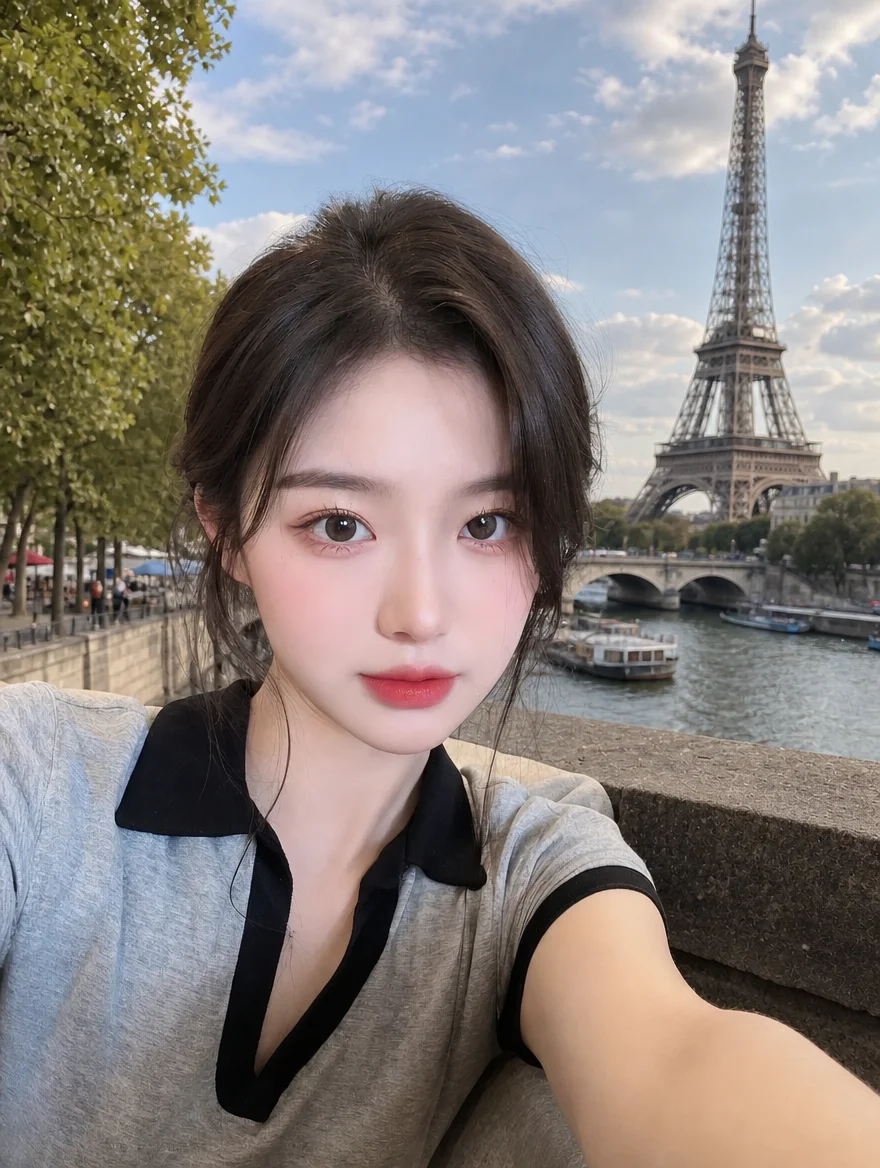
The AI background changer drops a selfie shot in a bedroom onto the bank of the Seine, with the Eiffel Tower behind. Her face, hair, collar and the angle of the outstretched selfie arm are untouched — only the room is replaced, and the daylight on the new background is matched to the direction the original light was already coming from.
 Before
 AI Result
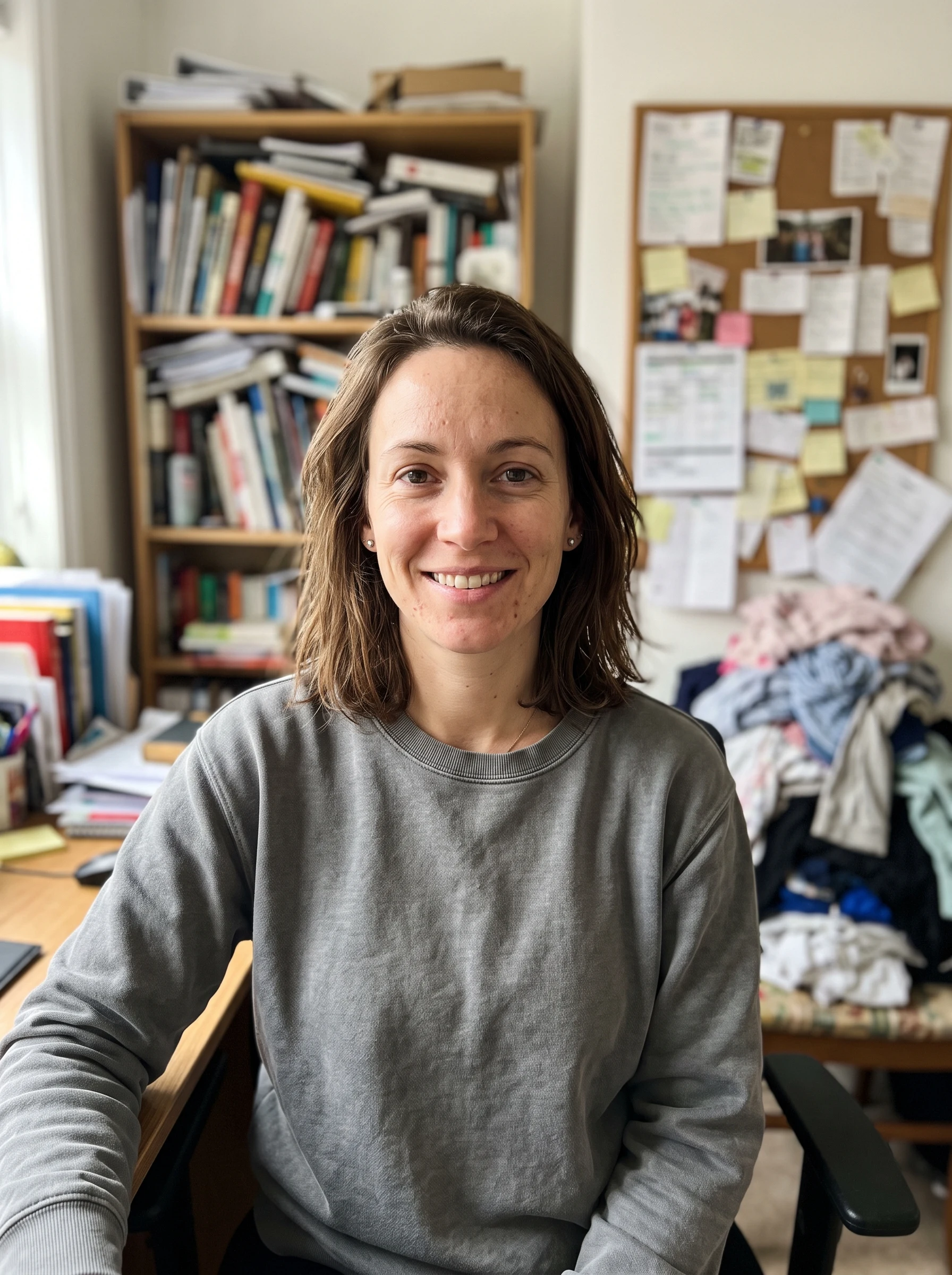
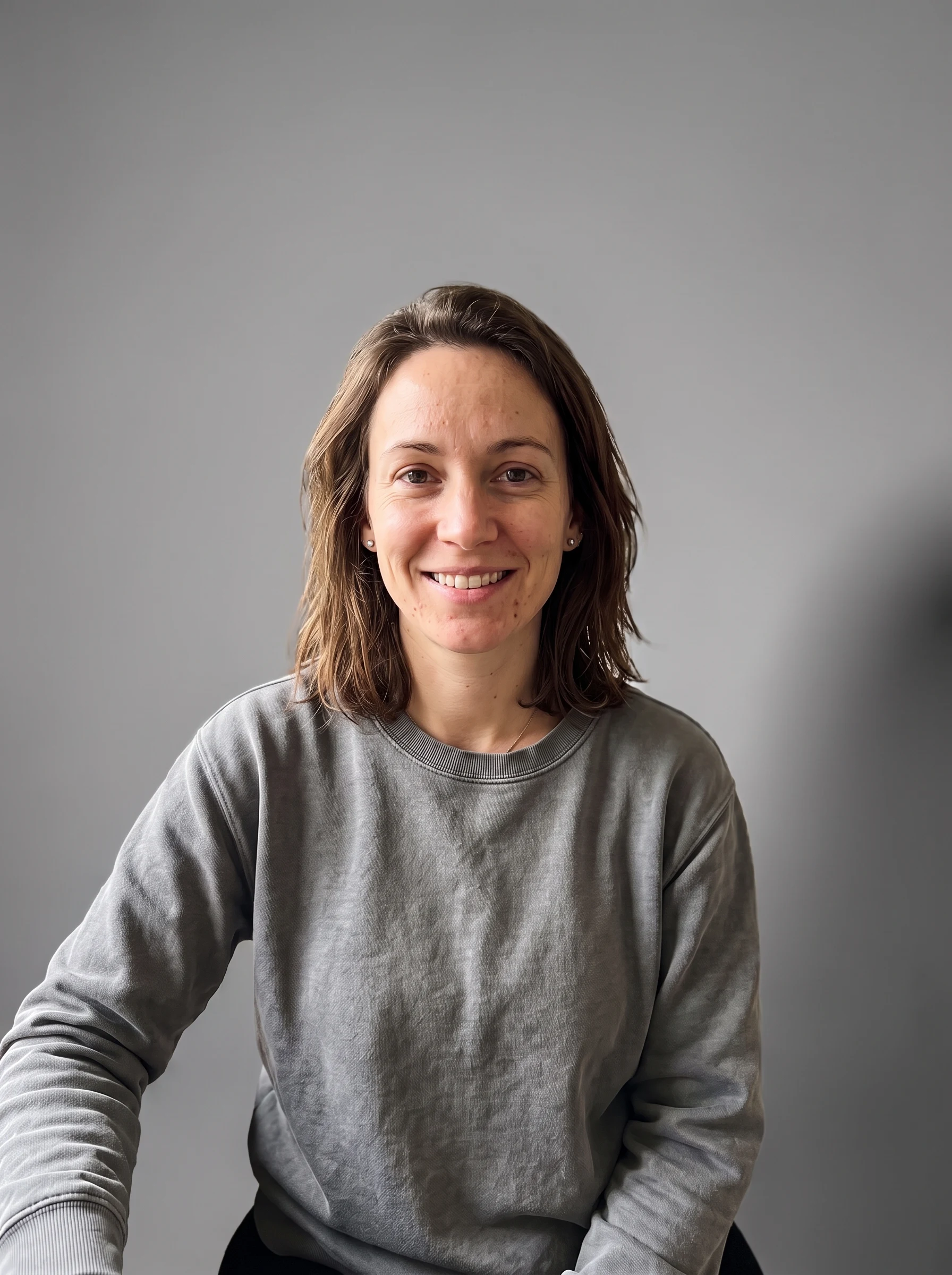
Everything behind her — the overloaded bookshelf, the corkboard, the laundry — is replaced by a smooth neutral-grey studio sweep, and she is relit to match it: a soft key from the left and her shadow falling to the right, instead of the flat window light she was actually shot in. Her face, hair, sweatshirt and pose are untouched. If you need a pure white or transparent cut-out rather than a studio scene, the background remover does that job better.
 Before
 AI Result
Background changes drive measurable conversion lifts in e-commerce and engagement in social — at a fraction of the cost of a studio reshoot. The data below shows why.
“Background swap is the single highest-volume request we get from e-commerce sellers. A clean white or neutral background measurably lifts product conversion, but shooting in a studio with proper backdrops costs $1,000+ per session. Generative AI delivers the same look from any phone shot — even one taken on a cluttered desk — at zero marginal cost. The economics of product photography fundamentally changed when this became viable.”
Six high-intent background categories cover most virtual background swap needs. Each preset is tuned for natural lighting integration with the subject.
Soft neutral gray backdrop with even diffused lighting — the look of $200+ studio sessions used for LinkedIn headshots, executive portraits, and branding.
"clean professional studio backdrop, soft gray"
Seamless white background with even lighting and no shadow on the backdrop — the e-commerce marketplace standard for Amazon, Shopify, and product catalogs.
"pure white seamless background, no shadows"
Tropical beach with white sand, turquoise water, palm trees — useful for travel photos, engagement shoots, and social media that needs a vacation vibe.
"tropical beach background, golden hour sunset"
Clean architectural office with floor-to-ceiling windows and natural daylight — replaces a messy home office with a polished work-from-anywhere look.
"modern office, floor-to-ceiling windows, daylight"
Lush green garden with soft dappled sunlight, vibrant plants, and beautiful natural bokeh — the look of outdoor wedding photography and lifestyle shoots.
"lush garden background, dappled sunlight, bokeh"
Stylish city street with modern architecture, soft daylight, and subtle traffic blur — used for editorial portraits, urban fashion, and lifestyle content.
"urban city street, modern architecture, daylight"
E-commerce platforms like Amazon, Etsy, and Shopify show measurable conversion lift for products photographed on clean white backgrounds. But booking a studio with proper white backdrops, lighting, and a product photographer typically costs $1,000–5,000 per shoot. AI background swap takes any phone product photo — even one taken on a cluttered desk — and outputs a clean marketplace-ready image in 20 seconds.
Typical conversion lift e-commerce sees from clean product backgrounds
Most small e-commerce sellers shoot products on whatever surface is convenient, knowing the photos hurt conversion but unable to justify a $1,500 studio shoot. AI background swap closes the quality gap in 20 seconds per product.
Try Product BackgroundA professional background is one of the highest-ROI single edits for any work photo — LinkedIn shows 14× more profile views for headshots on studio-quality backgrounds.
Replace a casual home background with a neutral gray studio backdrop. Direct eye contact + studio backdrop is the formula that drives 14× more profile views.
"clean neutral gray studio backdrop, soft diffused lighting"
Generate professional background images that you load into Zoom, Teams, or Google Meet as virtual backgrounds. Higher-quality than the stock options most apps ship with.
"modern office with floor-to-ceiling windows, daylight"
Boardroom-ready backgrounds for "About Us" pages, conference bios, press kits. The AI handles formal studio lighting and architectural backgrounds.
"executive portrait studio, charcoal backdrop"
Six audiences rely on AI background swap as part of their daily workflow.
Turn phone product shots into marketplace-ready listing photos with clean white or lifestyle backgrounds. The single highest-ROI edit for online catalog products.
Replace a casual home background with a studio-quality backdrop. 14× more profile views for headshots on professional backgrounds (per LinkedIn data).
Generate Zoom / Teams virtual backgrounds, refresh professional headshots, or convert any photo into a "working from anywhere" lifestyle shot.
Replace gloomy skies with golden-hour ones for listings. Swap weather, lighting, or season to make properties appear at their most appealing.
Replace cluttered reception venue backgrounds with elegant studio or garden scenes. Salvage portraits shot in unflattering locations.
Swap to themed backgrounds for branded posts — beach for travel content, garden for lifestyle, urban for fashion. Match brand aesthetic without traveling.
Three steps. Under one minute. No skills required.
Drop any photo (JPG, PNG, or WebP, up to 20 MB). Portraits, product shots, full-body, and group photos all work — the AI handles each equally well.
Choose from 8 presets — studio, white, beach, office, garden, city, forest, bokeh — or describe any custom scene in plain English.
Click "Change Background" and the AI replaces the background in 10–20 seconds while matching lighting and shadows to the subject. Download HD.
How sparkpix compares to remove.bg, Canva, and Photoshop for background swap.
| sparkpix.ai | remove.bg + Canva | Photoshop Generative Fill | |
|---|---|---|---|
| New background generation | Pick preset or describe any scene | Pick from Canva's stock catalog | Prompt-based, but needs manual mask |
| Lighting integration | AI matches subject to new BG lighting | No — flat cutout pasted onto BG | Yes — with skilled prompt |
| Pricing | Free to start, $9.99 for 350 generations | Each separately subscribed | $22+/month Creative Cloud |
| Steps required | 2 — upload + pick preset | 3+ — remove → upload to Canva → place | 4+ — open → mask → prompt → integrate |
| Custom backgrounds | Anything you can describe | Canva catalog only | Anything but expert-level prompting |
Everything you need to know about swapping photo backgrounds with AI.
The AI background changer identifies the subject in your photo, isolates them from the original background, and replaces the background with the new scene you picked. Critically, the AI also adjusts the new background's lighting direction, color temperature, and shadow falloff to match the lighting on the subject — so the result looks like the subject was actually photographed in the new location, not pasted onto a stock photo.
Yes — they are two distinct tools. A background remover (like sparkpix.ai/background-remover) outputs the subject with a transparent or solid color background, useful for product cutouts, profile photos, and design assets. A background changer (this page) outputs the subject placed in a new scene — beach, office, studio, garden — useful for changing the apparent location, not just isolating the subject.
Yes. The AI is specifically prompted to leave the subject's face, pose, hair, clothing, and skin tone identical to the original. The only change is the background behind them — plus minor lighting integration on the edges where the subject meets the new background, so it does not look like a hard-edged cutout pasted onto a stock photo.
Yes. The 8 presets cover the most common needs, but you can also write custom prompts like "a 1960s mid-century modern living room with vintage furniture", "a rooftop bar at night with city lights", "a snowy mountain peak", or "a Japanese cherry blossom garden in spring". Anything you can describe in plain English, the AI will attempt to generate as a background.
Yes. New accounts get 5 free credits on sign-up — enough to try several background swaps. Each background change costs 5 credits. No subscription, no credit card to start. Additional credit packs begin at $9.99 for 350 credits (~70 background changes).
Absolutely — this is a top use case. The Pure White preset turns any product shot (even a phone photo against a cluttered surface) into a clean marketplace-ready listing image. E-commerce platforms like Amazon and Shopify show measurable conversion lift for products on clean white backgrounds. Pro tip: pair with our background remover first if you want to also generate a transparent PNG.
Yes. The Professional Studio preset is tuned specifically for LinkedIn headshots — soft neutral gray backdrop with even diffused lighting, the exact look photographers use in $200+ studio sessions. Pair with our AI Outfit Changer and AI Pose Editor for a complete headshot rebuild from a casual selfie.
You can use this to generate professional background images that you then load into Zoom, Teams, or Google Meet as a virtual background. The AI generates higher-quality, more photographically realistic backgrounds than the stock options most video apps ship with. You can also use it to update profile photos for video-call apps.
remove.bg only removes backgrounds — it does not generate new ones. Canva has background swap but limited to its stock library and requires a paid plan for many backgrounds. Photoshop Generative Fill can do this but needs a $22+/month subscription, Photoshop installation, and manual subject masking before each generation. sparkpix is free to start, runs in any browser, and combines preset chips with custom prompts so you do not need to mask anything.
Yes. All paid plans include full commercial usage rights for AI-edited images. This makes sparkpix suitable for e-commerce product photos, real estate listings, marketing campaigns, social media content, professional headshots, and client work. The free tier includes a small watermark only on trial generations.
Upload a photo, pick a new background, and let AI integrate it naturally.
Change Background Now