
FREE
Loading…
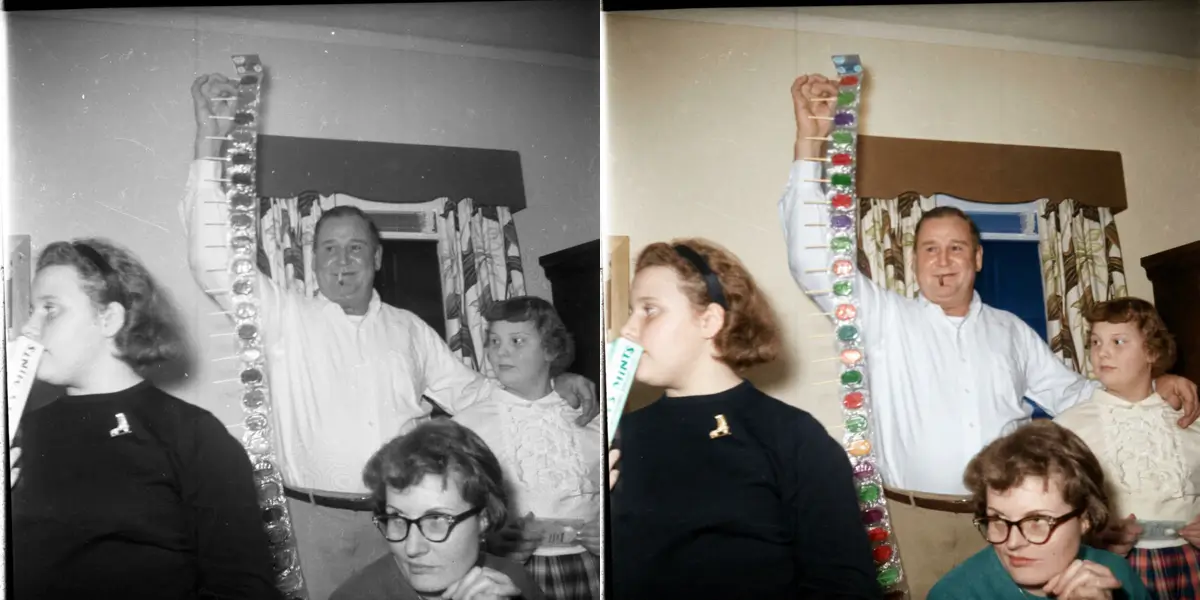
A black and white to colour converter for old family photos. Upload a black and white or sepia print and get it back in natural colour, at the same size, in about 20 seconds.
Just upload and click to process - no prompt needed
Typical time per photo; 15 to 18 s on our test set
Output matches your scan; upscale afterwards for large prints
Per photo; your first is covered by sign-up credits
Failed or refused runs cost nothing
A black and white photograph stores only how bright each point was. Colour is not hidden in it; it was never recorded. An AI colorizer, or colouriser, learns from millions of colour photos what things usually look like: skin, sky, foliage, brick, wood, denim, uniforms. It recognises those things in your photo and paints them, keeping the brightness the original recorded so that shadows and highlights stay where they were.
That makes common things reliable and specific things a guess. Skin tones, skies, grass and the sea usually look right. A particular dress, car, flag or painted door may come out in a plausible colour that is not the real one. If you know the real colour, tell the AI: the photo restoration editor has a Colorize preset where you can add "the coat is dark red, the car is pale blue".
Scan at 600 DPI if you can. With a phone, shoot the print flat in daylight, straight on and without glare, and crop off the border.
JPG, PNG or WebP up to 20 MB. The AI colours the whole photo in one pass, in about 20 seconds.
Compare with the original, download the result at the same size as your scan, and re-run if a colour looks wrong.
| Photo | Result | What to do |
|---|---|---|
| Portraits, family groups | Skin, hair and eyes usually look natural | Nothing extra; name clothing colours if you know them |
| Landscapes, streets, buildings | Sky, foliage and stone come out believable | Signs and painted surfaces are guesses |
| Sepia and faded brown prints | Tint replaced with full colour | Nothing extra |
| Scratched, creased or torn prints | Damage gets coloured too and stands out more | Restore first, then colorize |
| Very small or blurry faces | Colour lands, but faces stay soft | Run GFPGAN face restoration first |
| Uniforms, flags, vehicles with known colours | Plausible but not necessarily correct | State the colours in the restoration editor prompt |
| AI colorizer (here) | Photoshop by hand | Hired colourist | |
|---|---|---|---|
| Time | About 20 seconds | Hours per photo | Days, depending on the queue |
| Skill | None | Layers, masks, blend modes | None on your side |
| Colour accuracy | Plausible; exact if you state the colours | As accurate as your research | Best, with period research |
| Cost | 5 credits per photo | Photoshop subscription | Priced per photo by the artist |
A black and white photo only records brightness, so the true colours are gone. The AI recognises what is in the picture, such as skin, sky, grass, brick, denim or a wedding dress, and paints each in the colour such things usually have, matching the brightness the photo recorded. It is an informed guess, which is why skin and sky usually look right and a single dress or car may not match the original.
Not guaranteed. The AI picks plausible colours, not the real ones. If you know a detail, such as a uniform colour, a car or the colour of a dress, use the Colorize preset in the photo restoration editor and say it in the prompt: "the dress is navy blue, the car is dark green".
Usually 15 to 30 seconds. Six test photos colorized on 8 October 2026 took 15 to 18 seconds each.
It should be rare now. Until October 2026 the colorizer ran on a model whose safety filter refused about one ordinary family photo in three, often ones with children in them. It now runs on a model that colorizes those photos normally. If a run does fail, you are not charged; the credits go back automatically.
Light damage is fine. For heavy scratches, creases or tears, restore the photo first and colorize the result, because colouring damage makes it more visible.
Yes. Sepia and faded brown prints are treated like black and white: the tint is replaced with full colour.
The colorized photo comes back at the same size as the photo you upload, so a large scan gives a large result. For a bigger print, run the result through the Real-ESRGAN upscaler, which enlarges it 4x without redrawing it.
Each photo costs 5 credits. New accounts get 5 free credits, enough for one photo. Credit packs start at $9.99 for 350 credits, about 70 photos.
Every kind of old-photo repair, with a Colorize preset you can steer.
Clean up scratches and dust before colouring.
Sharpen small or soft faces in old photos.
For colour prints that turned yellow, not black and white ones.
Enlarge the colorized result 4x for printing.
Bring back colour that faded, rather than adding new colour.
For black-and-white manga pages and line art rather than photographs.