
AI Image Humanizer — make AI photos look real
One pass removes the giveaways (waxy skin, light from nowhere, backgrounds that melt) and re-renders your image the way a real camera would have caught it. The person, the pose and the framing stay exactly as they are.
Upload an image to transform or edit
Result
Your result will appear here
Upload an image and describe your transformation to generate
AI image humanizer examples: six different jobs
Each pair is one humanizing pass at the free 1K setting with the default instruction, not retouched afterwards. The subject, pose and framing hold in every pair. What changes is everything that made the image read as generated.
Humanize an AI headshot before it goes on LinkedIn
This AI-generated corporate portrait has every studio tell at once: a white halo around the head, skin like tanned wax and teeth a shade too white. One pass of the AI image humanizer turns the halo into a plain grey wall and gives the face pores, fine lines and an everyday skin tone. Same man, same suit, same framing.
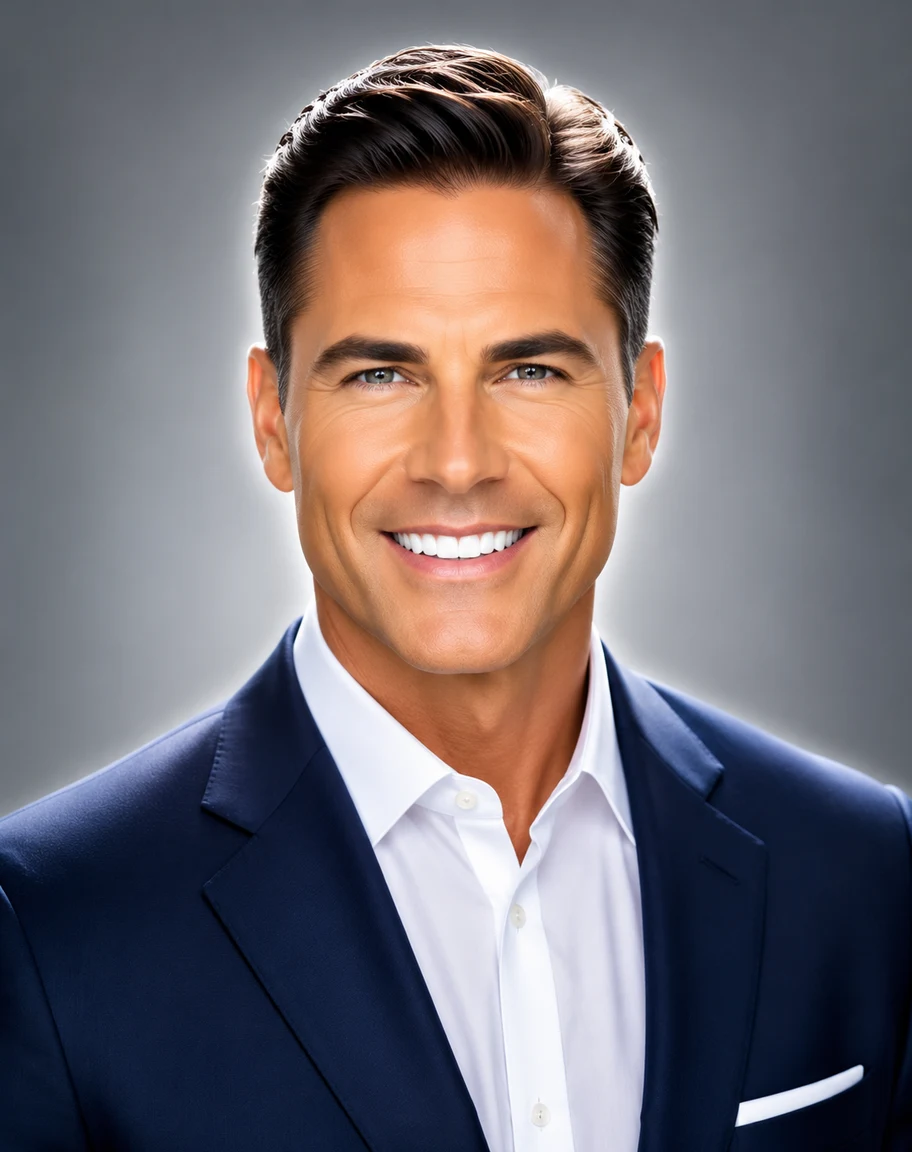 Before
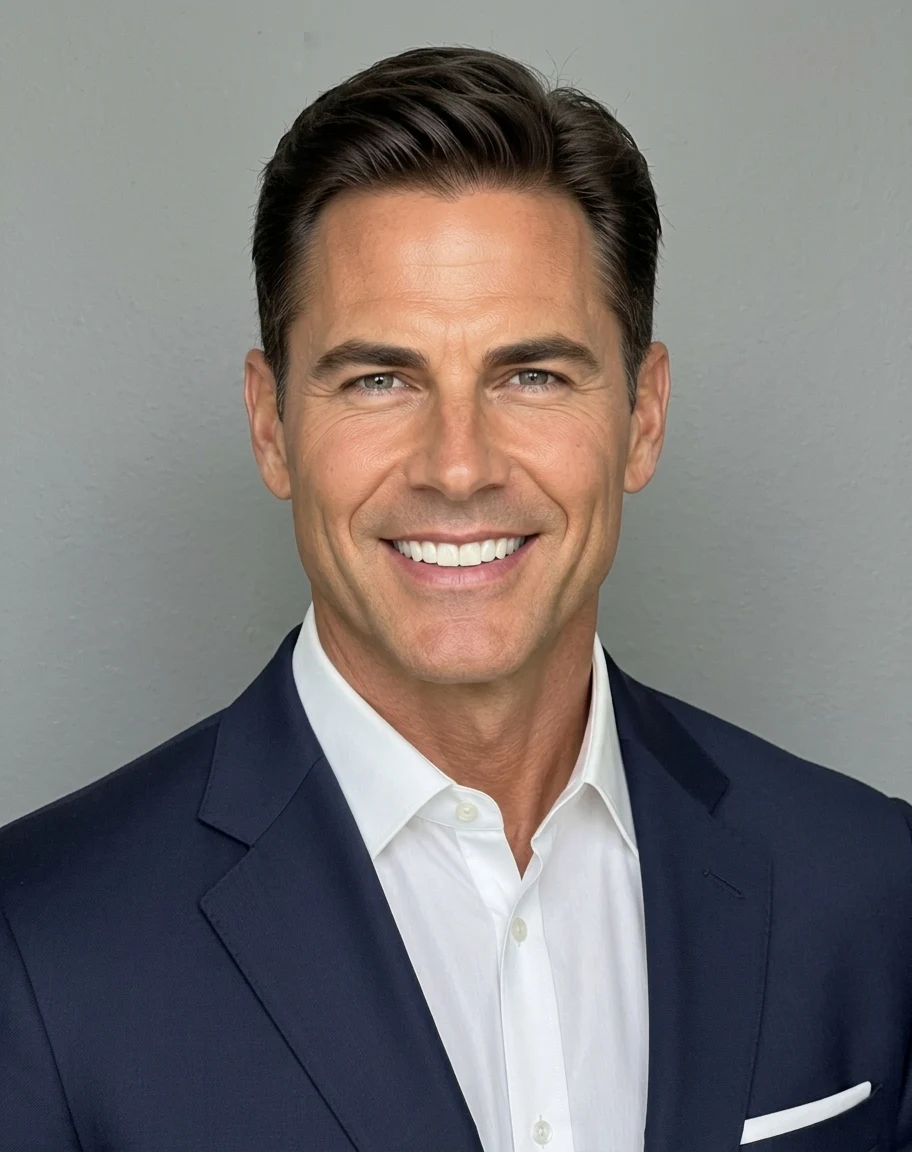 AI Result
Humanizing AI UGC for a skincare ad
UGC-style ads work because they look like a customer shot them, and glass skin gives an AI creator away at a glance. The AI photo humanizer takes off the wet shine and the lacquered lips, brings back freckles and pores, and leaves the bottle, the robe and the bathroom where they were. That is the version you can actually run.
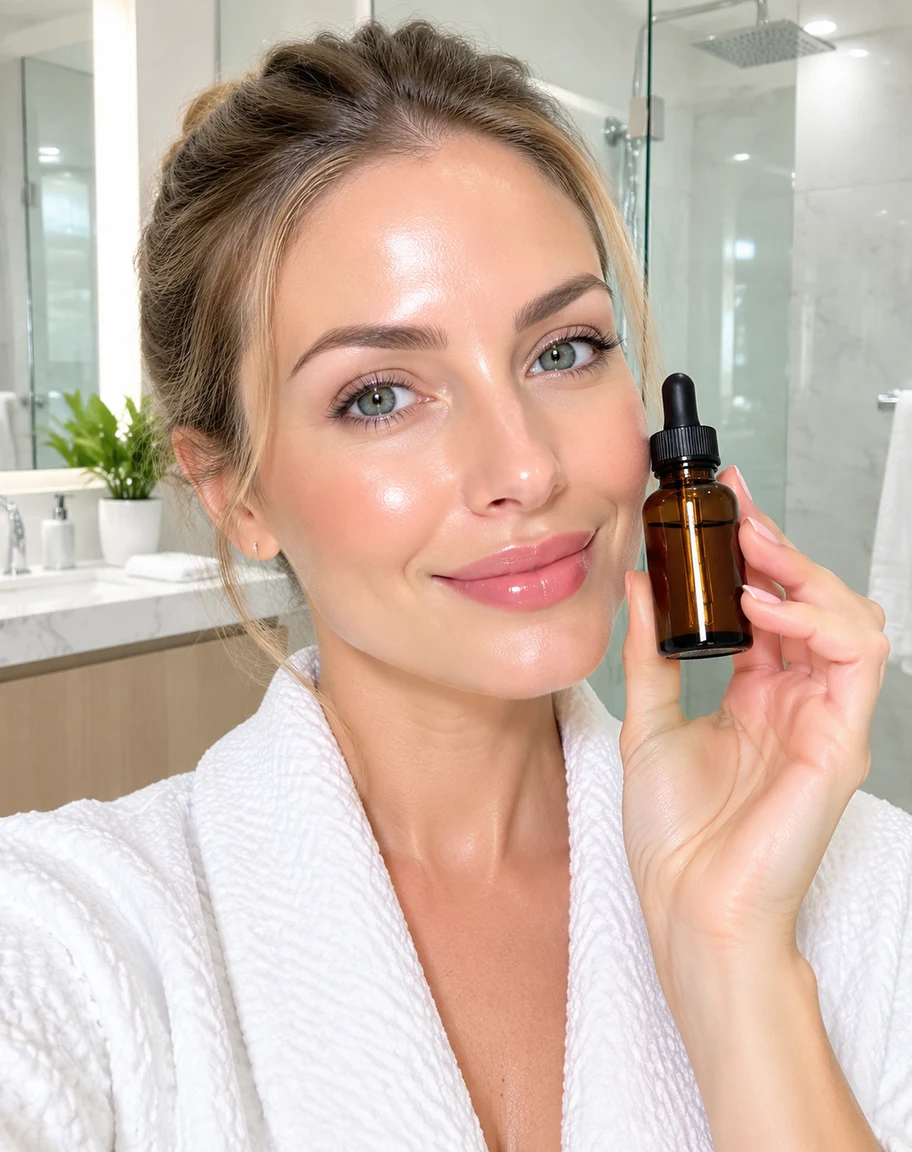 Before
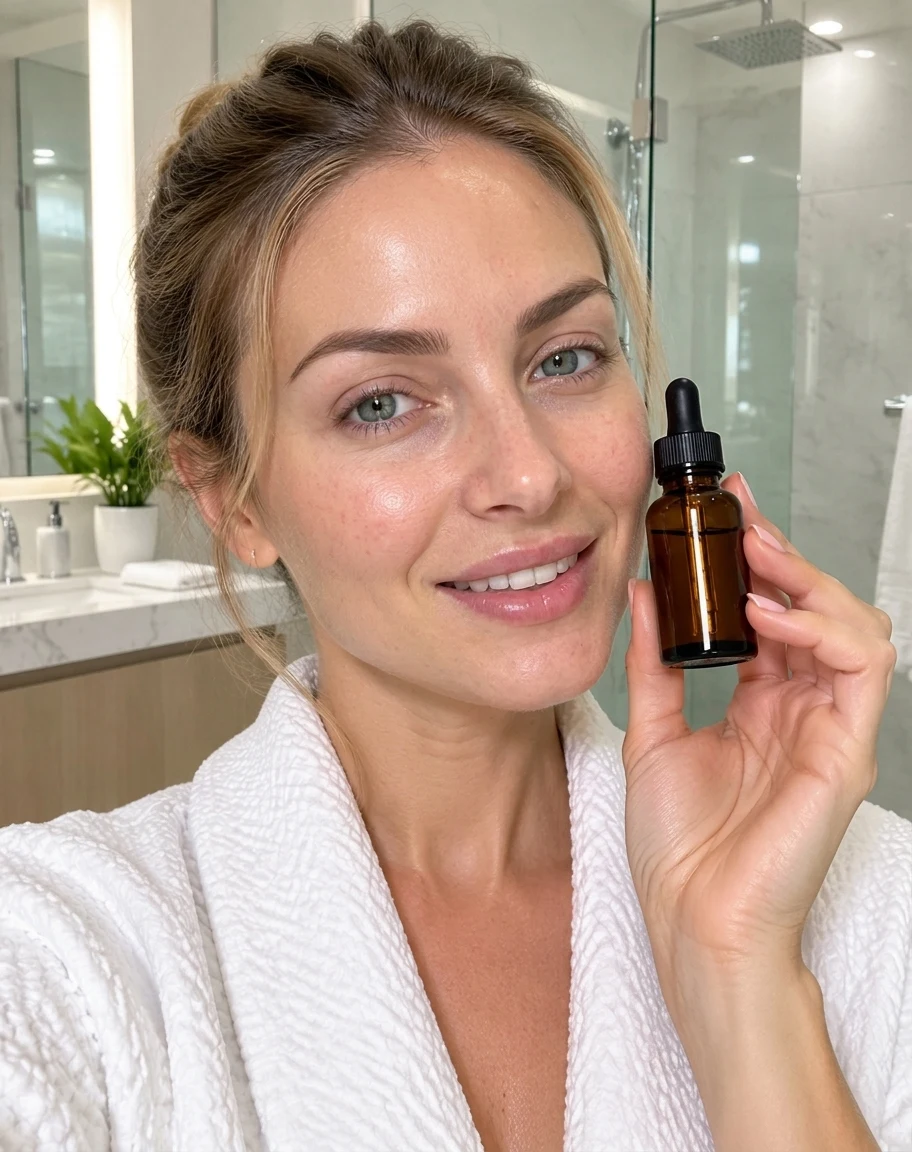 AI Result
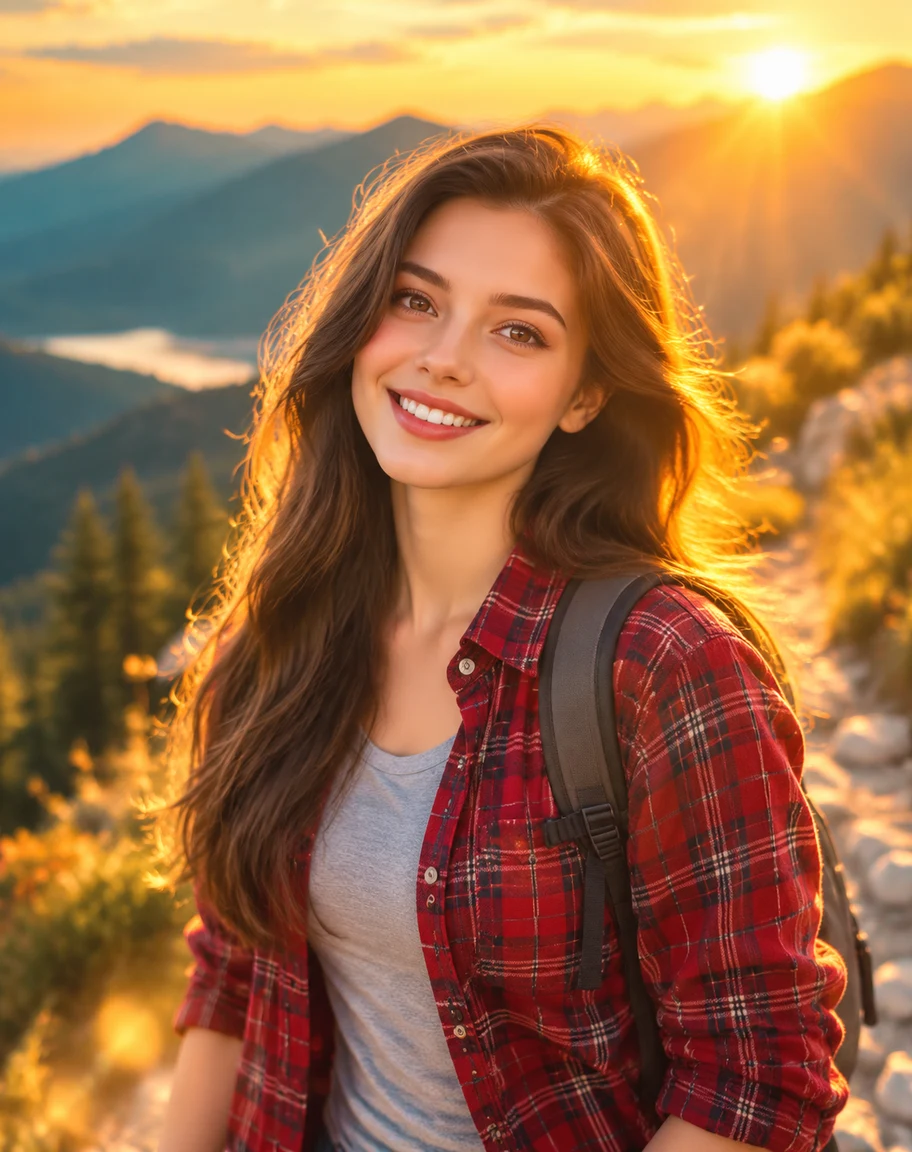
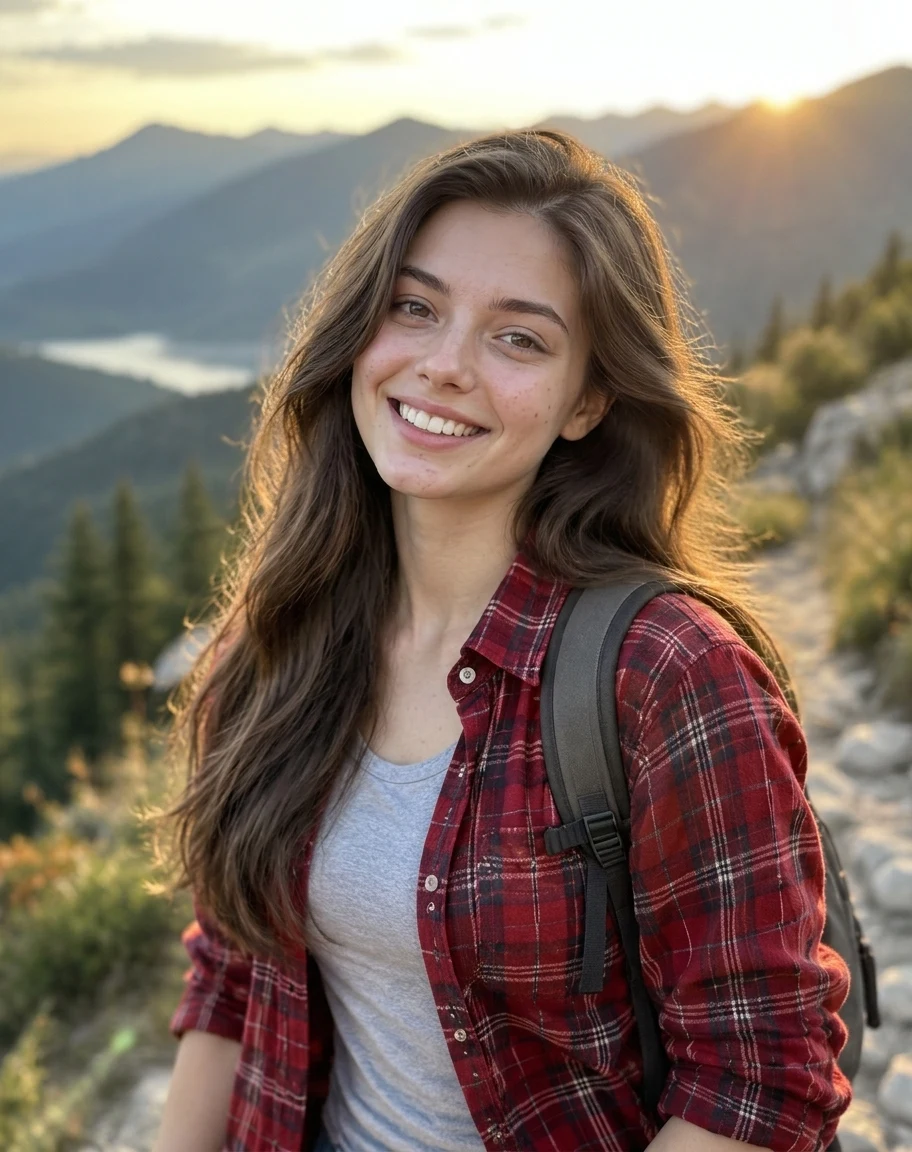
A dating profile photo, humanized
Golden glow from every direction, lens bloom and poreless skin make a profile photo look generated before anyone reads the bio. Humanizing the AI photo swaps the glow for plain outdoor light, puts freckles and texture back on her face, and keeps her hair, smile, shirt and the mountain trail as they were.
 Before
 AI Result
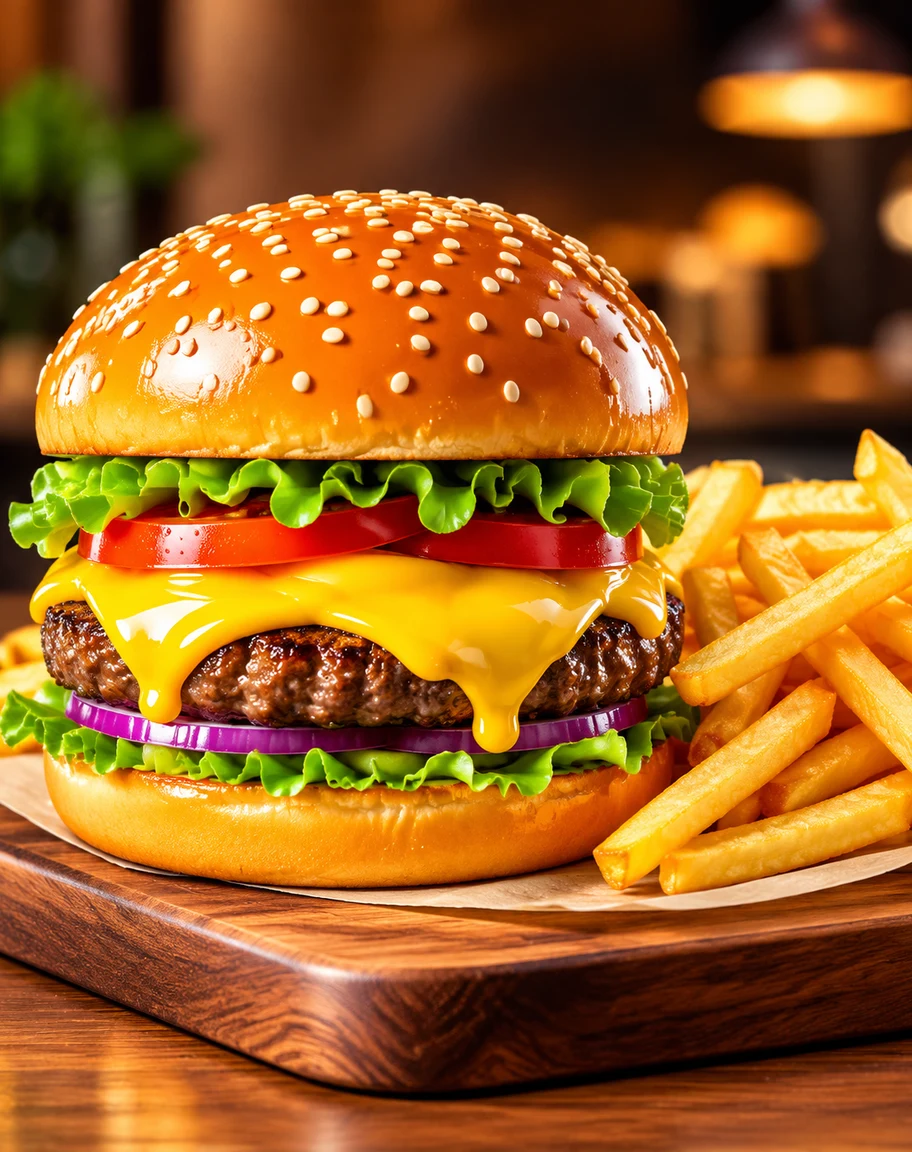
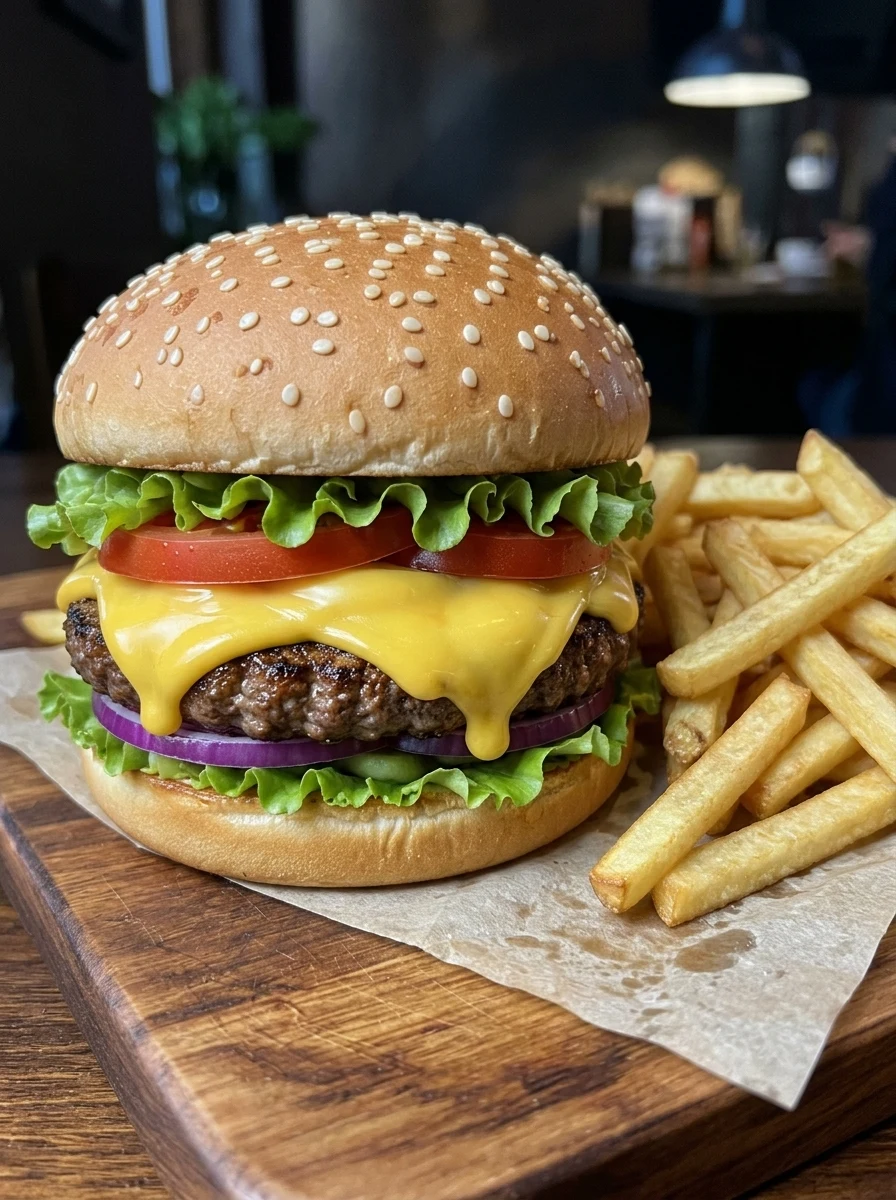
Humanize AI food photos for a menu
AI food renders look like plastic props: a varnished bun, cheese poured like liquid gold, sesame seeds placed by a machine. A menu photo that looks fake makes the food look fake too. The image humanizer re-renders the same burger with a matte, floury bun, uneven seeds, ordinary fries and plain restaurant light.
 Before
 AI Result
Humanizing an AI portrait of grandparents
Generated family portraits smooth older faces until the age disappears, then bathe the room in honey-coloured haze. Run through the AI image humanizer, this couple keeps their wrinkles, smile lines and grey hair, and the living room gets ordinary window light, while every pose, cardigan and cushion stays put. Two faces held at once is the hard part, and both held.
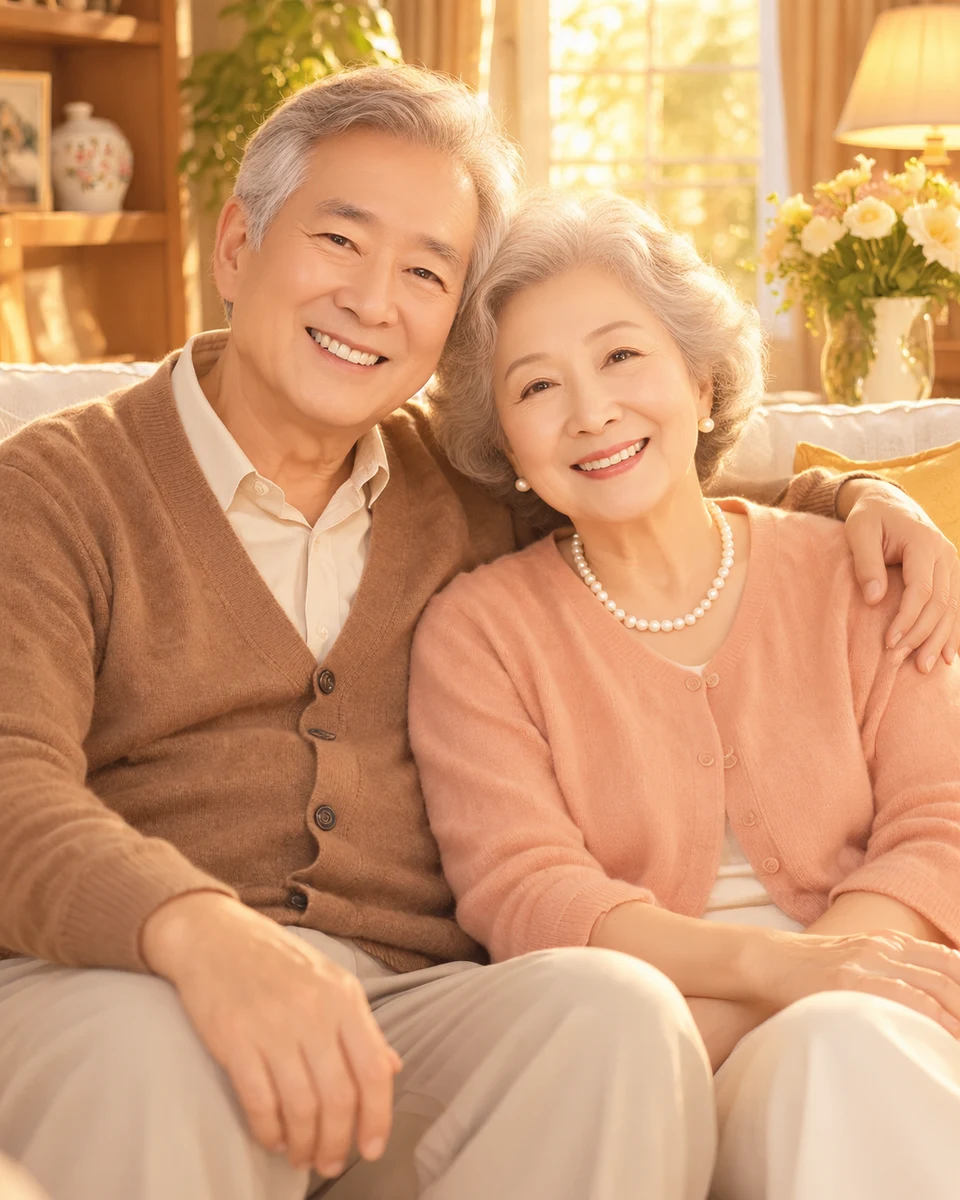 Before
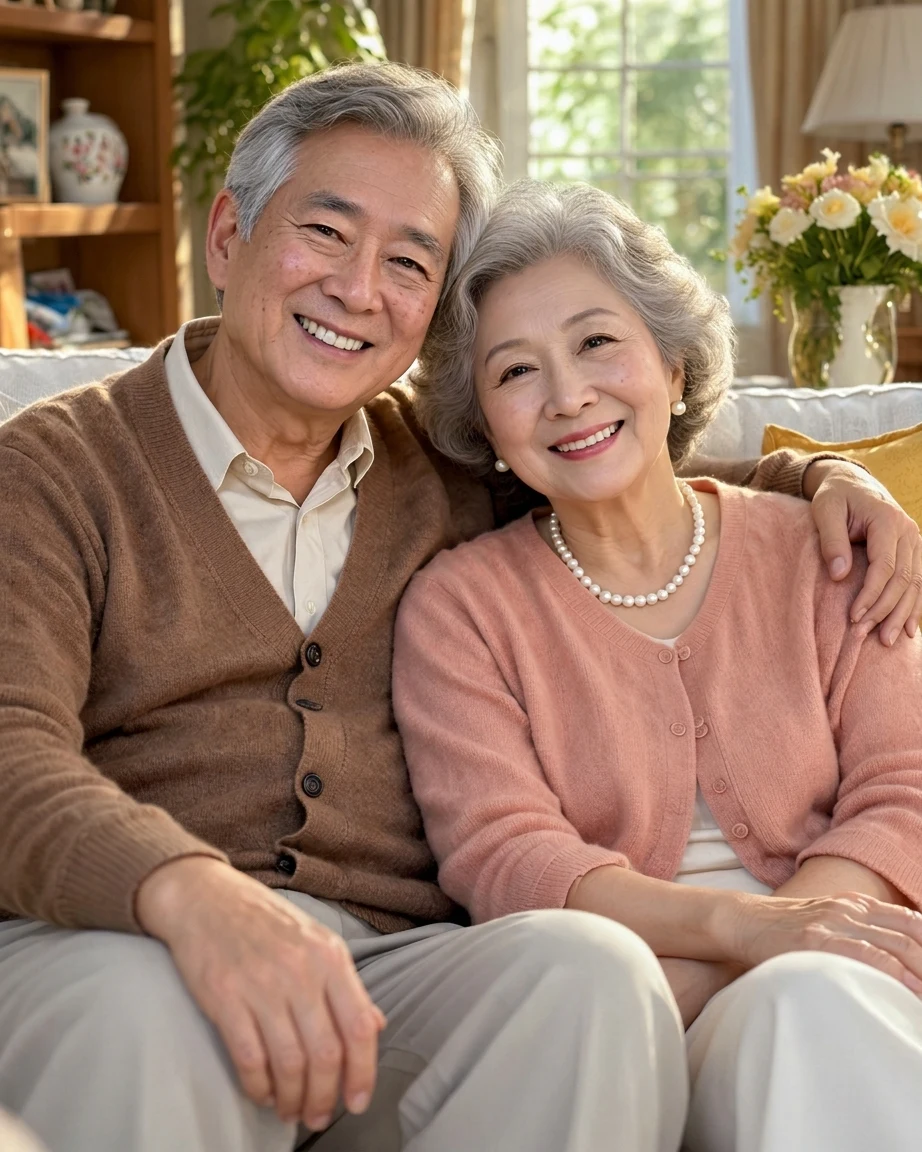 AI Result
Not only people: an AI pet photo, humanized
Generated fur is painted rather than grown: every strand glossy, the coat glowing at the edges, the eyes glassy. The AI photo humanizer gives the golden retriever a matte, uneven coat with real fluff and lets the living room fall back to plain daylight colour. The pass does the same job on a dog as on a face.
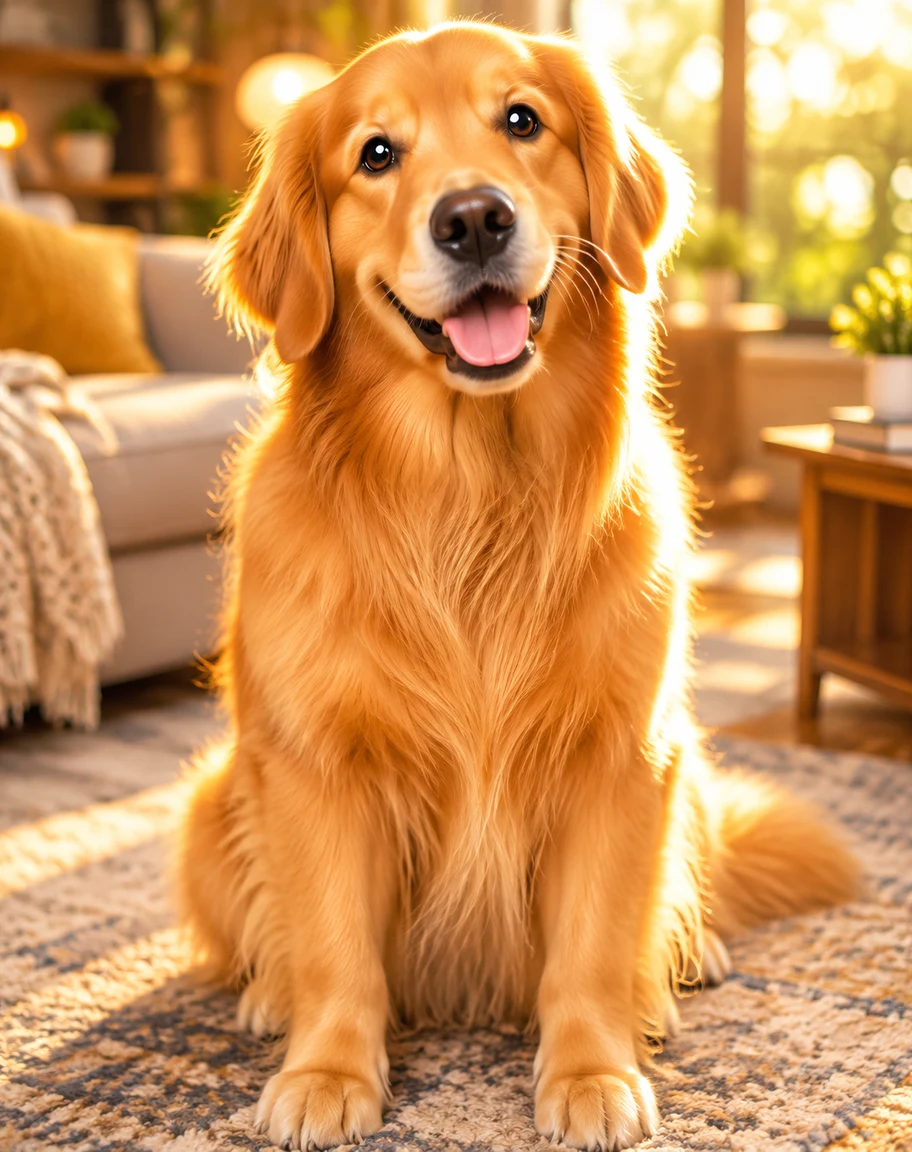 Before
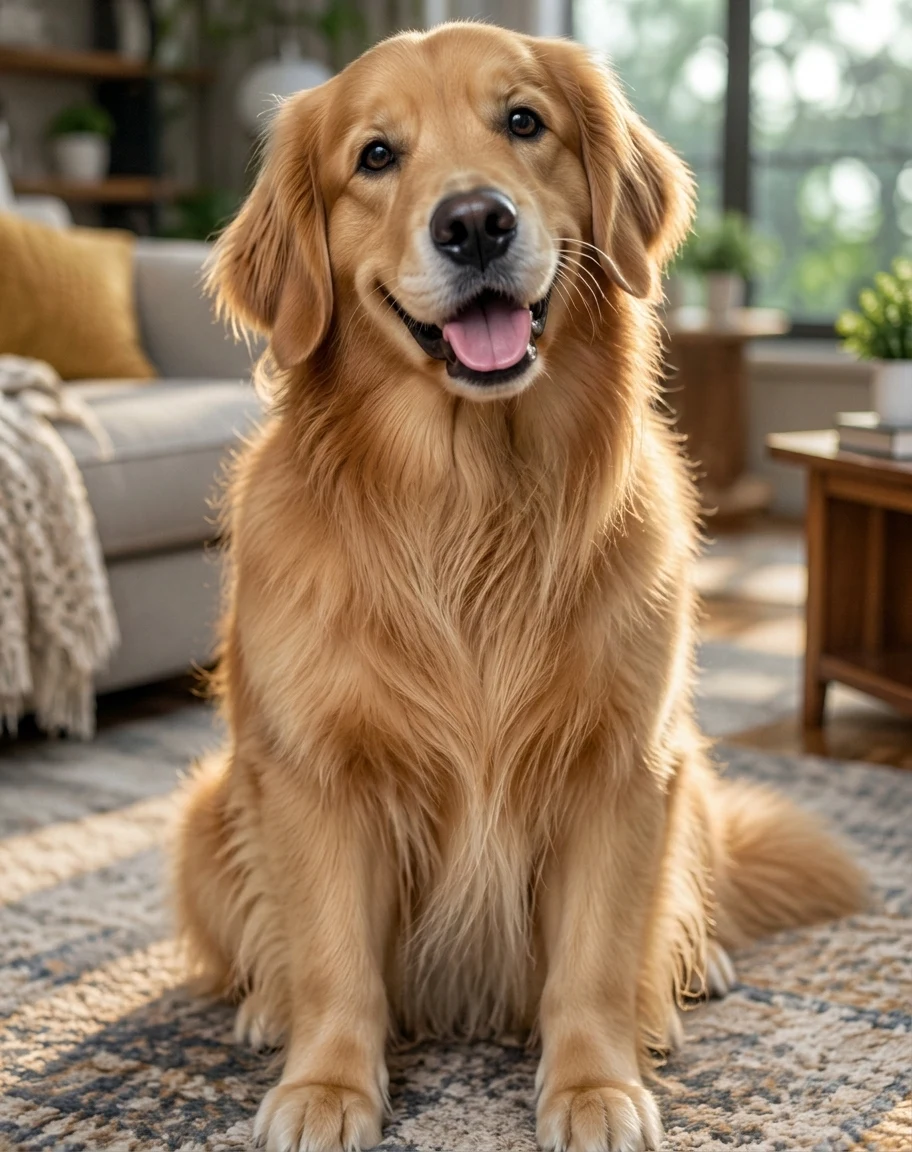 AI Result
What is an AI image humanizer?
An AI image humanizer takes an image that reads as AI-generated and re-renders it to read as a photograph: the same subject, pose and scene, captured the way a real camera would have caught them. The term comes from the text world, where a humanizer rewrites AI prose until it sounds like a person; this is the identical job for pixels, and it exists for the same reason: generating the content got easy, while making it feel human stayed hard.
What it is not is an enhancer. Enhancers sharpen, brighten and smooth, all of which push a face further toward the rendered look. A humanizer moves in the opposite direction: it adds back the texture, the uneven light and the small imperfections that perfection stripped out, because those imperfections are what your eye uses to decide something is real.
Last updated:
The six tells it removes
Nobody consciously checks a list. The eye reads all of these at once and returns a verdict in half a second. The pass addresses them together, which is why single-fix edits never quite get there.
Waxy, poreless skin
The number-one giveaway. Real skin has pores, fine lines, slight shine and uneven tone; generated skin is a single airbrushed surface. The humanizer puts the texture back without adding blemishes that were never there.
Light from nowhere
Real photos are unevenly lit: a warm cast from a lamp, shine on a forehead, shadows that agree on a direction. Generated images light everything equally, which is exactly what makes them feel staged.
Too-perfect geometry
Perfectly symmetric faces, perfectly draped fabric, hair that flows as one shape. Reality is slightly crooked: strands escape, collars sit unevenly, and that irregularity is what your eye reads as "real".
Colour that is too clean
AI colour is graded like an advertisement: saturated, contrasty, noiseless. A phone camera renders colour with a particular, familiar imperfection, and matching that rendering is most of what "looks real" means.
Backgrounds that melt
Look past the subject in a generated image and objects go abstract: shelves without contents, posters without words, streets without cars. The humanizer resolves the background into things that survive a second look.
No trace of a camera
A real photo carries evidence of the device that took it: sensor grain, focus falloff, mild motion softness. Renders are suspiciously clean. Adding the camera back is the finishing touch that ties the rest together.
How to humanize an AI image
- 1
Upload the AI image
Any AI-generated image works, from ChatGPT, Midjourney, Gemini or our own generators. Over-filtered real photos work too; the job is the same.
- 2
Run it, or tell it what to fix
The default instruction handles the usual tells in one pass. If something specific gives your image away, such as skin, lighting or colour, name it in the prompt box and the pass focuses there.
- 3
Download in about 20-40 seconds
The humanized image comes back with pose, framing and identity untouched. Only the rendering changes. Accounts that have bought credits get 2K output; the free first image is 1K.
Humanizer vs re-prompting vs manual retouching
Three ways to deal with an image that looks AI. They differ mostly in what you risk losing along the way.
| Re-prompting the generator | Manual retouching | AI image humanizer | |
|---|---|---|---|
| What you do | Rewrite the prompt, roll again | Grain, blur and colour work by hand | Upload, run one pass |
| Keeps your image | No, every roll is a new image | Yes | Yes, pose and identity held fixed |
| Time | Unbounded, luck-based | About 30-60 min per image | About 20-40 seconds |
| Skill needed | Prompt-craft | Photoshop proficiency | None |
| Best for | When the composition is wrong anyway | Pixel-level control on one hero image | Making the image you already like read as real |
The re-prompting column is the real competitor: it is what everyone tries first. It works until you get an image you actually like, at which point every re-roll risks the thing you are trying to keep, which is exactly the moment this tool is for.
Comparing dedicated tools instead? See 10 AI image humanizers compared by price, method and face safety.
Want to change what is in the picture rather than how it reads, such as a new background, a different outfit, someone removed? That is an edit, not a realism pass: describe it in our AI photo editor.
Who runs a realism pass
One-off fixes and weekly workflows land on the same button. The difference is only how often they come back.
AI portraits going on a profile
A profile photo that reads as AI-generated costs credibility exactly where you need it. Humanizing is the difference between "nice photo" and "why does your photo look like that".
Creators posting AI visuals
Audiences scroll past the AI look, and they are getting faster at spotting it. Creators who publish AI imagery weekly run every frame through a realism pass before it ships.
Marketing and UGC-style visuals
Ad creative works when it feels like a customer shot it. AI product-in-use imagery only performs after the render sheen comes off. Plastic skin in an ad reads as a scam signal.
AI art headed for print
The render look that passes on a phone screen is merciless at poster size. A realism pass before upscaling gives print the material texture that large formats expose.
Over-filtered real photos
Beauty filters produce the same waxy skin as a generator. The pass works in reverse too, taking a real photo that filters made artificial back to natural.
Dating profile photos
The highest-stakes case there is: a match who suspects the photo is fake is gone. Enhanced photos need to stay recognisably, checkably you, and natural texture is what makes that credible.
Frequently asked questions
What is an AI image humanizer?
An AI image humanizer is a tool that takes an AI-generated image and re-renders it to look like a photograph taken with a real camera, restoring skin texture, natural lighting, believable colour and background detail while keeping the subject, pose and composition exactly as they are. The name is borrowed from text-side AI humanizers; this is the same job for images.
How does it work?
One pass, one instruction: render this image the way a familiar phone camera would have captured it. The model already knows what a phone photo looks like (the skin, the colour response, the imperfect light), so the image is re-rendered with those characteristics instead of being edited tell by tell. Identity, pose and framing are preserved; only the rendering changes.
Is the AI image humanizer free?
Your first image is free: new accounts get 5 credits on sign-up and a humanizing pass costs 5 credits, so you see a full result before paying anything. After that, credit packs start at $9.99 for 350 credits, about 70 images. No subscription required and no credit card needed to try it.
Will the result bypass AI detectors?
No, and that is not what this tool is for. Detection systems read metadata, provenance signals and statistical patterns that visual realism does not touch, and no tool can honestly promise to beat them all. The humanizer makes images look natural to people. If a platform requires AI content to be labelled, label it. A better-looking image does not change what it is.
Will it change my face or composition?
No. The pass is explicitly constrained to rendering: facial identity, expression, pose, clothing, framing and the scene all stay as they are. What changes is how the image reads as a capture: skin texture, light behaviour, colour response and background resolution.
What resolution do I get?
2K on accounts that have bought credits; the free first image is 1K. If the image is headed for print, run the humanizer first and an upscaler second: realism at native size, then resolution on top of it.
Does it work on real photos that filters ruined?
Yes. Beauty filters and heavy retouching create the same tells as a generator (waxy skin, flattened light, over-clean colour), and the pass reverses them the same way. If that is your whole use case, the dedicated filter-removal page does exactly this job.
How is this different from Remove AI Look and Make AI Photo Realistic?
Same engine, same price: three doors into one job. Those two pages are single-purpose entries built around their own search phrases; this page is the hub for the whole realism toolkit, and the place to start if you were not searching for one of those exact phrases.
See your image without the AI look
Upload one image and judge the result yourself. The first pass is on us.
Need to change the text inside the image?
Realism is about how a photo looks, not what it says. When the problem is wording baked into the picture, such as a caption, a label or a screenshot, our sister site EditTextImage edits that directly.
Edit text in a screenshot
Fix a typo, blank out a name or change a number in a screenshot, with the interface around it left alone.
Edit text in an image with the same font
Matches the original typeface, weight and colour, so the replacement does not read as pasted on.
Edit text in a JPG
Works straight on a flattened JPG — no layers, no original project file needed.
Replace text in a photo, free
Swap the wording on a sign, label or poster inside a photo, free to try.
Related tools
Make AI Photo Realistic
The same engine, built around converting an AI render into a photo.
AI to Real Image Converter
The one-click converter framing: upload, convert, download.
Remove AI Look
The same engine, framed as subtracting the AI tells from a finished image.
AI Skin Texture Enhancer
Skin only: pores and a natural finish back on plastic AI skin, with the light and colours kept.
Remove Filter from Photo
The reverse case: real photos that beauty filters made artificial.
Game Screenshot to Real Photo
The same realism pass for renders: a game screenshot rebuilt as a photo of the scene.
Photo Upscaler
The step after realism: resolution for printing and large formats.
AI Headshot Generator
Professional headshots with the same no-plastic-skin standard.
Dating Profile Photos
The highest-stakes place a photo can look fake.
GPT Image 2 Generator
Generate the image first, humanize it here after.
GPT Image 2.5
OpenAI's newest. It can take the plastic skin and orange cast off in one instruction.
Photo Enhancer
For when the problem is quality, not realism.
Realistic AI Image Prompts
Not generated yet? Twelve prompts that start out looking like real photos.
AI Text Cleaner
For text, not images: strips hidden characters and Markdown from text copied out of AI chats. It does not rewrite it.
All of these are part of the sparkpix.ai AI photo editor, so one account works across every tool.
Last updated: 2026-07-25