
FREE
Loading…
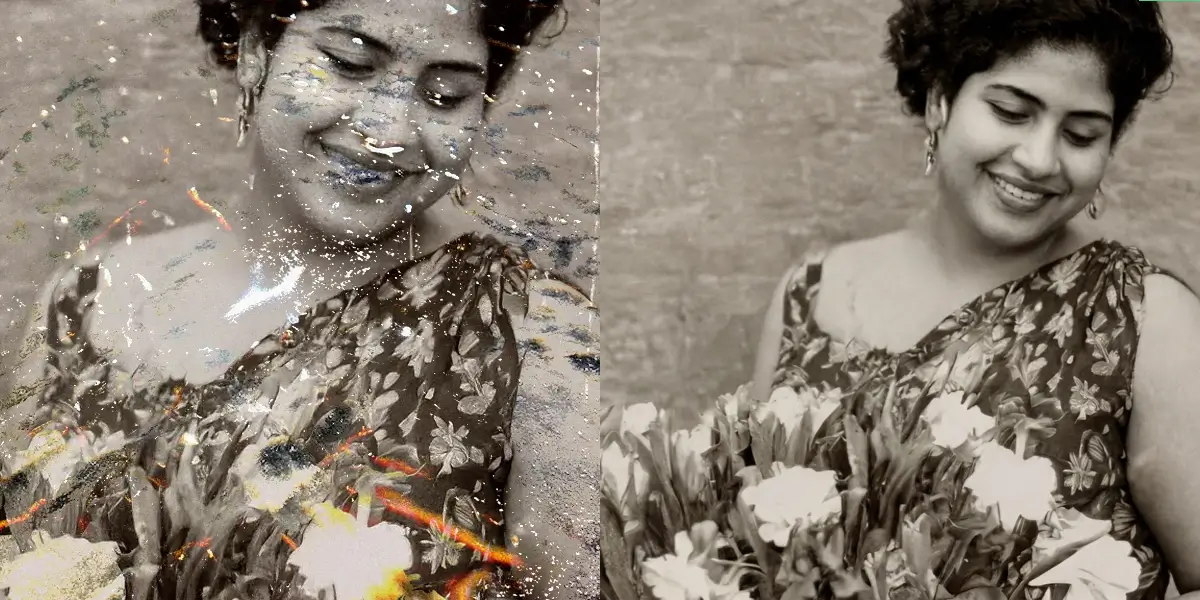
FEMA reports that water damage is the number-one cause of irreversible photo loss following natural disasters. Our AI uses multi-layer damage segmentation to separate stain patterns from the original photographic content, removing water marks, mold, and chemical spots while reconstructing the image beneath.
Upload your damaged photo and get instant AI restoration
Just upload and click to process - no prompt needed
Photos Repaired
Stain Removal Rate
Average Time
User Rating
AI-powered restoration with professional quality results
AI identifies water marks, mold discoloration, chemical spots, and adhesive residue as separate damage layers, then removes each independently for thorough restoration.
The neural network reconstructs image data hidden beneath water stains by analyzing surrounding pixels, texture patterns, and color continuity to predict what lies underneath.
Specifically targets foxing marks (brown spots from fungal growth) and mold discoloration. According to the Library of Congress preservation guidelines, photographs stored above 65% relative humidity are at high risk for biological growth — our AI reverses this damage at the pixel level.
Removes the distinctive wave-shaped tide lines left by receding water, which are among the most recognizable signs of flood damage on photographs.
Water damage often causes uneven color shifts across the photograph. The AI normalizes the color balance across the entire image after removing stain layers.
Advanced AI processes even severely water-damaged photos in about a minute, revealing details that appeared permanently lost to water exposure.
Upload your water-damaged, stained, or mold-affected photo. We support JPG, PNG, and WebP formats up to 20MB.
Click the repair button. Our AI detects and removes all water damage layers while reconstructing the original image beneath.
Preview the restored photo with water damage removed and download it in high resolution for printing or archiving.
Our AI uses multi-layer damage segmentation to identify different types of water damage separately — water stains, mold spots, foxing marks, tide lines, and chemical residue. As conservation scientist Dr. Debra Hess Norris of the University of Delaware notes, "water damage creates distinct chemical interactions with photographic emulsions that require layer-by-layer treatment." Our system removes each damage layer individually while reconstructing the hidden original content using surrounding pixel analysis and texture synthesis.
The AI can recover a remarkable amount of detail from water-damaged photos. Even photographs that appear completely ruined often contain more recoverable data than expected. However, if the water has physically dissolved the photographic emulsion (common in prolonged submersion), some areas may be beyond recovery. The AI will restore whatever content remains.
Yes, this tool was designed with flood damage in mind. FEMA estimates that flooding affects over 2 million U.S. households annually, and family photographs are among the most commonly reported irreplaceable losses. Our AI is specifically trained to identify and remove flood-specific damage patterns including tide lines, sediment stains, and mold growth from hurricanes, burst pipes, and any other water exposure.
Absolutely. Foxing marks and mold spots are among the most common forms of humidity damage. The AI distinguishes between mold discoloration and the original image content, removing the biological growth stains while preserving the photograph beneath. This works even when mold has spread across large areas of the print.
Most water-damaged photos are processed in about a minute. Severely damaged images with multiple types of staining may take slightly longer as the AI processes each damage layer separately, but results are typically delivered in under a minute.
Always let photos dry completely before scanning. Scanning a wet photo can cause further damage to both the photo and your scanner. Once dry, scan at the highest resolution possible (at least 300 DPI, ideally 600 DPI) to give our AI the most data to work with during restoration.
Recover vibrant colors from yellowed and discolored old photographs
Remove scratches, tears, and creases from damaged old photographs
Reconstruct missing pieces, torn edges, and ripped corners of old photos
Add natural, realistic colors to black and white photographs with AI
Comprehensive AI restoration for all types of old photo damage
Sharpen blurry and low-resolution old photographs with AI enhancement
Start for free. No credit card required.