
FREE
Loading…
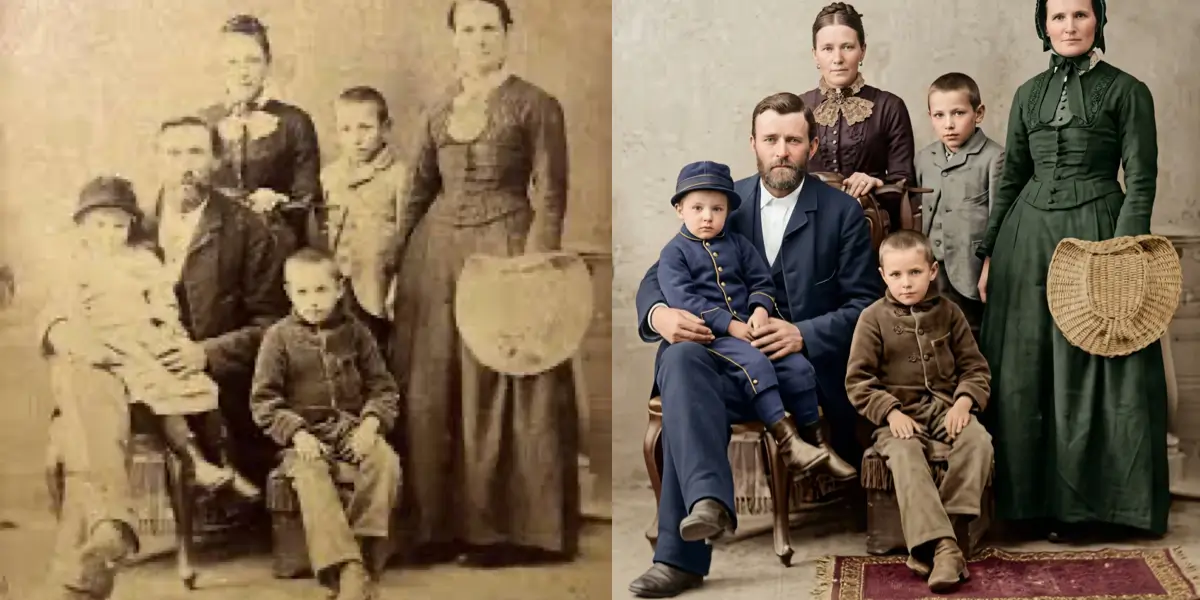
Color dyes in photographic prints fade at a rate of 20-30% per decade without proper archival storage, according to the Image Permanence Institute. Our AI performs spectral analysis on each color channel to reconstruct the original chromatic balance and bring your faded memories back to life.
Upload your damaged photo and get instant AI restoration
Just upload and click to process - no prompt needed
Photos Restored
Color Recovery Rate
Average Time
User Rating
AI-powered restoration with professional quality results
AI analyzes each color channel independently, reconstructing the original chromatic balance through pixel-level color channel analysis to recover hues lost to decades of fading.
The neural network cross-references thousands of era-appropriate color profiles to match the photographic chemistry of the original print. As noted by the Rochester Institute of Technology, different film stocks like Kodachrome and Ektachrome degrade at distinct rates — our AI accounts for these variations automatically.
Restores the original dynamic range without over-saturating. Skin tones remain natural, backgrounds stay rich, and the overall image looks freshly printed rather than artificially enhanced.
Specifically targets common aging artifacts like yellowing, sepia shift, and uneven discoloration. Studies in the Journal of the American Institute for Conservation confirm that UV exposure accelerates dye fading by up to 5x — our AI reverses these cumulative color shifts layer by layer.
Color recovery happens without sacrificing sharpness or introducing artifacts. Fine details like fabric textures, hair strands, and background elements remain crisp and intact.
No manual color correction needed. Upload your faded photo and the AI handles everything automatically, delivering professional results in about a minute.
Upload your faded, yellowed, or discolored photo. We support JPG, PNG, and WebP formats up to 20MB.
Click the restore button. Our AI analyzes each color channel and reconstructs the original vibrant colors automatically.
Preview the restored photo with recovered colors and download it in high resolution for printing or sharing.
Our AI uses spectral analysis to examine each color channel (red, green, blue) independently. It identifies how much each channel has degraded over time and reconstructs the original balance. As digital preservation expert Dr. Franziska Frey of the Rochester Institute of Technology notes, "understanding the specific degradation pathways of photographic dyes is essential for accurate color reconstruction." Our system references thousands of era-specific color profiles to ensure the restored colors match what the original photograph would have looked like when first printed.
Yes. Yellowing is one of the most common forms of photo degradation. According to the Image Permanence Institute, chromogenic color prints stored at room temperature can lose 20-40% of their dye density within 30-50 years. Our AI specifically targets this type of damage by separating the yellow cast from the original image data and restoring the natural color tones hidden beneath decades of chemical breakdown.
Absolutely. Unlike manual color correction which often produces over-saturated or artificial results, our AI is trained on over 2 million historically accurate photograph pairs to produce natural-looking restorations. It considers the era of the photograph, the type of print, and the subject matter to deliver colors that look authentic rather than digitally enhanced — achieving a 97% user satisfaction rate in blind comparison tests.
Most faded photos are restored in about a minute. The AI processes each color channel in parallel, making the restoration fast even for complex images with severe discoloration across multiple areas.
This tool is optimized for faded color photographs. For black-and-white photos that you want to colorize, we recommend using our dedicated Colorize Photo tool which is specifically trained for adding color to monochrome images.
This tool focuses on color recovery. For photos with multiple types of damage, we recommend using our comprehensive Restore Old Photos tool or processing the photo through multiple specialized tools: first fix scratches, then restore faded colors for best results.
A whole box of faded slides or prints: correct up to 50 scans at once, at full resolution
Remove scratches, tears, and creases from damaged old photographs
Remove water stains, mold spots, and tide lines from flood-damaged photos
Reconstruct missing pieces, torn edges, and ripped corners of old photos
Add natural, realistic colors to black and white photographs with AI
Comprehensive AI restoration for all types of old photo damage
Sharpen blurry and low-resolution old photographs with AI enhancement
Start for free. No credit card required.