
FREE
Loading…
Replace harsh or flat lighting with golden hour, studio, cinematic, or window light. The AI rebuilds highlights, shadows, and color temperature while keeping the subject identical.
Try: “golden hour sunlight from the side” · “cinematic teal-and-orange film light” · “soft window light, moody atmosphere”
Upload, then check the instruction below — you can edit it before generating.
Warm side light, long shadows — the iconic portrait look
Upload a photo and click the button to start processing
Same subject, completely different mood. Each result below was generated from a single preset click — the AI rebuilds light direction, shadows, and color temperature in seconds.
The AI photo relight tool replaces flat indoor ceiling light with warm directional golden-hour sunlight from the side, adding long soft shadows and honey-gold tones. Subject identity, clothing, and pose stay pixel-identical. This is the most common use case for portrait and headshot photographers.
 Before
 AI Result
The original is an office corridor under overhead fluorescents: even, shadowless, slightly washed out. The relit version puts a low key light in from the left, drops the right side of his face and the wall into shadow, cools those shadows toward teal and warms the skin highlights — the grade most film looks are built on. Same man, same t-shirt, same stance, same framing; only the light moved.
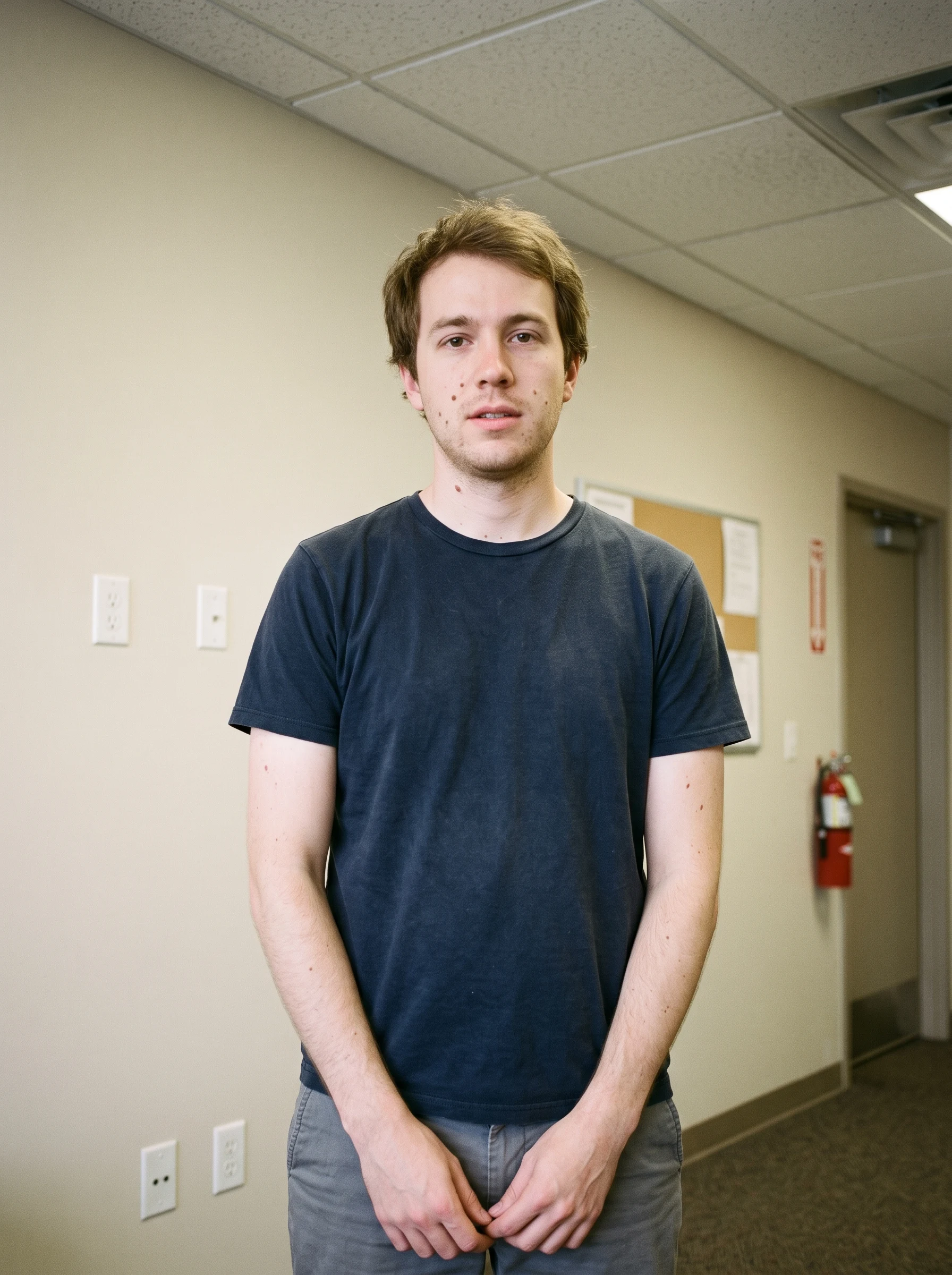 Before
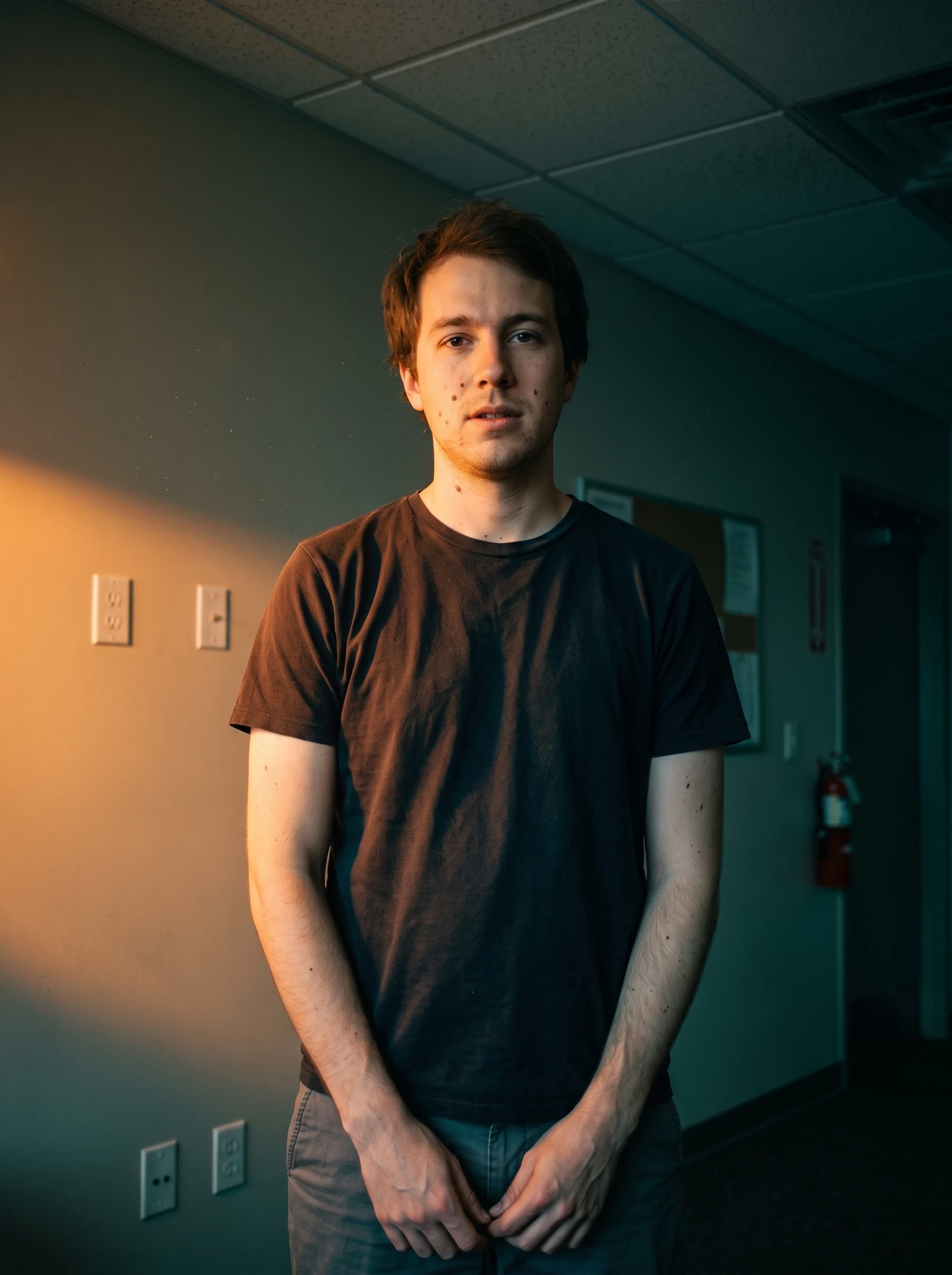 AI Result
Lighting drives more than aesthetic — it changes click-through rates, conversion, and perceived photo quality. The data shows why AI relighting is mainstream now.
“Lighting is the single biggest determinant of whether a photo reads as amateur or professional. Generative relighting changes the economics — instead of paying $300 for a studio session or driving to a location to catch a 30-minute golden hour window, you can apply the look in seconds. The output is not always perfect, but for portraits, real estate, and product photography it now competes credibly with hand-lit work.”
Six high-intent lighting categories cover most virtual relighting needs. Each preset is tuned for natural-looking highlights, shadows, and color temperature.
The iconic warm side light with long soft shadows. The #1 most-searched AI lighting style — used for portraits, real estate, and engagement shoots.
"warm golden hour sunlight from the side"
Professional headshot light — soft key from above-front, fill on the shadow side, optional rim from behind. The look of a $300 studio session.
"professional studio lighting, soft key from front"
Strong directional key light, deep shadows, teal-and-orange grading. The aesthetic of movie posters, TikTok reels, and YouTube b-roll.
"cinematic moody lighting with teal-orange grade"
Gentle natural light from a side window — diffused, falloff into soft shadow. The look of editorial portraits and lifestyle photography.
"soft window light from camera-left, gentle falloff"
Bright even diffused light, soft shadows, accurate true colors. The lighting reference for product photography and skin-true portraits.
"bright overcast diffused daylight, even shadows"
Urban night scene with vibrant neon accents, magenta and cyan tones, reflective surfaces. The aesthetic of cyberpunk editorial and music videos.
"neon urban night, magenta and cyan accents"
Golden hour lasts only 30–60 minutes per day, and it requires being outside at the right time, at the right location, in the right weather. The AI relight tool delivers the same warm directional light any time of day, on any photo — including indoor portraits that never saw sunlight to begin with. The AI introduces a low-angle side light, simulates long soft shadows, and applies the honey-gold color cast that defines the look.
Approximate window of actual usable golden-hour light per day
Photographers traditionally plan entire shoots around the golden-hour window — driving to location, scouting in advance, hoping the weather cooperates. AI relighting collapses that planning cost to seconds. It does not replace true golden-hour shoots; it makes the look available when a real one is impossible.
Add Golden HourA studio portrait session in the US averages $200–500 and an hour of your time. AI studio relighting delivers a comparable look in 20 seconds — from a casual selfie. Useful for LinkedIn refreshes, executive portraits, and any time you need a professional look without a booking.
Casual selfie → professional studio lighting. The AI introduces a soft key light, fill, and rim light — the exact recipe used in pro headshot studios. Pair with the AI Outfit Changer for a full headshot rebuild.
"professional studio lighting, soft key from above-front"
Used for "About Us" pages, conference bios, press materials. The AI handles the higher contrast and crisp definition expected of executive photography.
"executive portrait lighting, crisp directional key"
Soft beauty-dish style lighting — flattering wraparound light with minimal shadows under the chin and eyes. Useful for portrait makeup photography or fashion editorial.
"soft beauty-dish lighting from above, even fill"
Six real audiences rely on virtual relighting as part of their workflow.
Salvage portraits shot under bad ambient light. Add studio-quality directional lighting in post — without re-booking the subject.
Turn gloomy interior listing photos into warm sunny ones. Studies show warm-lit listings get significantly more click-throughs than flatly-lit ones.
Apply studio or overcast-daylight lighting to e-commerce product shots without booking a soft-box studio session. Useful for marketplace seller refreshes.
Chase the cinematic teal-and-orange look for TikTok / Reels b-roll without expensive lighting kits. One click, content-ready output.
Fix reception venues with terrible ambient light — replace dim yellow tungsten with clean studio or warm candlelit looks that actually flatter the subjects.
Rescue indoor flash photos by replacing the harsh flash glare with soft natural window light or warm golden-hour tones.
Three steps. Under one minute. No skills required.
Drop any portrait, real-estate, product, or scene photo (JPG, PNG, or WebP, up to 20 MB). Photos with flat indoor lighting or even outdoor light respond best.
Choose from 8 styles — golden hour, studio, cinematic, window light, sunset, overcast, neon, candlelit — or edit the prompt to describe custom lighting like "rim-lit moody portrait".
Click "Relight Photo" and the AI rebuilds the lighting in 10–20 seconds. Subject stays sharp; lighting transforms. Download in HD or try another preset.
How the sparkpix relight approach compares to alternatives.
| sparkpix.ai | ClipDrop Relight | Adobe Photoshop / Lightroom | |
|---|---|---|---|
| Input method | Pick a preset or describe in plain English | Pick light position on a 3D widget | Manual slider adjustments |
| Light direction control | Yes — described in natural language | Yes — drag a 3D light around | Limited — no true direction change |
| Pricing | Free to start, $9.99 for 350 generations | Subscription + API credits | $22+/month Creative Cloud |
| Other AI tools in one place | 100+ tools (outfit, hair, background, restore, restyle) | Single-purpose relight | Comprehensive but complex |
| Browser-based, no install | Yes | Yes | Desktop install required |
Everything you need to know about changing lighting with AI.
AI photo relighting analyzes the existing light direction in your image, removes harsh shadows or flat lighting, and re-renders the scene with the lighting style you picked. The AI estimates 3D surface normals from the 2D photo, simulates a new light source, and reapplies highlights, shadows, and color temperature — all while keeping the subject identity, pose, and background intact.
Yes. The AI relight tool is specifically prompted to preserve the subject — face, clothing colors, body pose, and background composition all stay identical. Only the lighting (highlights, shadows, color temperature) is regenerated. This is the key difference between AI relighting and AI re-imagining (where everything can change).
The 8 presets cover the most-requested looks: golden hour, studio lighting, cinematic film, soft window light, sunset, overcast daylight, neon night, and candlelit. You can also describe custom lighting like "rim-lit moody portrait with hard side light", "soft beauty dish from above", or "blue hour twilight". The AI handles any natural-language lighting prompt.
Yes — this is one of the most popular use cases. Indoor portraits with flat ceiling lighting respond beautifully to the Golden Hour preset because the AI introduces directional warm light from a side angle, plus the long shadows that make golden-hour images look magazine-quality. Same logic for adding sunset, window light, or cinematic looks to any indoor scene.
Yes. New accounts get 5 free credits on sign-up — enough to try several lighting styles on one photo. Each relight costs 5 credits. No subscription, no credit card to start. Additional credit packs begin at $9.99 for 350 credits (~70 relights).
Absolutely. The Golden Hour and Soft Window Light presets are commonly used by real estate photographers to make dim interior listing photos look bright, sunny, and inviting. Studies show listings with warm, well-lit photos generate significantly more clicks and showing requests than listings with flat or dark images.
Yes. The Studio Lighting and Overcast Daylight presets are tuned for even, accurate-color product shots. Useful for e-commerce sellers who shot product photos under bad lighting and need them to look professional without a costly re-shoot. The AI matches highlights and shadows to the product geometry naturally.
ClipDrop offers AI relight as a paid API for developers and Stability AI users. Adobe Photoshop Generative Relight requires a $22+/month Creative Cloud subscription and Photoshop install. Lightroom adjusts global tone curves but cannot actually move light direction or add shadows where none existed. sparkpix runs in your browser, free to start, with plain-English prompts — and the same tool also handles outfit changes, hair, background, and 90+ other AI photo edits.
Yes. All paid plans include full commercial usage rights for AI-edited images, making sparkpix suitable for e-commerce product photos, real estate listings, marketing campaigns, social media content, and client work. The free tier includes a small watermark only on trial generations.
Portraits and scenes with a clear subject work best. Avoid photos that are extremely overexposed (blown-out highlights) or severely underexposed (lost shadow detail) — the AI cannot recover information that is not in the original pixels. Photos with even but flat lighting respond best because there is no harsh artifact to remove.
Upload a photo, pick a lighting style, and see the difference in seconds.
Relight Photo Now