
FREE
Loading…
Upload an image to transform or edit
Upload an image and describe your transformation to generate
Objects Removed
Accuracy
Processing Time
User Rating
Our AI object remover uses content-aware inpainting to erase unwanted elements and reconstruct backgrounds — delivering professional results in under 10 seconds

According to Shopify research, products with clean, distraction-free photography see up to 94% higher conversion rates. Our AI object remover helps e-commerce sellers eliminate price tags, scratches, stray cables, and background clutter from product shots — no reshooting required.
The content-aware fill algorithm analyzes surrounding pixels and reconstructs natural textures, lighting gradients, and surface patterns. Whether you are removing a reflection from glass or a label from packaging, the result is a seamless, studio-quality product image ready for your store.
Remove Objects from Product Photos
A 2023 Adobe survey found that 67% of photographers spend over 30 minutes manually retouching photobombers and bystanders from travel shots. Our AI-powered object remover completes the same task in under 10 seconds using semantic segmentation — the AI understands the difference between "the person in the red jacket" and "everyone in the background."
The neural inpainting engine reconstructs occluded backgrounds with remarkable accuracy, whether it is extending a cobblestone street, continuing a mountain ridgeline, or filling in a crowded beach scene. Just type what to remove — our AI handles the rest.
Remove People from Photos Free
Date stamps, caption overlays, and unwanted text can obscure important visual details. Our AI text remover uses optical character recognition (OCR) paired with generative inpainting to precisely identify text regions and reconstruct the original image beneath them — preserving complex textures, gradients, and fine details.
Unlike basic clone-stamp approaches, our deep learning model understands the semantic context of each image region. It knows the difference between a sky gradient behind text and a brick wall beneath a date stamp, producing results that are virtually indistinguishable from the original.
Remove Text from Images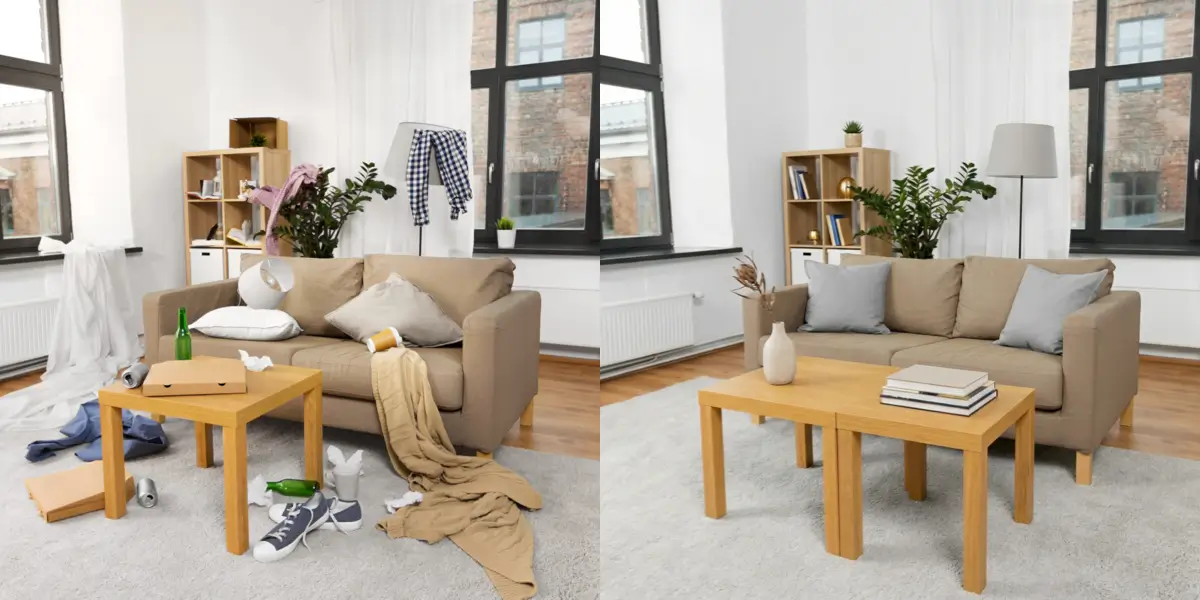
The National Association of Realtors reports that listings with professionally edited photos sell 32% faster. Our AI object remover lets agents and homeowners digitally declutter spaces — remove personal items, misplaced furniture, parked cars, and garbage bins from interior and exterior shots without scheduling a reshoot.
The AI preserves architectural details like flooring patterns, wall textures, and natural light while seamlessly filling removed areas. This is especially valuable for occupied properties where physical staging is impractical, saving an average of $2,000-5,000 per listing in professional staging costs.
Clean Up Real Estate Photos.webp)
Research from Hootsuite shows that clean, visually uncluttered images receive 38% more engagement on Instagram and TikTok. Our AI object remover erases power lines, trash cans, signs, parked vehicles, and other visual distractions from your photos — turning an ordinary snapshot into scroll-stopping content.
Content creators and influencers use our tool to achieve that polished, editorial look without expensive photo editing software. The AI processes images at up to 2K resolution, preserving fine details like hair strands and fabric textures while removing only the elements you specify.
Clean Up Photos for Social Media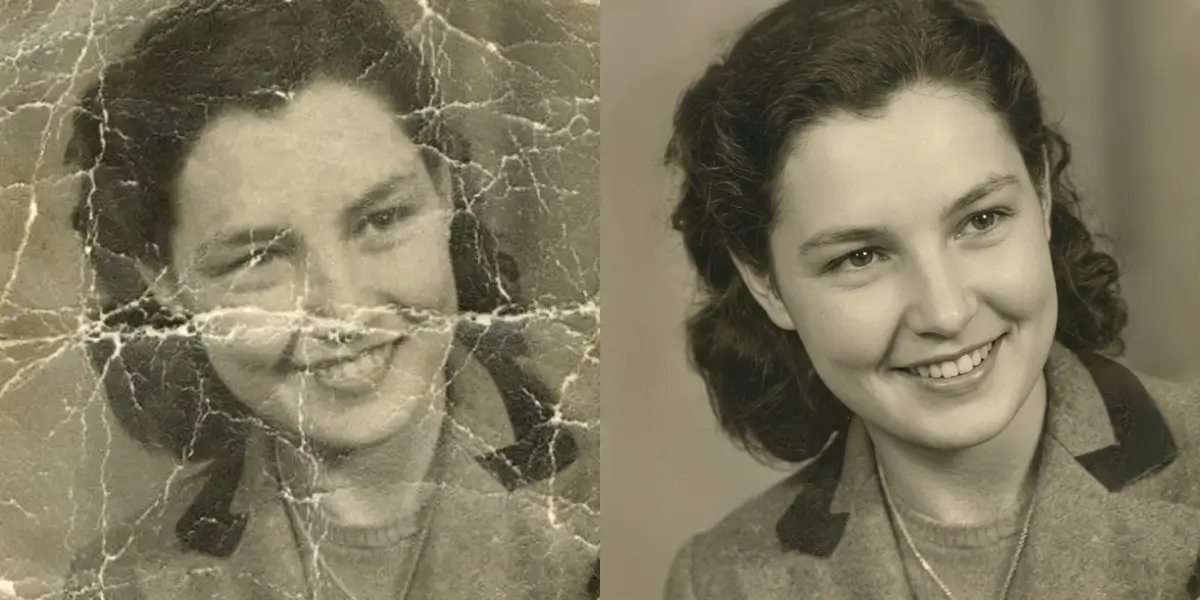
Physical photographs degrade over time — scratches, dust spots, water stains, creases, and yellowing can obscure precious memories. Our AI object remover uses specialized damage detection algorithms to identify and remove these imperfections while preserving the original detail, skin tones, and facial features beneath.
Unlike manual restoration that can take a skilled editor 2-4 hours per photo, our AI completes the process in seconds. The deep learning model was trained on thousands of damaged photograph samples, learning to distinguish between intentional image content and physical damage artifacts with over 95% accuracy.
Remove Scratches from Old PhotosThese are the exact situations our object remover was built for
You waited 20 minutes to get that perfect shot of the Eiffel Tower. The lighting was just right, your pose was on point... and then you look at the photo and there are three random strangers photobombing your moment. With our object remover, just type "remove the people in the background" and get the photo you actually wanted.
You are shooting products for your store, and everything looks great except for that tiny scratch on the table, the power cord sneaking into frame, or the reflection you did not notice until now. Our object remover cleans all that up so you can focus on selling, not re-shooting.
That listing needs to go live today, but the current tenant left their stuff everywhere, there is a car in the driveway, and somehow a garbage bin made it into every exterior shot. Use our object remover to declutter spaces digitally and make properties look their best.
The one group photo where everyone is smiling also happens to be the one where cousin Steve is making bunny ears behind grandma, and there is a stranger wandering through the background. Our object remover lets you keep the smiles and lose the distractions.
Pretty much anything you can describe, our object remover can remove
Photobombers, crowds, strangers in the background - our object remover handles them all. Keep only the people you want in the shot.
Examples:
Cars, trash cans, signs, power lines, furniture - if it is in your photo and you do not want it there, we can remove it.
Examples:
Got text overlays, date stamps, or captions cluttering your image? Our object remover cleans them up seamlessly.
Examples:
Dust spots on your camera sensor, scratches on products, stains on surfaces - remove these small imperfections for cleaner images.
Examples:
Messy rooms, cluttered desks, busy backgrounds - remove objects from photos to create cleaner, more focused compositions.
Examples:
Need to remove objects from photos with tricky situations? Like everything except one person? Our AI understands context.
Examples:
Three simple steps. No Photoshop skills required. Seriously.
Drop your image into our object remover. We accept JPG, PNG, and WebP files up to 10MB. Your photos stay private and secure.
Just type it out naturally. Say things like "remove the person on the right" or "delete all the cars in the background." Our AI understands what you mean.
In seconds, our AI removes the objects from your photo and fills in the space naturally. Download and use your cleaned-up image anywhere.
You do not always have control over your environment. Our object remover helps you deliver clean, polished images even when the shoot was not perfect.
Remove photobombers fast
Clean up location shots
Fix composition issues
Product photos need to look professional. Remove objects from photos to eliminate distractions and keep the focus on what you are selling.
Clean product backgrounds
Remove imperfections
Consistent catalog look
Your social content needs to stand out. Use our object remover to create cleaner, more engaging visuals for your audience.
Perfect vacation photos
Clean selfie backgrounds
Professional-looking posts
Removing an object erases it for good. If that object is the part you actually need, for another design or a different background, LayerGrab from the same team can lift it out of the photo onto its own transparent layer and fill in the space it leaves behind.
The AI uses advanced computer vision trained on millions of images. When you describe what to remove — like "the car on the left" — it identifies that specific element using spatial understanding and object recognition, then erases it precisely while preserving surrounding content.
This is where AI really shines. After erasing the target element, the algorithm analyzes surrounding pixels and reconstructs what the background would look like naturally. It continues grass patterns, extends pavement, and rebuilds textures seamlessly. In most cases, the edit is undetectable.
Absolutely. The results rival professional retouching for most common removal tasks. The AI uses the same underlying technology as professional editing software, made accessible through a simple text interface. Quality remains consistent whether handling simple or complex edits.
There is no practical limit. You can specify multiple targets in a single command — for example, "remove all the people, the trash can, and the graffiti." The AI processes everything simultaneously, saving you from doing multiple passes.
Yes, you can try it free. New users get 5 free credits upon sign-up, and each removal costs 5 credits. Additional credits start at $9.99 for 350 credits — far more affordable than hours of manual Photoshop work or hiring a professional editor.
Try the free AI object removal tool today. Get clean, professional photos in seconds — just describe what to remove. No credit card needed to start.
4.9/5 rating
3-second removal
Free to try
Erase text, captions, and overlays from images with AI
Remove photobombers and unwanted people from photos
Erase your ex from photos while keeping the memories
Remove crowds and strangers from travel photos
Eliminate harsh shadows and fix uneven lighting with AI
Remove emoji overlays and stickers from photos with AI
Digitally remove tattoos while preserving natural skin texture
Remove acne, pimples, and skin blemishes from photos
See what you look like without glasses using AI
Preview your smile without braces using AI
Erase power lines and cables from landscape photos
Remove fences and barriers from zoo and wildlife photos
Erase date stamps and timestamps from old camera photos
Remove Instagram and Snapchat filters from photos
Remove glare and reflections from glass and windows
Remove leashes and harnesses from pet photos
Remove background from any photo instantly with AI
Generate any image from text — no restrictions, no watermark, free daily use.
Remove, replace, add or restructure anything in your photos with a sentence.
Take out tourists, strangers, or anyone you don’t want.
Clear text, watermarks, emojis, and date stamps.
Erase clutter, power lines, fences, reflections, shadows.
Describe any change in words, or draw over the area to edit.
Add a missing friend, a late relative, or your younger self.