
FREE
Loading…
Add a deceased loved one to the wedding, graduation or new-baby photo they should have been in. Upload the photo and any picture of them, even an old print, and the AI places them in the scene with the light and colour matched.
Last updated:
Five real results from this tool. On the left, the photo with the picture of the loved one in the corner; on the right, what came back, unretouched. Three of the five started from an old print, because that is the photo most families have.
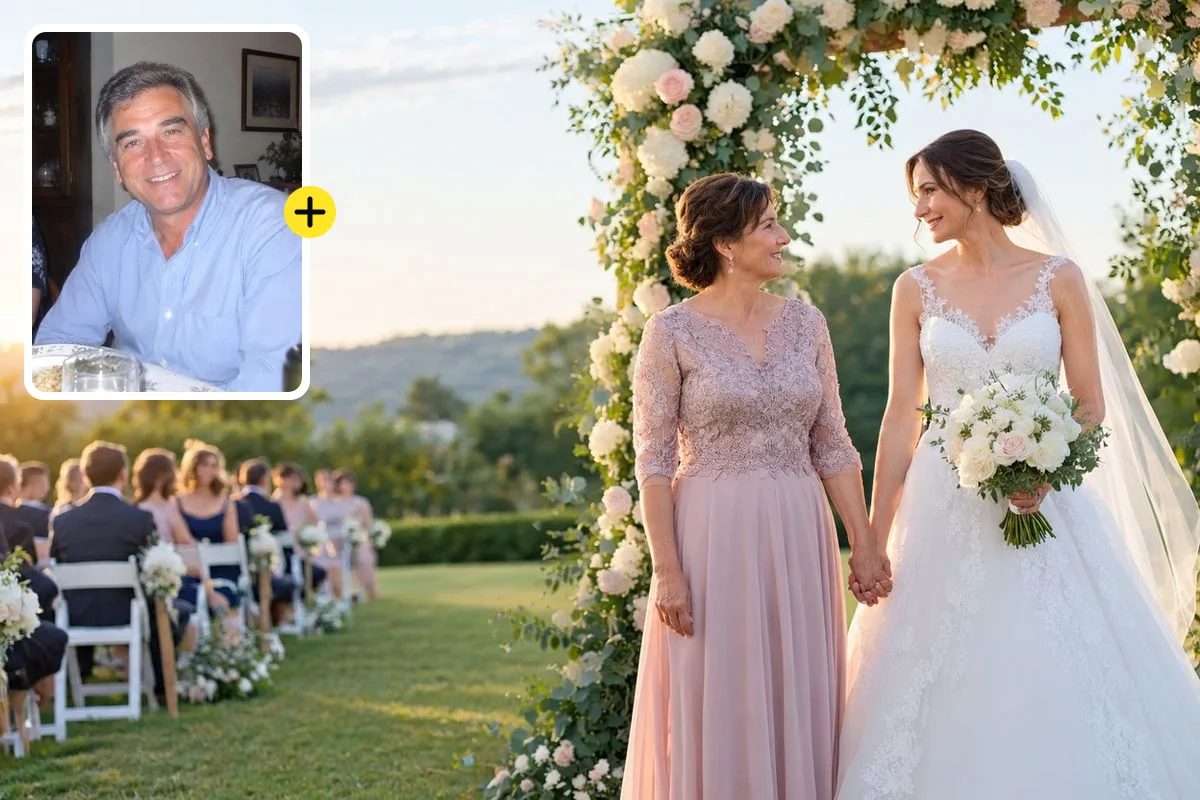
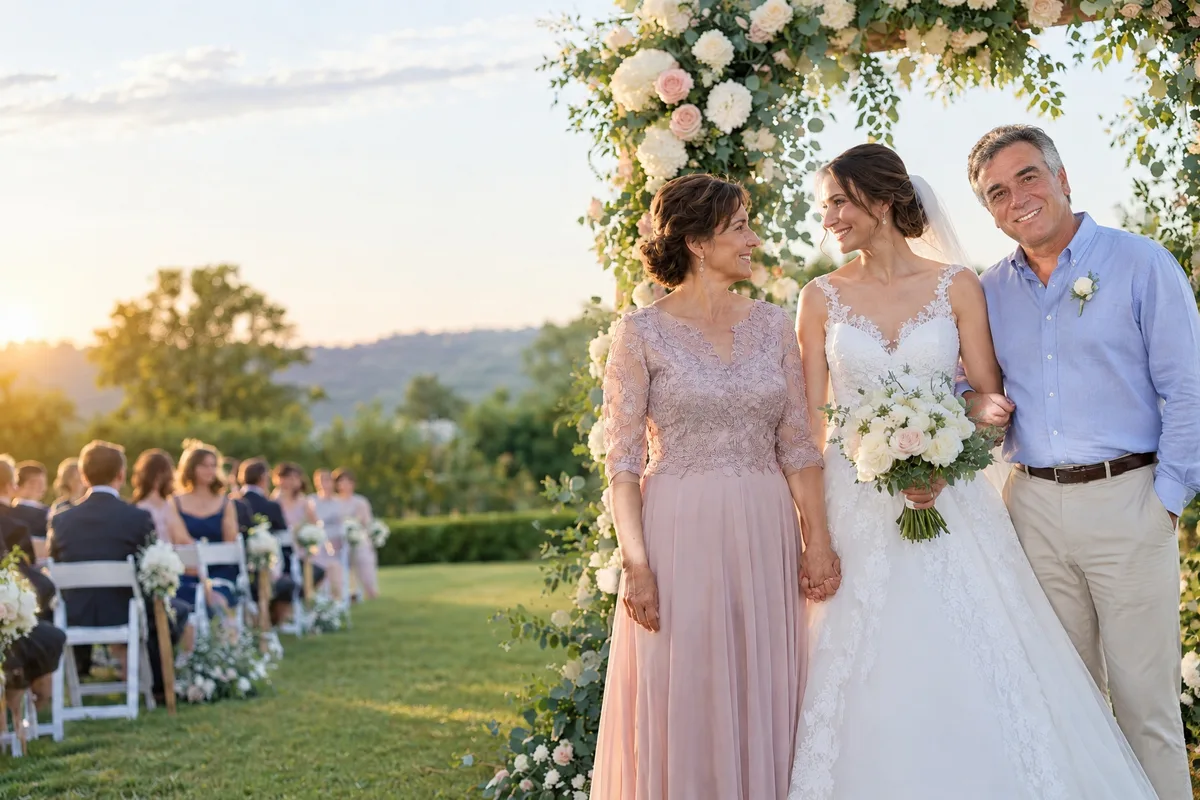
The wish behind most searches for adding a deceased loved one to a photo is a wedding: a bride or groom who wanted a parent there. Here the bride stood under the arch with her mother; her father was added from a soft, flash-lit family dinner snapshot from the 2000s.
He stands on her other side with her arm through his, lit by the same low afternoon sun as the two women, in the light blue shirt from his snapshot with a boutonnière added for the day. His face, grey hair and smile come from that snapshot, which is why a clear, natural photo of your loved one matters more than a formal one.
Typed into the editor
“Place him on the bride’s left side under the arch, her arm linked through his, smiling as the father of the bride.”
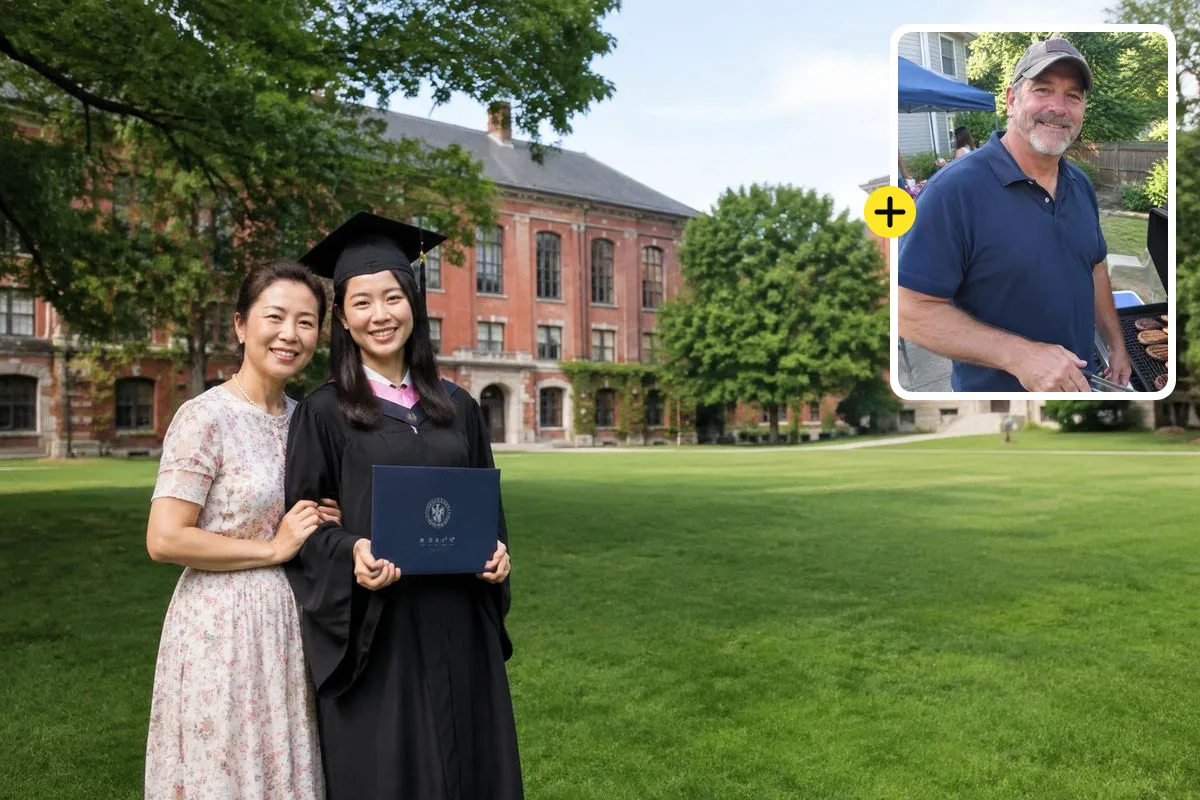
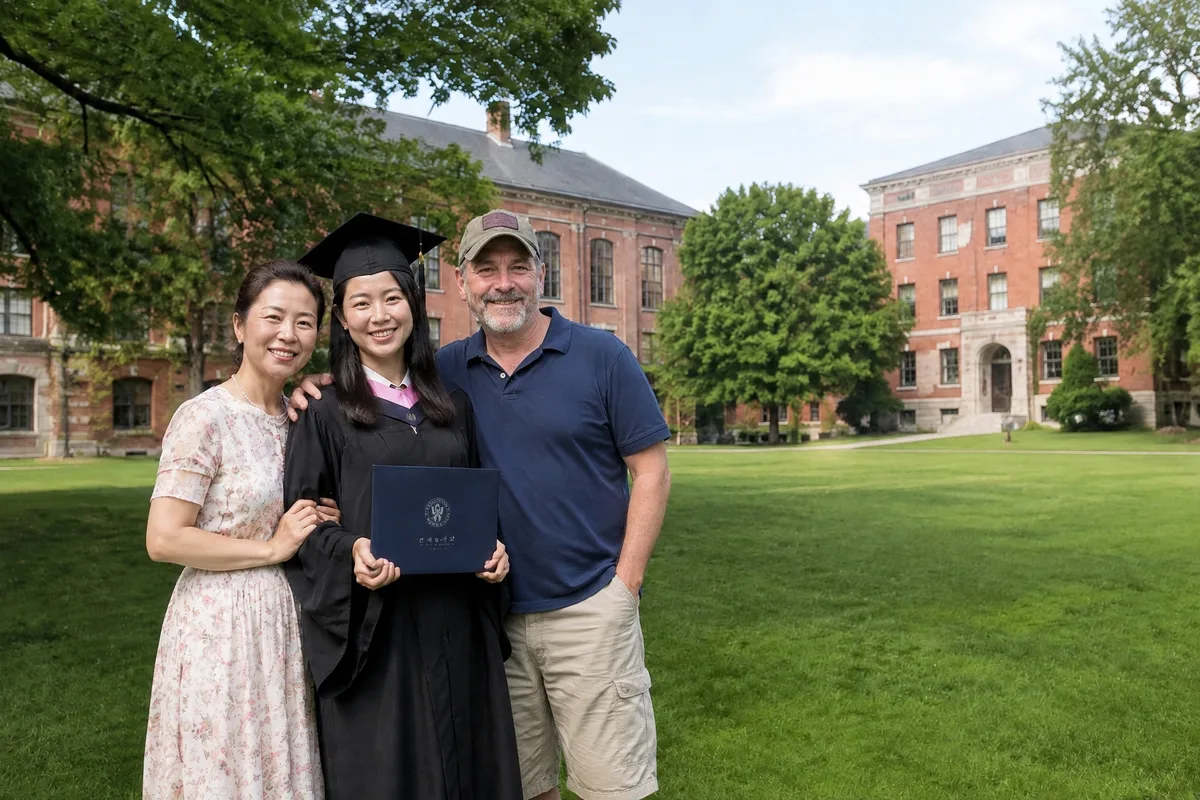
Graduations are the second most common reason families put a deceased loved one into a photo: a milestone a parent talked about for years and did not live to see. The graduate and her mother were photographed on the campus lawn; her father came from a casual barbecue photo.
The model kept his beard, cap, polo shirt and face and moved him into the bright campus daylight, standing close beside his daughter at the right height for a man next to her. Nothing about the graduate or her mother changed.
Typed into the editor
“Place him beside his daughter on her right, his arm around her shoulders, smiling proudly at the camera.”
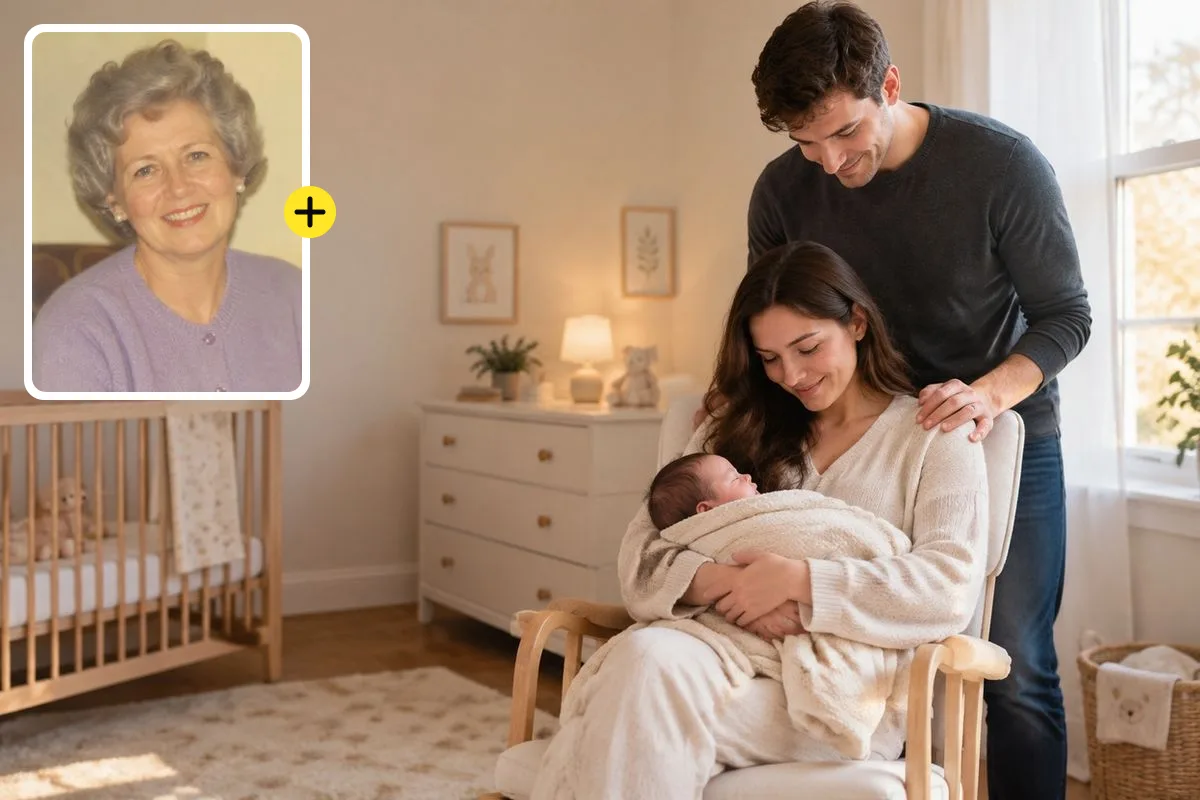
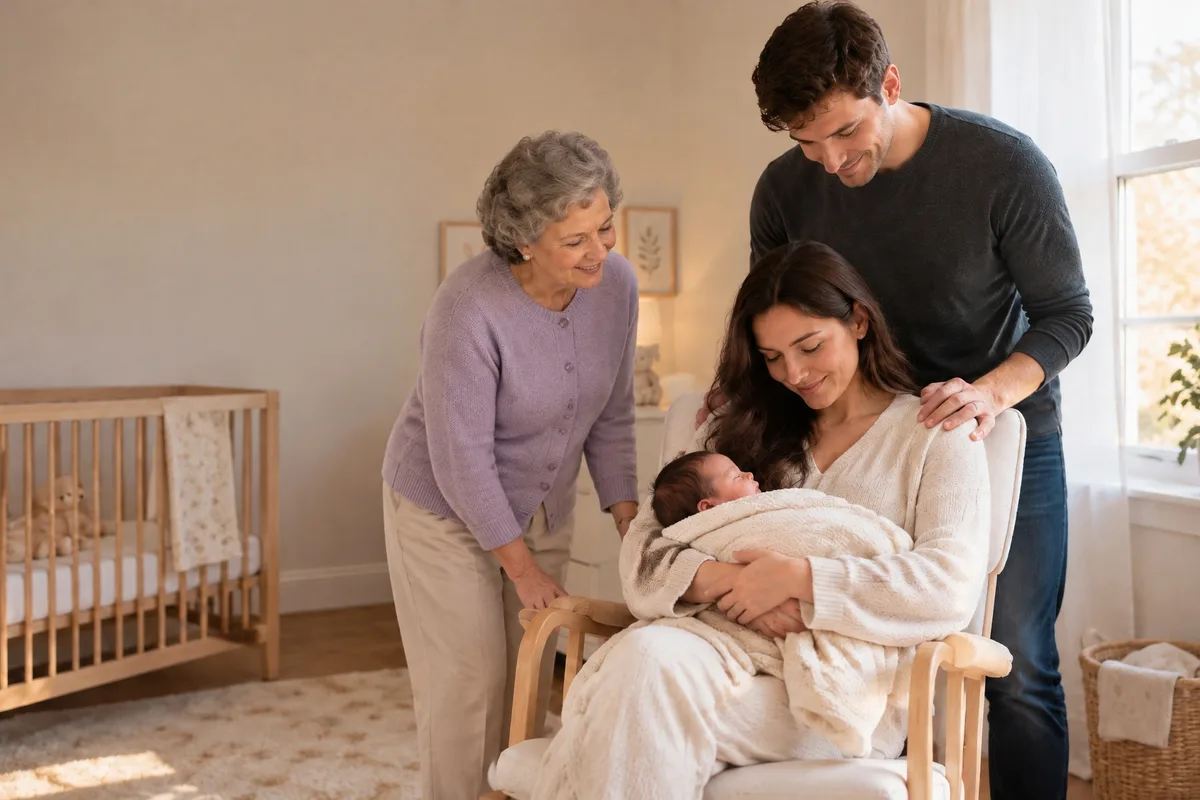
A new baby is when the absence of a grandparent is felt most. The only photo the family had of the grandmother was a faded 1990s print with a yellow cast and soft focus, the kind of picture most families have of someone who died before phones.
She was rendered in clean colour at the quality of the nursery photo, without the yellow cast of the print, leaning in towards the baby in the same window light as the parents. Her curled grey hair and lavender cardigan are kept from the original.
Typed into the editor
“Place her standing beside the rocking chair on the left, leaning in and looking down at the baby with a gentle smile.”
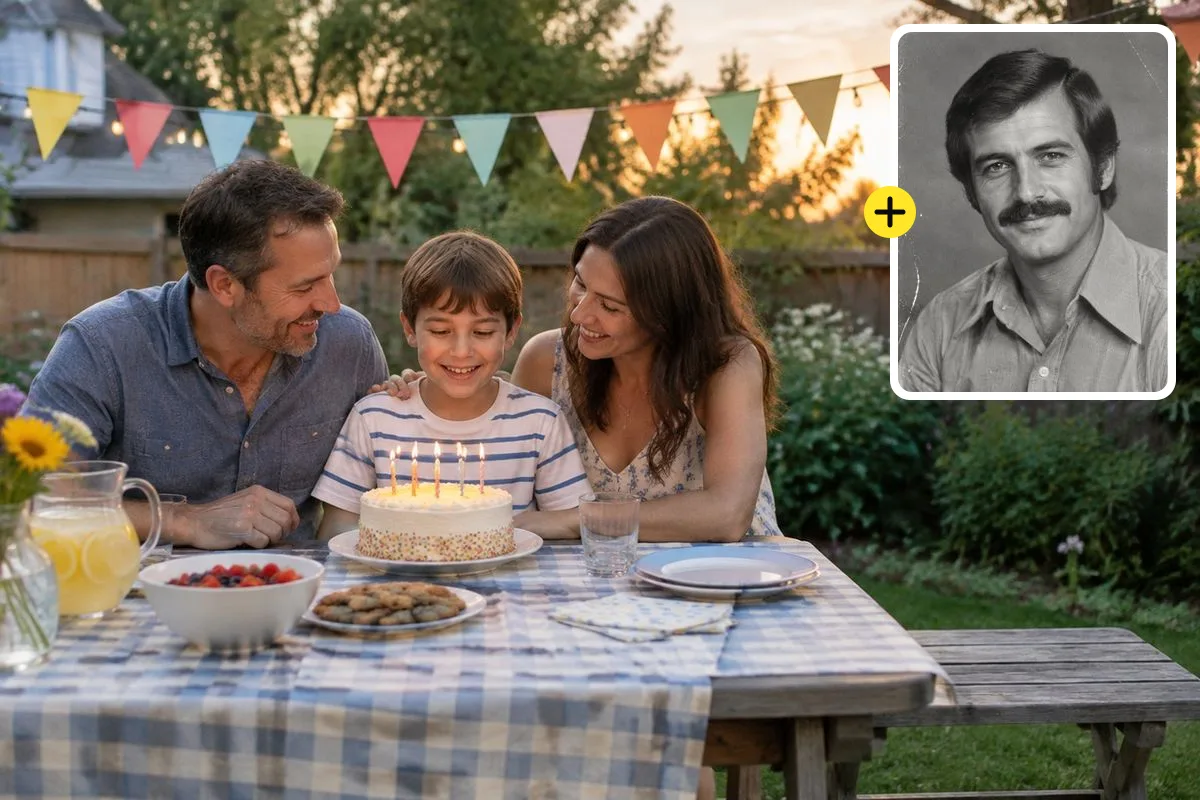
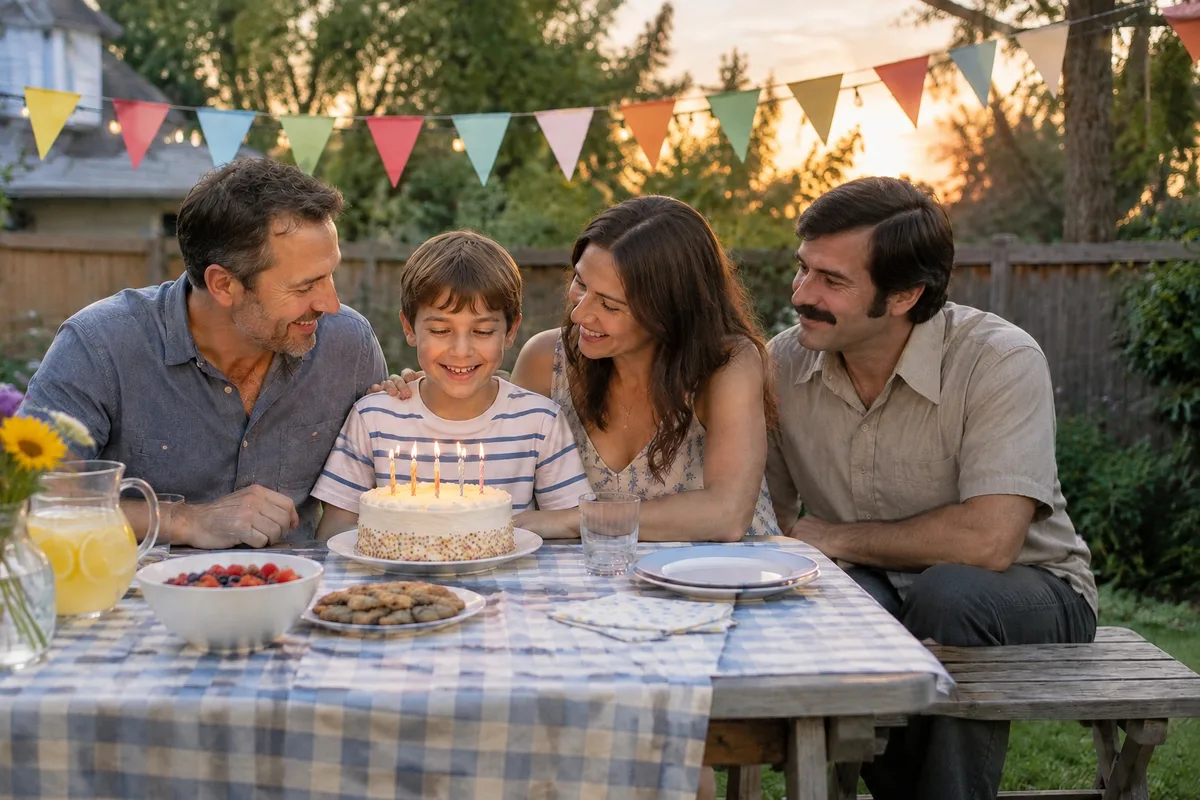
Sometimes the only photo of a grandparent is black and white. This family’s birthday photo gained the grandfather from a 1970s black-and-white portrait with film grain and scratches.
He appears in natural colour at the end of the bench, in the warm evening light of the backyard, at the age he was in his portrait. That is worth knowing before you start: the person is added as they look in the photo you upload, so pick the photo from the age you want to remember.
Typed into the editor
“Seat him at the end of the bench beside his son, smiling at the birthday cake with the family.”
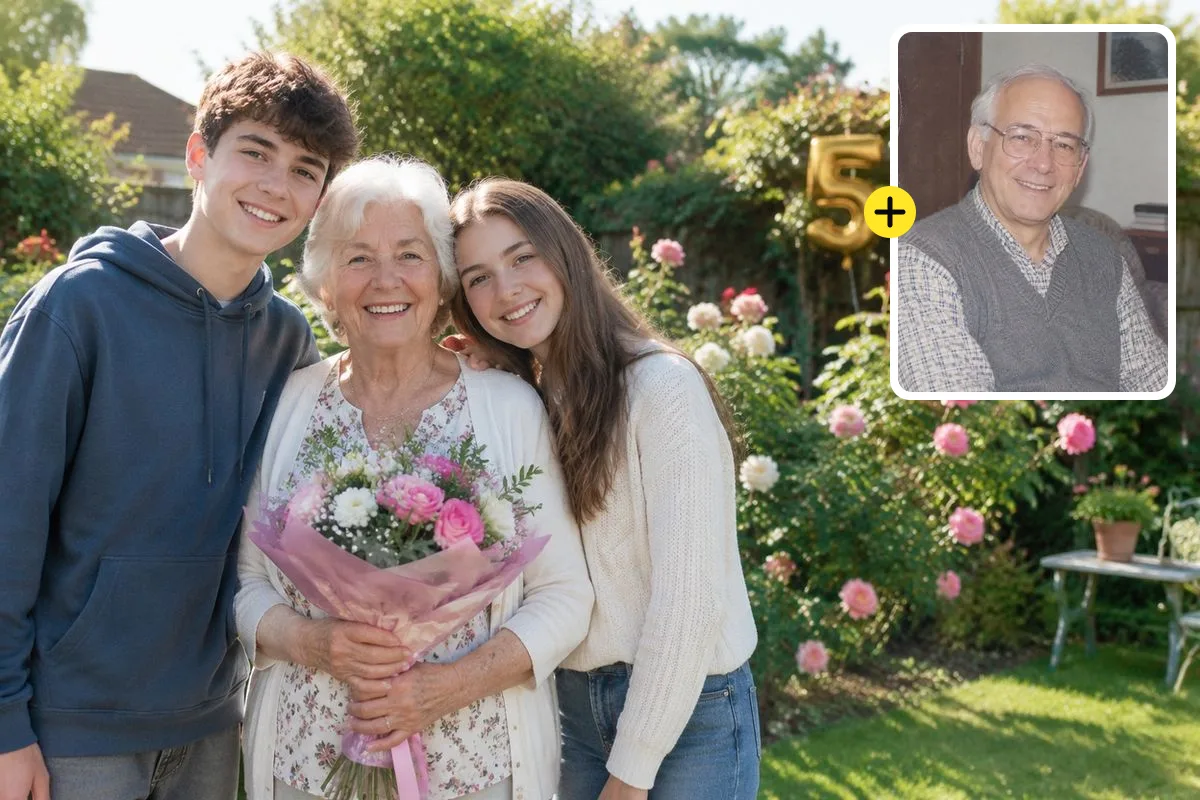
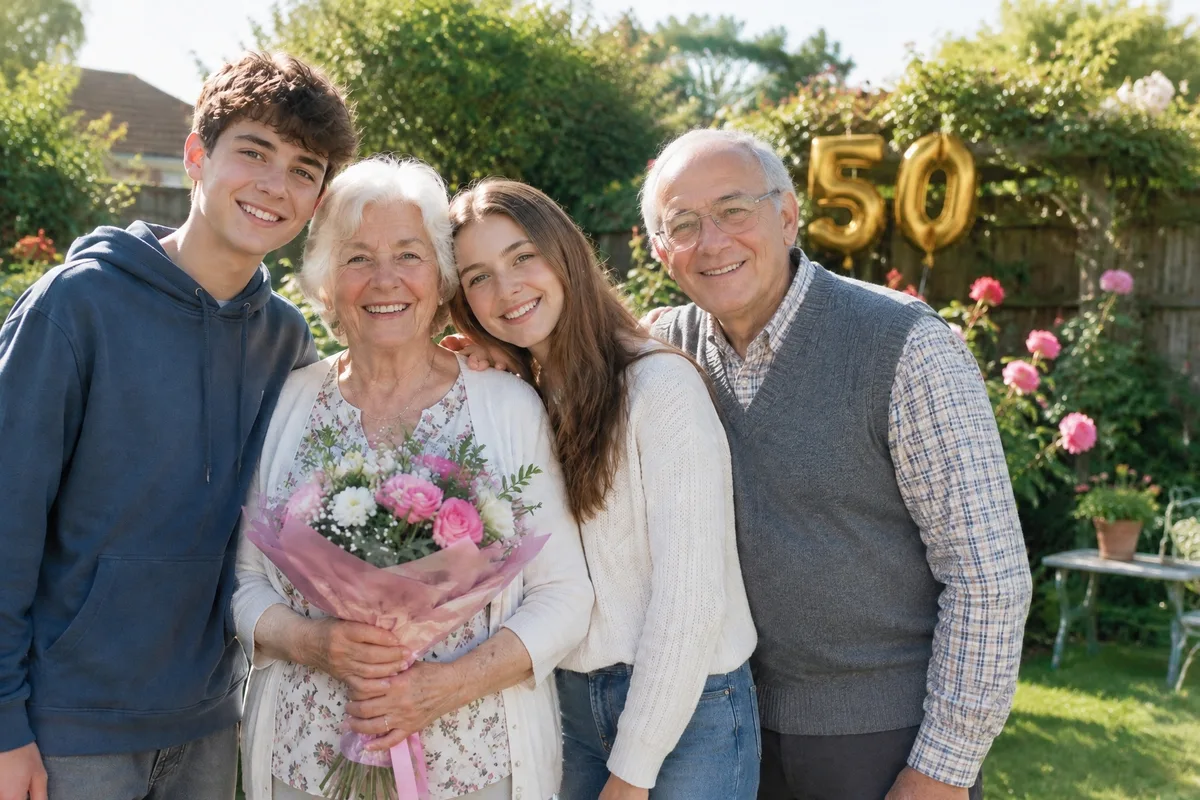
Milestone anniversaries are hard when one partner has died. On what would have been their 50th, the grandmother was photographed with her grandchildren in the garden; her husband was added from a scanned 1990s photo.
There was no space beside his wife, so he joined the group at the end next to his granddaughter, with his glasses, sweater vest and white hair kept from the scan and the same sunny garden light on him. If the exact spot matters, leave room for it in the photo you start from. A photo like this is often printed and framed, so see the print size table below before you order one.
Typed into the editor
“Place him beside his wife with his arm around her, both smiling at the camera with the grandchildren.”
sparkpix.ai is a browser-based AI tool that adds a deceased loved one to a photo from any picture of them, including old and black-and-white prints. You upload the photo they should be in and a photo of them, choose the moment, and the AI returns the new photo in about a minute with the light, colour and scale matched and everyone else unchanged. The first photo is free with the sign-up credits. A human retoucher charges $7 to $75 and takes days; a retoucher is still the better choice for a hand-finished heirloom print.
| AI here | Etsy retoucher | Fiverr freelancer | Memorial AI subscription | |
|---|---|---|---|---|
| Price | 5 credits; first photo free | $7–$75 per photo | $10–$30 per photo | $12–$34 per plan |
| Turnaround | About a minute | Usually a few days | Around 3 days | Under a minute |
| Revisions | Re-run as often as you like | Depends on the seller | Depends on the package | Within the plan’s quota |
| Works from old or B&W prints | Yes, colour-matched | Yes, by hand | Yes, by hand | Varies |
| Prints and framing | Download, print anywhere | Often offered | No | No |
| Best for | Fast, private, try several versions | Hand-finished heirloom pieces | A budget human edit | Many photos over months |
Etsy, Fiverr and subscription prices are ranges from public listings checked in October 2026; individual sellers vary.
Adding a deceased loved one to a photo takes two pictures and one sentence: the photo they should be in, the best photo you have of them, and where they stand.
This is Photo 1: the wedding, graduation, new baby or family photo. Use the original file, not a screenshot, so the result can be printed.
This is Photo 2. Choose a photo where their face is clear and well lit, at the age you want to remember. Old, faded and black-and-white prints work; scan them or photograph them flat in daylight.
Pick Wedding, Graduation, New baby or another chip, or write your own line such as "beside his daughter with an arm around her". The lighting, colour and scale are matched for you.
In about a minute you see the photo. If the pose or position is not right, change the line and run it again. Download the full-size image when it feels right.
People add a deceased loved one to a photo for the days that person should have seen. These are the moments it is used for most.
A late father beside the bride, a mother at the groom’s side, grandparents in the family group.
The parent who always talked about this day, standing beside the graduate in cap and gown.
A grandparent meeting the grandchild they never got to hold, often the most requested memorial photo.
A family photo with a deceased loved one in it: the first portrait after a loss, or a reunion picture with everyone there again.
Christmas, Thanksgiving, a milestone birthday: the table with the empty chair filled.
Both partners in the photo on the anniversary one of them did not reach.
A framed print for a widow, a sibling or a parent on Mother’s Day, Father’s Day or the anniversary of the death.
A family photo with everyone in it for the service display or the order of service.
When you add a deceased loved one to a photo, the picture of them decides how much the result looks like them. Families often have only a few, so here is how to pick, and what to do when the best one is damaged.
A clear, front-facing face matters more than resolution. A sharp phone snapshot beats a blurry professional portrait.
The AI keeps the face as it is in the photo. A photo from the 1970s adds them at the age they were then, which can look odd next to grown grandchildren.
If a crease or stain crosses the face, repair it first with photo restoration. The AI can only keep a face it can see.
Crop to your loved one, or use a photo of them alone. In a group photo the AI has to guess which person to add.
A relaxed everyday smile blends into a family photo better than a stiff passport or ID photo.
If they are wearing sunglasses or a wide hat, the face is partly invented. Choose a photo where both eyes are visible.
A photo with a deceased loved one is usually printed for a frame, an album or the memorial table. The download is about 2048 pixels on the long side; at the 300 DPI print shops ask for, this is how far it goes.
| Print size | Pixels needed at 300 DPI | Download as is? |
|---|---|---|
| 4 × 6 in (10 × 15 cm) | 1800 × 1200 | Yes, as downloaded |
| 5 × 7 in (13 × 18 cm) | 2100 × 1500 | Yes, about 290 DPI |
| 8 × 10 in (20 × 25 cm) | 3000 × 2400 | Upscale 2× first |
| 11 × 14 in (28 × 36 cm) | 4200 × 3300 | Upscale 2× first |
| 16 × 20 in and canvas | 6000 × 4800 | Upscale 4× first |
A photo like this is a tribute, not a record. A few honest notes, from what families tell us and what the tool can and cannot do.
Ask close family before giving it as a gift: some find it comforting, some find it hard
Share it as a tribute, so nobody mistakes it for a real photo from that day
You can re-run as many versions as you need until it feels like them
Old, faded and black-and-white photos of them work
Official, legal, insurance or estate documents of any kind
A face that is tiny, blurred or covered in every photo you have: the AI would invent it
A stylised memorial with wings or clouds: make the photo here, then use style transfer
Anyone who is not your own family or friend, including public figures
Upload the photo they should be in, then the clearest photo you have of your loved one, and choose the moment, such as a wedding or a new baby. The AI adds them with the lighting, scale and shadows matched and returns the photo in about a minute. No Photoshop or editing skill is needed.
Yes, your first photo is free. Each photo costs 5 credits and new accounts get 5 free credits on sign-up. After that, credit packs start at $9.99. A human retoucher on Etsy or Fiverr typically charges $10 to $75 for the same job and takes a few days.
That works. The AI renders your loved one in natural colour at the same quality as the new photo, keeping their face. If the old print has a scratch or stain across the face, restore it first with the photo restoration tool so the face can be kept accurately.
The tool regenerates the person into the scene instead of pasting a cut-out, so light direction, colour and shadows match the photo. Check the face against your original before you print. If anything looks off, change the placement line and run it again.
The AI keeps them as they look in the photo you upload, so the most reliable way is to choose a photo from the age you want. You can ask for small changes in the placement line, but large age changes reduce how much the face looks like them.
This page is built for realistic photos, as if they had been there. For a stylised memorial, such as a watercolour or a painted portrait, make the photo here first and then use style transfer on the result.
Yes. To add more than one deceased loved one to a photo, upload the base photo, then one photo per person, up to four. This helps when both grandparents have passed, or a parent and a sibling.
Many families find it comforting, and others find it painful. If the photo is a gift, ask the closest family members first, and share it as a tribute, not as a real photo. Do not use an edited photo in any official, legal or financial context.
Uploaded photos are deleted within 3 days. The finished photos are saved to your account so you can download them again, and you can remove them from your history at any time.
Yes. The download is about 2048 pixels on the long side, which prints well at 4×6 and 5×7 inches. For 8×10 inches, larger frames or canvas, upscale it first with the image upscaler for printing.
Two photos and one sentence. Add a deceased loved one to the photo of the day they should have seen, and keep it, print it or share it with the family.
About a minute
First photo free
Add a living friend, partner or colleague to any group photo.
Repair a faded or damaged print of your loved one before adding them.
Bring a black-and-white photo of them into colour on its own.
A clean portrait sized for the service, often on a short deadline.
Enlarge the finished photo for an 8×10 frame or canvas.
Turn the finished photo into a painted or watercolour memorial.
Add, remove and change anything in a photo by describing it.
Erase any unwanted object from a photo in one click.
Take out tourists, strangers, or anyone you don’t want.
Clear text, watermarks, emojis, and date stamps.
Erase clutter, power lines, fences, reflections, shadows.
Remove or replace any background.