
FREE
Loading…
Add a Santa hat to a photo in one click. Every person and pet in the picture gets a Christmas hat that fits their head and matches the light, and the rest of your photo stays exactly as it was: same faces, same clothes, same background. Reindeer antlers and elf hats too.
This model edits a photo: add one with + first.
Last updated:
Unretouched results from this tool: the uploaded photo on the left, the result on the right. Compare the faces and backgrounds; only the hats are new. The people and pets in these examples are AI-generated stand-ins: we never publish customers’ photos.
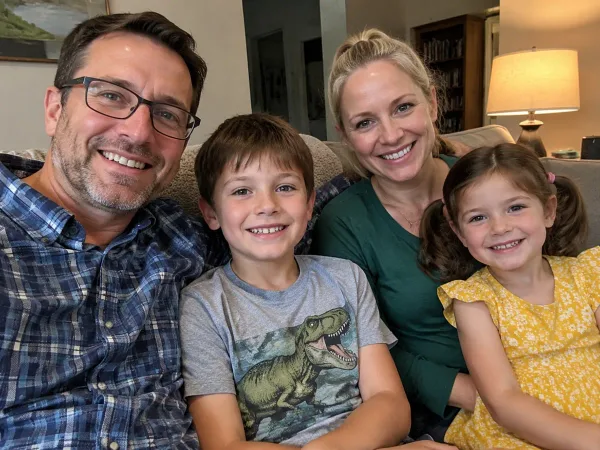
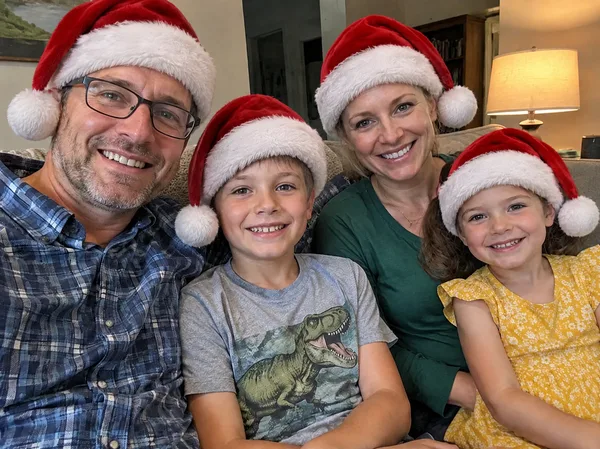
Four people, four hats, one click. Each hat is sized to its own head: the father’s sits back on his forehead above his glasses, the children’s are smaller and tilted the way a hat that is slightly too big really sits.
Look at everything that is not a hat: the dinosaur T-shirt, the lamp, the bookshelf, all four smiles. They are the uploaded photo. A sticker app would need four stickers placed and scaled by hand, and none of them would press into the hair.
Option in the editor: Santa hat
“a classic red Santa hat with white fur trim and a white pom-pom on everyone in the photo, people and pets”
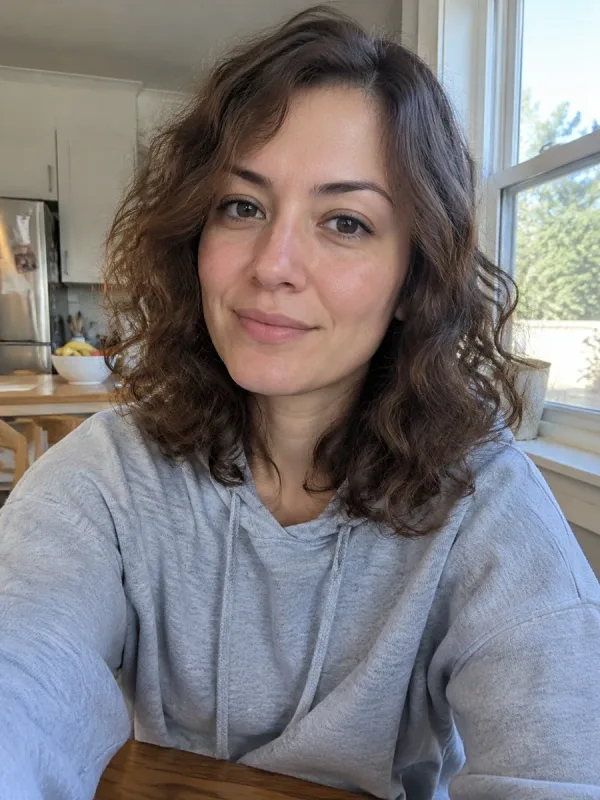
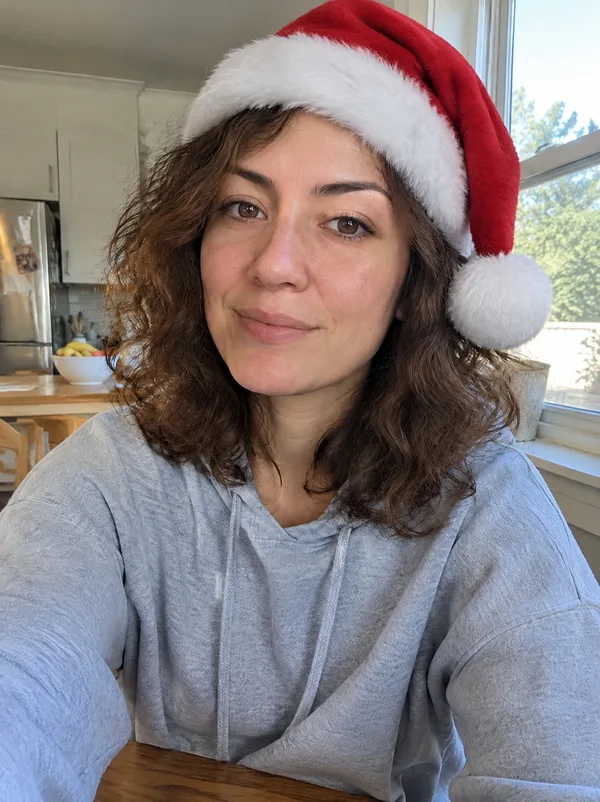
A kitchen selfie turned into a Christmas profile picture. The hat pushes her curls down at the band and lets them spring out underneath, and the white trim picks up the window light from the right, as the rest of her does.
Her face, the grey hoodie and the kitchen behind her are unchanged, so it is still recognisably the photo she took, only in December.
Option in the editor: Santa hat
“a classic red Santa hat with white fur trim and a white pom-pom on everyone in the photo, people and pets”
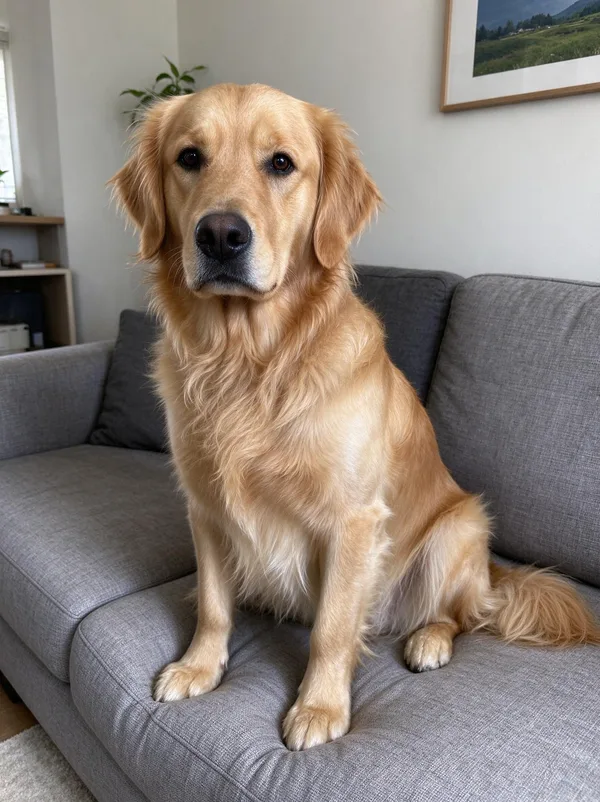
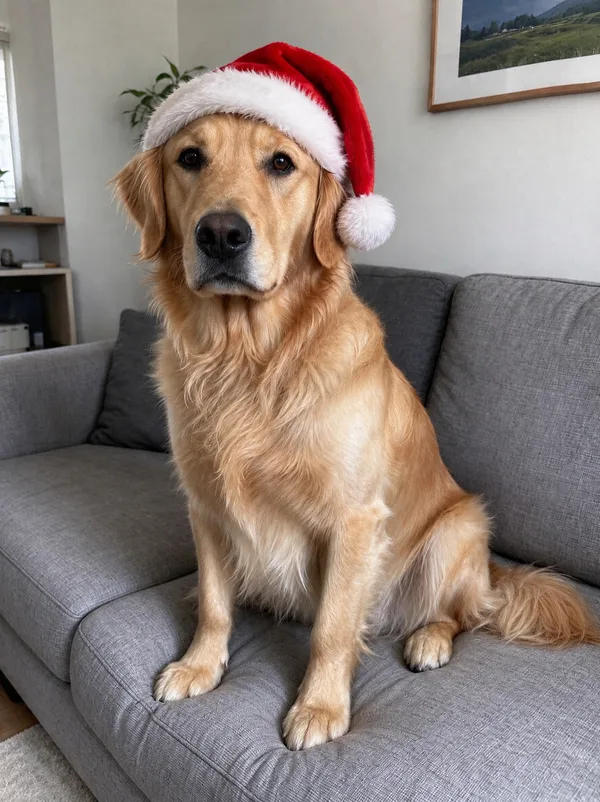
Pets are counted as heads. The golden retriever keeps its coat, its expression and its spot on the sofa; the hat sits between the ears at a slight tilt, with the pom-pom hanging to one side.
No real dog keeps a hat on for long enough to take this photo, which is most of the reason people look for this tool.
Option in the editor: Santa hat
“a classic red Santa hat with white fur trim and a white pom-pom on everyone in the photo, people and pets”
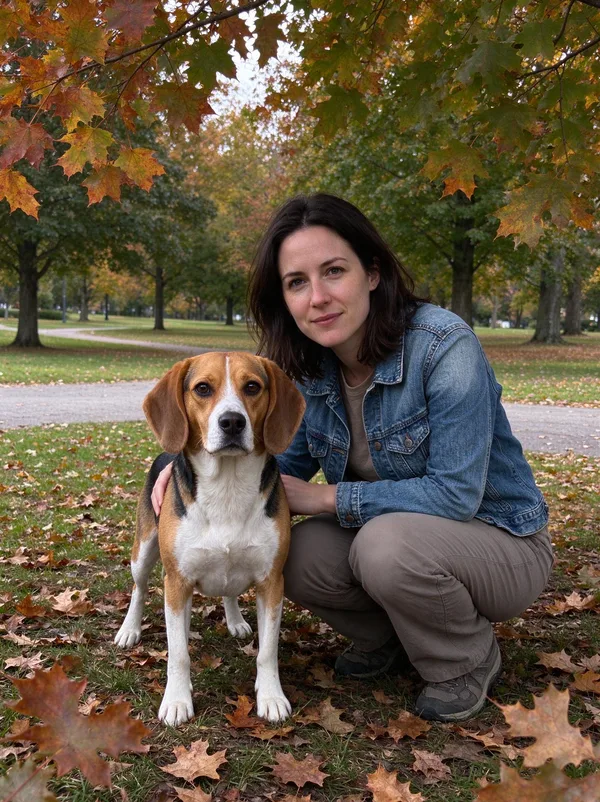
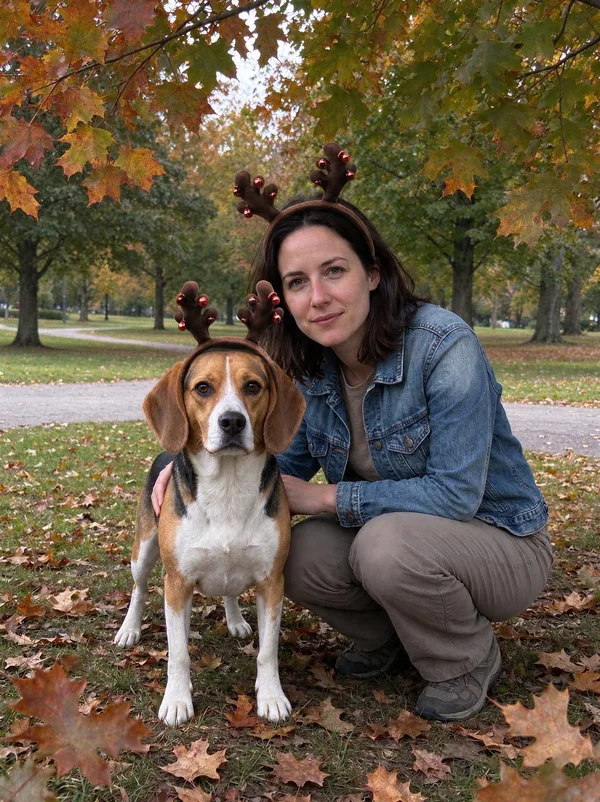
The Reindeer antlers option on a photo with a person and a dog. Both get a headband, each at its own scale, and the autumn park, the denim jacket and the beagle’s markings stay exactly as they were.
The same works with the elf hat or the hat-and-scarf option: the chip decides what is added, the photo decides where.
Option in the editor: Reindeer antlers
“a brown reindeer-antler headband with small red bells on everyone in the photo, people and pets”
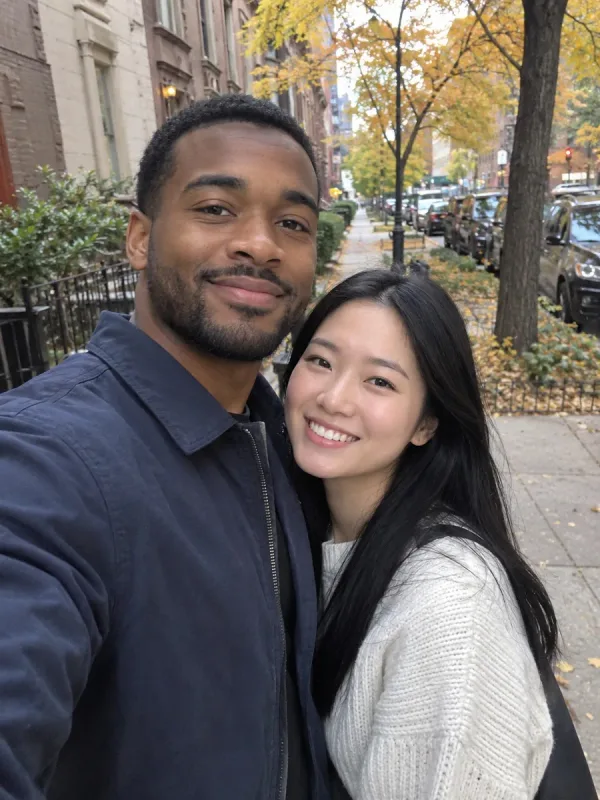
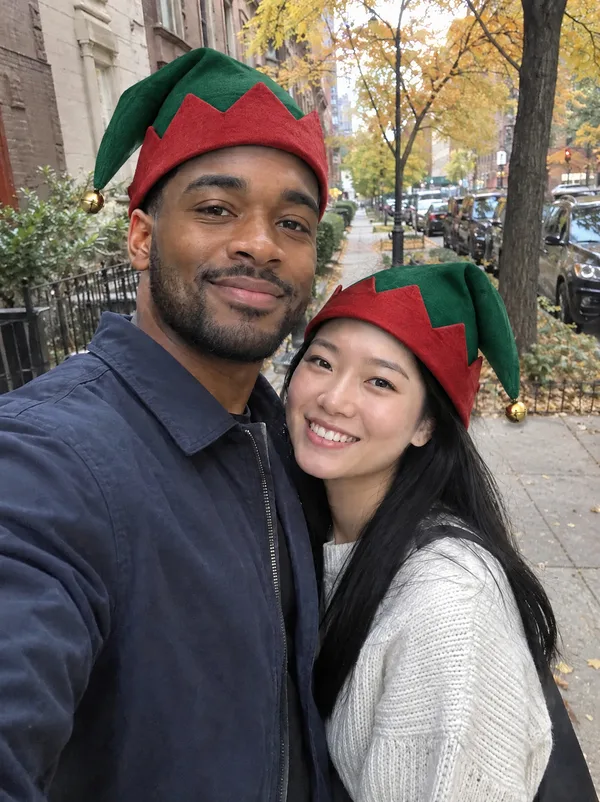
Elf hats on a couple’s street selfie. Two hats in the same style but not identical, each following the angle of the head underneath, which is what keeps a pair of added hats from looking copy-pasted.
The street, the jackets and both faces are the original photo.
Option in the editor: Elf hat
“a green and red pointed elf hat with a small gold bell on the tip on everyone in the photo, people and pets”

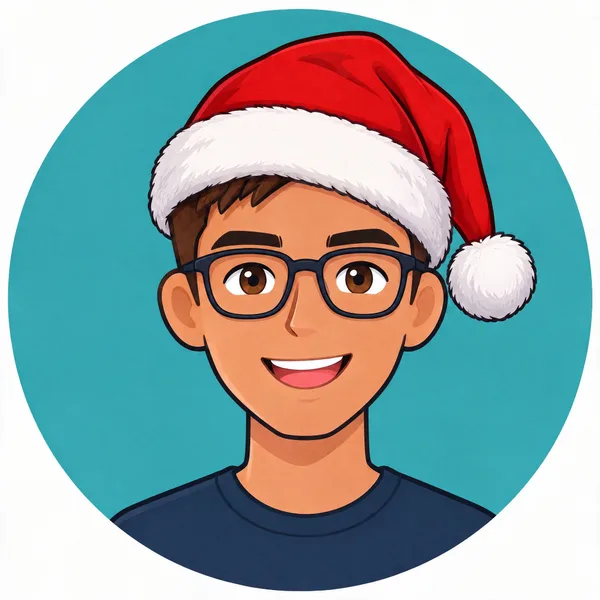
It is not only for photographs. On a flat cartoon avatar the hat is drawn in the same flat style, with the same outline weight and shading, so it looks like part of the original artwork.
Use the Logo or avatar option for profile pictures, mascots, emoji-style avatars and company logos over the holidays.
Option in the editor: Logo or avatar
“one small red Santa hat sitting at a jaunty angle on the top of the logo, character or avatar, drawn in the same style as the image”
sparkpix.ai Add Santa Hat to Photo is a browser-based AI photo editor that adds a Santa hat to every person and pet in a photo. You upload one photo and press Generate; in about a minute the same photo comes back with hats that fit each head, sit in the hair and match the photo’s light, while faces, clothes and background are left unchanged. Each photo costs 5 credits (about $0.14), and new accounts get 5 free credits. It also adds reindeer antlers, elf hats, scarves and Santa beards, and works on cartoon avatars and logos.
| AI hat (here) | Sticker apps | Photoshop | |
|---|---|---|---|
| Hats on everyone at once | Yes, every person and pet | One sticker at a time | One at a time, by hand |
| Fits each head | Sized and angled automatically | You drag, resize and rotate | By hand |
| Sits in the hair, matches the light | Yes | No, a flat cut-out on top | With masking and shading skill |
| Rest of the photo | Unchanged | Unchanged | Unchanged |
| Works on cartoons and logos | Yes, drawn in the same style | Photo-style sticker on a drawing | Yes, if you can draw |
| Time | About a minute | A few minutes per head | 10 minutes or more |
| Cost | 5 credits, about $0.14 | Often free with ads | Software subscription |
Any photo with faces in it: a selfie, a family photo, a team photo, a pet. Drawings, avatars and logos work too.
Santa hat, reindeer antlers, elf hat, hat and scarf, or a Santa beard. Or write your own line, such as "a Santa hat only on the dog".
In about a minute the same photo comes back with the hats on. Faces, clothes and background are not touched.
Save it as your Christmas profile picture, drop it in the family chat or put it on a card.
The quickest seasonal profile picture: your current photo with a Santa hat. People still recognise you, which a full AI Christmas portrait cannot promise.
Dogs and cats in Santa hats or antlers without wrestling a real hat onto them. The animal stays exactly as it is in your photo.
A hat on every head in a group photo for the office party invitation, the team page in December or the class newsletter.
A small Santa hat on a logo or cartoon avatar, drawn in its own style, for social accounts over the holidays.
Turn a good photo from any time of year into a card photo. To add the greeting as well, send the result to the card generator.
Antlers on Dad, an elf hat on the baby, a Santa beard on Grandpa. Five credits each, so it is cheap to make several.
This is the exact prompt the tool sends for the Santa hat option. It also works in ChatGPT or Gemini with your photo attached. The second and third sentences matter most: they are what keep the hat fitted and the rest of the photo untouched.
Add to this photo: a classic red Santa hat with white fur trim and a white pom-pom on everyone in the photo, people and pets. Each one sits naturally on its head: the right size and angle for that head, pressing the hair down where it rests and covering only the hair it would really cover, with a soft contact shadow, lit by the photo's own light and with the photo's own sharpness and grain. Change nothing else. Every face, expression, hairstyle, body, piece of clothing, the background, the framing, the colours and the image quality stay exactly as in the original: do not restyle, retouch, beautify, crop or re-light the photo. If the image is a drawing, logo, cartoon or avatar rather than a photo, draw the addition in the same style as the image. Do not add any text, logos or watermarks.
A hat needs space. If the photo is cropped at the hairline, the top of the hat will be cut off too; use a shot with some headroom.
The tool finds heads by their faces. People seen from behind or hidden behind others may be skipped.
The chips put a hat on everyone. For one person, write it: "a Santa hat only on the man on the left" or "only on the cat".
If someone already wears a cap or a beanie, the Santa hat takes its place. Say "leave the baseball cap as it is" to keep it.
It works best up to about ten faces. In a photo of thirty people the faces are small and some hats may be missed; crop into smaller groups.
For Christmas clothes and a Christmas background too, use the AI Christmas photo generator, which changes the whole scene and keeps the faces.
Profile pictures, family photos and pet photos you want to keep as they are
Group photos up to about ten faces
Cartoon avatars, mascots and logos
Several quick variations: hat, antlers, elf hat
A full Christmas scene with new clothes and background: use the AI Christmas photo generator
Photos cropped at the hairline: there is no room for a hat
Crowds where faces are a few pixels wide
Photos of people who have not agreed to be edited
Upload the photo, leave the Santa hat option selected and press Generate. In about a minute you get the same photo back with a Santa hat on every person and pet in it. There is nothing to drag, resize or rotate.
Your first one is: each photo costs 5 credits and new accounts get 5 free credits. After that the $9.99 monthly plan has 350 credits, enough for 70 photos. Results have no watermark. You sign in before the first one; there is no run without an account.
No. The tool is instructed to add the hat and change nothing else: faces, expressions, clothes, background, framing and colours stay as they are. This is the difference from a full AI Christmas portrait, which redraws the scene.
Yes. Pets get hats too, sized to the animal, and the default option covers people and pets together. To hat only the pet, write "a Santa hat only on the dog".
Yes. Pick the Logo or avatar option and the hat is drawn in the same style as the image, flat for a flat logo, shaded for a 3D avatar. Check that seasonal changes to a company logo are allowed by your brand guidelines.
Yes, every visible head gets one in a single run, each at its own size and angle. It is reliable up to about ten faces; for very large groups, crop the photo into sections first.
Reindeer antlers, an elf hat, a hat with a scarf, or a Santa hat with a white beard, from the chips. You can also type anything else in the box: "a wreath of holly on her head", "a red nose on the dog", "a party hat for New Year’s Eve".
A sticker is a flat picture laid over the photo: it does not fit the head, cover the right hair or match the light, and you place one per person. Here the hat is generated into the photo, so it presses into the hair, casts a soft shadow and is lit like the head it sits on.
Yes, that is what this page is for. It runs in the browser on a phone or a computer, with no app to install and no layers or masks.
Yes. Open this page in Safari, choose the photo from your camera roll and generate; then hold the result and save it to Photos. No app is needed.
Yes, with a sticker: most phone photo editors and sticker apps let you paste a hat picture on top and drag it into place, and nothing in the photo is redrawn. That is the better choice if you want every original pixel left alone. The AI version is for when the hat should fit the head, sit in the hair and match the light, or when there are many faces to do at once.
Uploaded photos are deleted within 3 days. Your results are saved to your account so you can download them again, and you can delete them at any time.
One photo, one click, a hat on everyone. Your first one is free.
About a minute
No watermark
All of these are part of the sparkpix.ai AI photo editor, so one account works across every tool.
Christmas clothes and a Christmas scene around the same faces.
Your photo and a greeting on a print-ready card.
Santa himself, leaving presents in your living room.
Scenes for ChatGPT and Gemini, each with its real result.
Add anything else: glasses, snow, decorations.
Swap the whole outfit for a Christmas sweater.
Add, remove and change anything in a photo by describing it.
Take out tourists, strangers, or anyone you don’t want.
Clear text, watermarks, emojis, and date stamps.
Erase clutter, power lines, fences, reflections, shadows.
Describe any change in words, or draw over the area to edit.
Add a missing friend, a late relative, or your younger self.
All of these are part of the sparkpix.ai AI photo editor, so one account works across every tool.