
AI Skin Texture Enhancer — fix plastic AI skin
Upload a portrait with waxy, airbrushed skin and get it back with pores, fine hair, age-appropriate lines and a natural sheen. The face, the makeup, the lighting and the colours stay exactly as they are.
Upload an image to transform or edit
Result
Your result will appear here
Upload an image and describe your transformation to generate
AI skin texture enhancer examples
Six AI portraits generated with plastic skin on purpose, each run once through the default instruction at the free 1K setting and not retouched afterwards. One of them shows the tool's main weakness, so you know what to check.
Fix the plastic skin on an AI headshot
The generated headshot has the classic giveaway: one even, polished surface from hairline to jaw, with a shine on the forehead and the tip of the nose. After one pass the skin has pores, fine lines at the corners of the eyes and a faint stubble shadow, and the forehead is matte. The grey backdrop, the suit and the studio light are as they were.
 Before
 AI Result
Glass skin back to real skin
A face filling the frame is where a poreless finish is most obvious, and where texture matters most. The enhancer adds fine pores across the cheeks and nose and turns the wet highlight on the forehead into a soft sheen. The eyeliner, the glossy lips and the hair are untouched — makeup is kept, only the skin underneath changes.
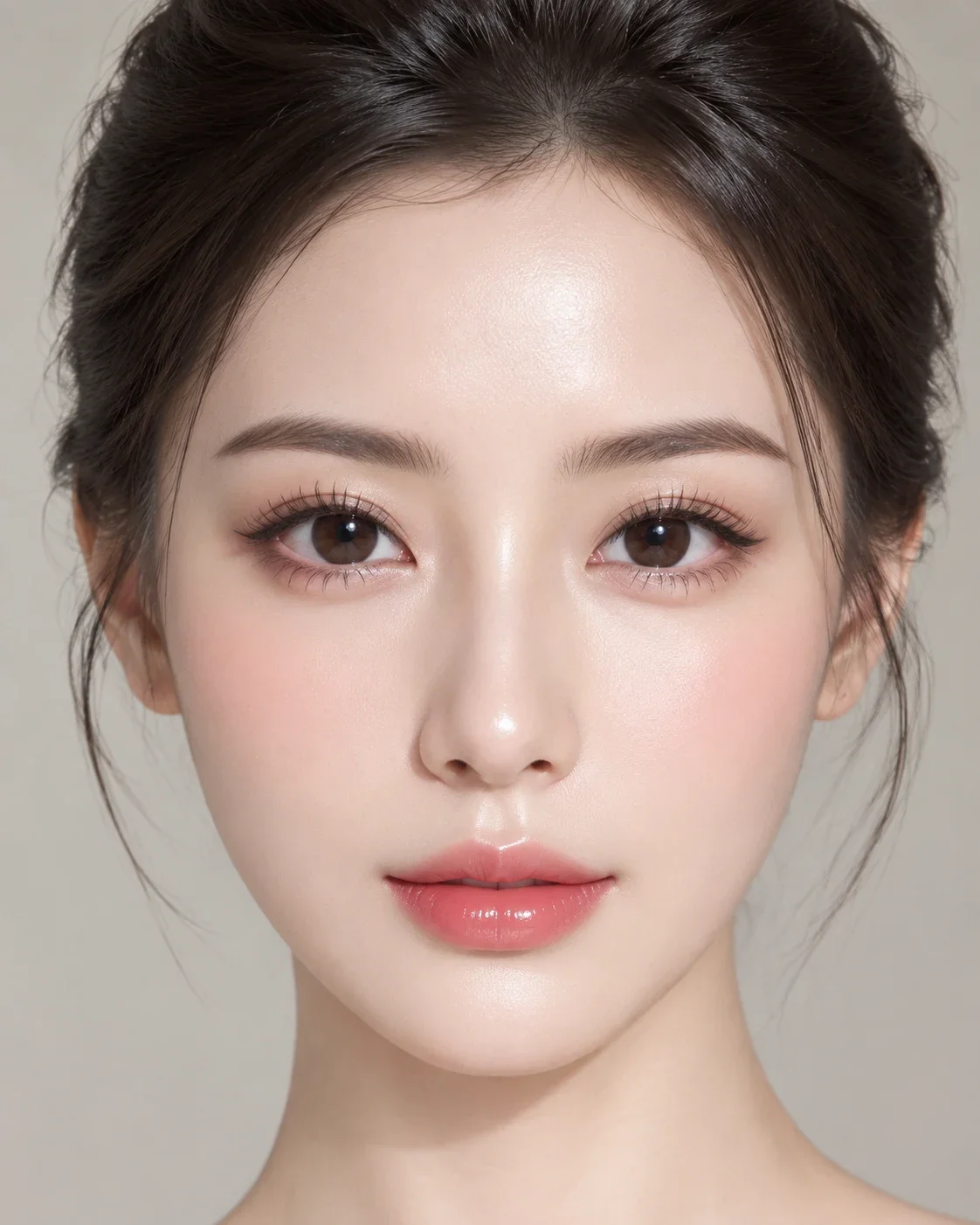 Before
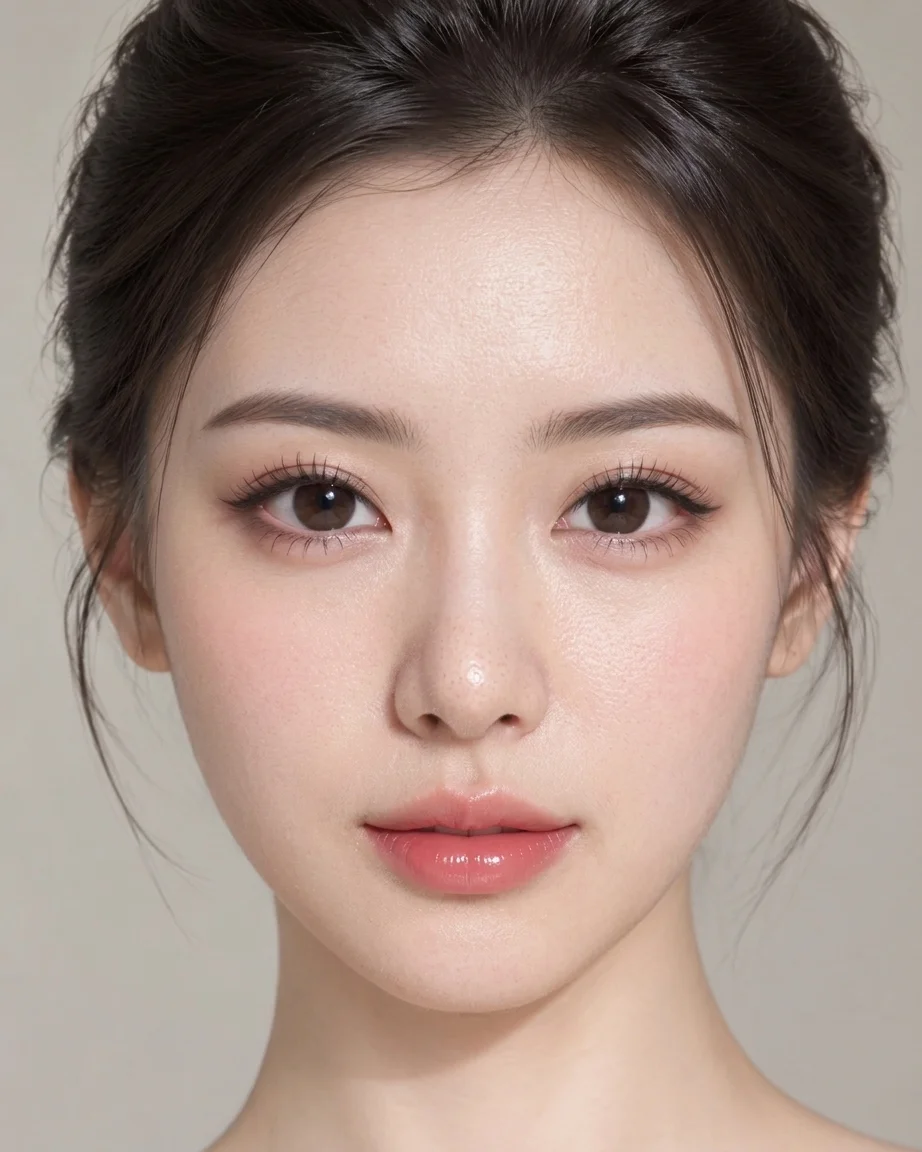 AI Result
Waxy cheeks and an oily forehead, fixed
Generated men tend to get skin that is too smooth for the stubble on it. This pass takes the oily shine off the forehead and the bridge of the nose, adds pores, and lets the stubble read as individual hairs growing out of skin rather than a texture painted on. Face, eyes and the blurred street are the same.
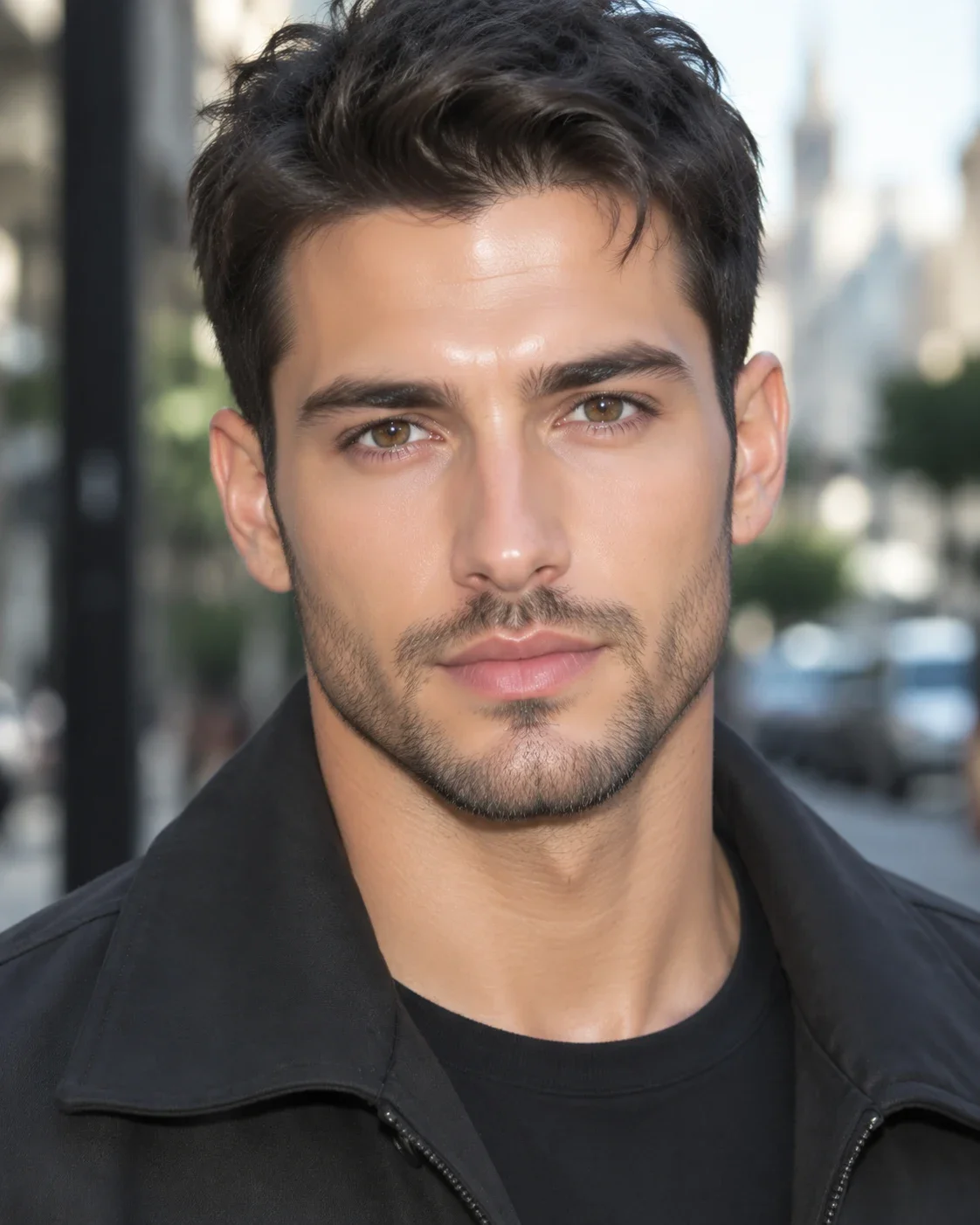 Before
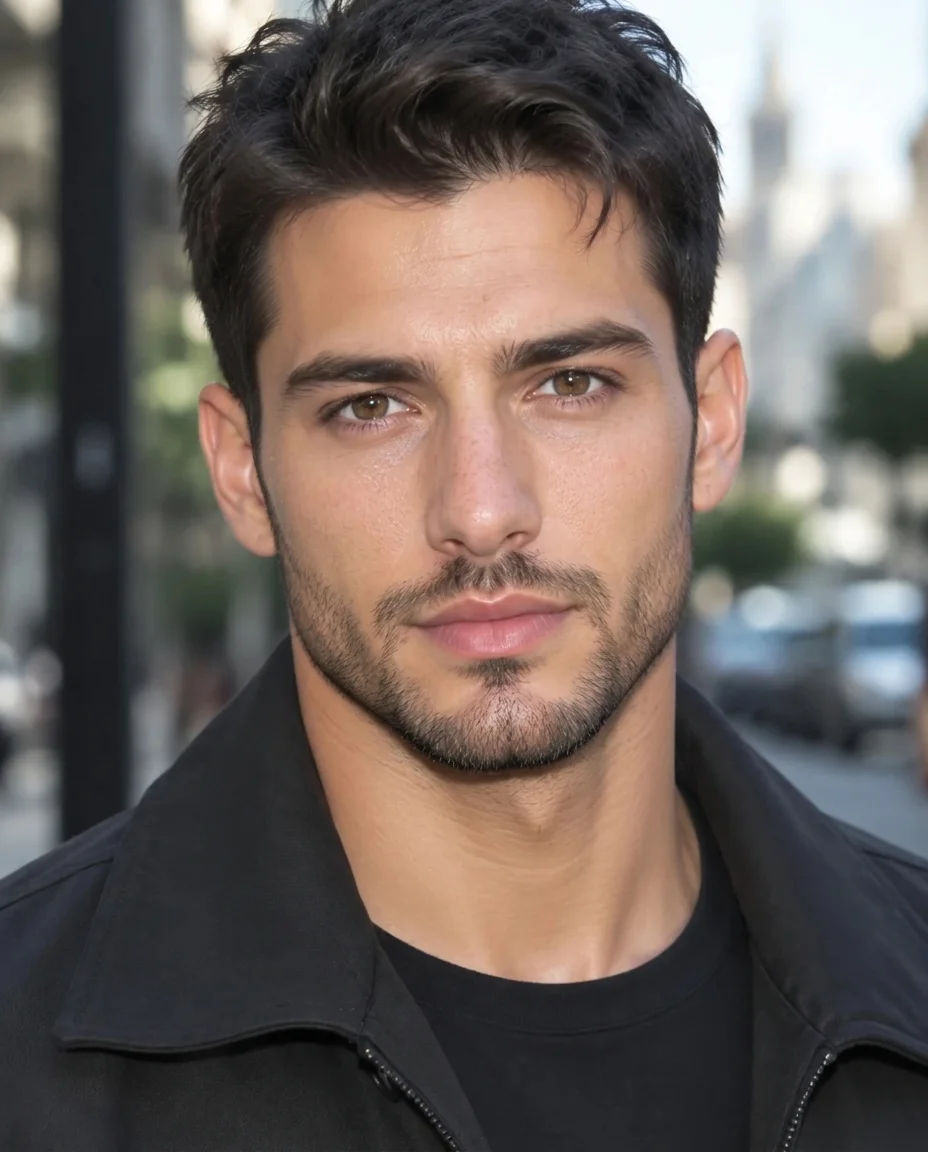 AI Result
Real texture on a deeper skin tone
The generated glow sat on her cheeks like a filter. After the pass her skin is matte with visible pores and a natural sheen, and her lipstick, earrings, curls and the office behind her are unchanged. Look closely at the cheeks, though: a few fine dark dots appeared that the original did not have. Check close-ups before you publish.
 Before
 AI Result
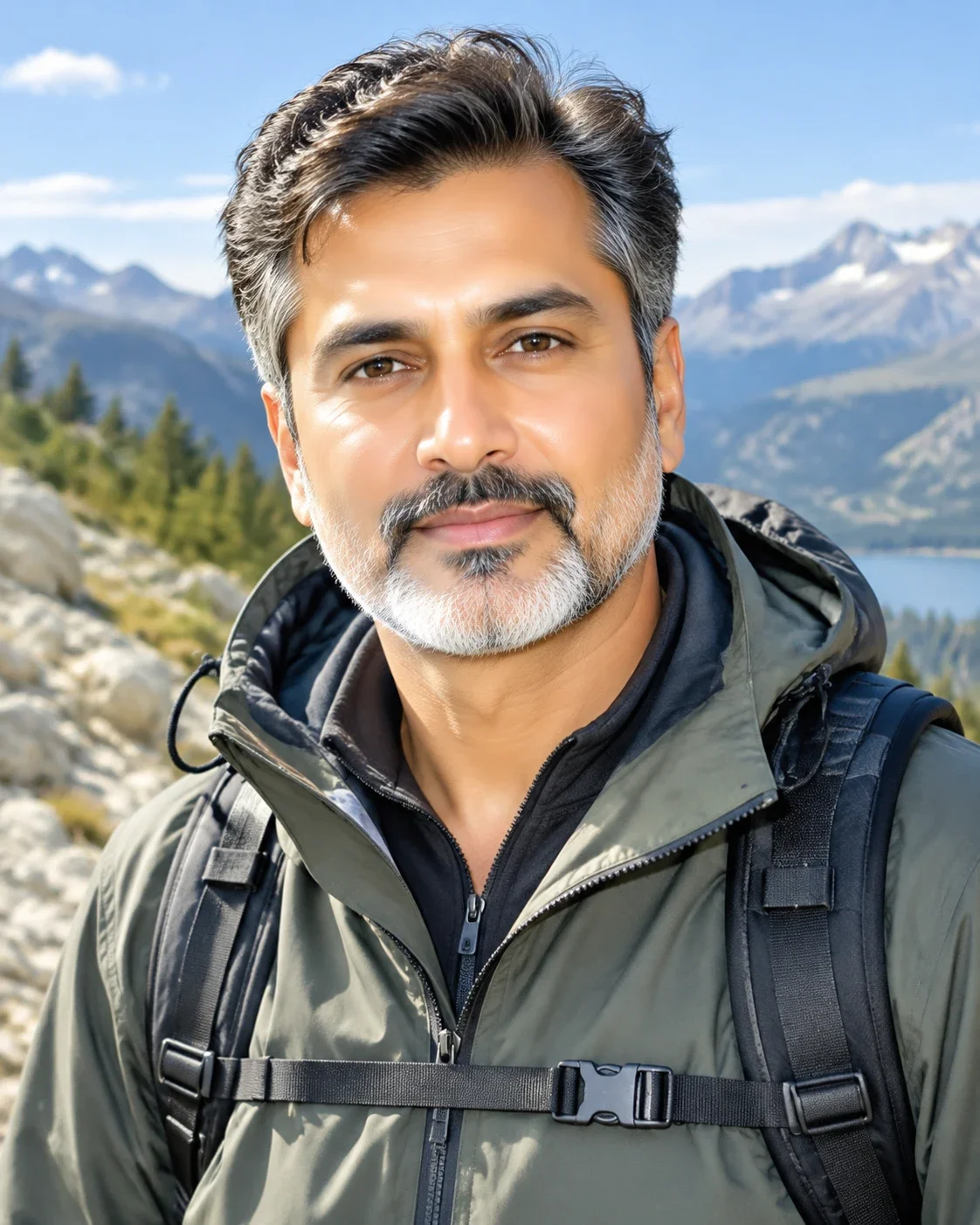
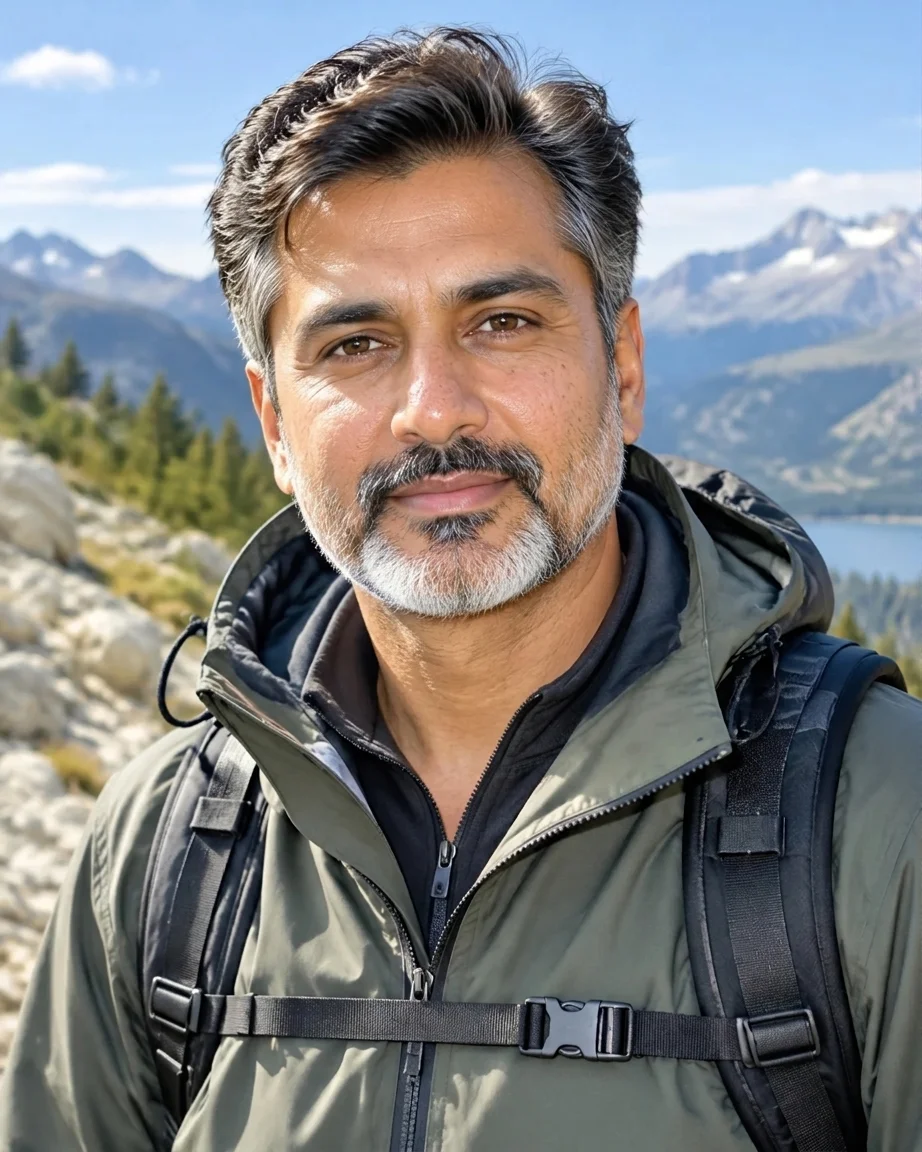
An outdoor portrait: texture without new light
A man in his fifties rendered with the skin of someone half that age is a tell on its own. The pass gives him pores, crow's feet and a beard made of separate grey hairs, and keeps the afternoon sun, the mountains and his jacket where they were. The fix is in the skin; the light is not re-graded.
 Before
 AI Result
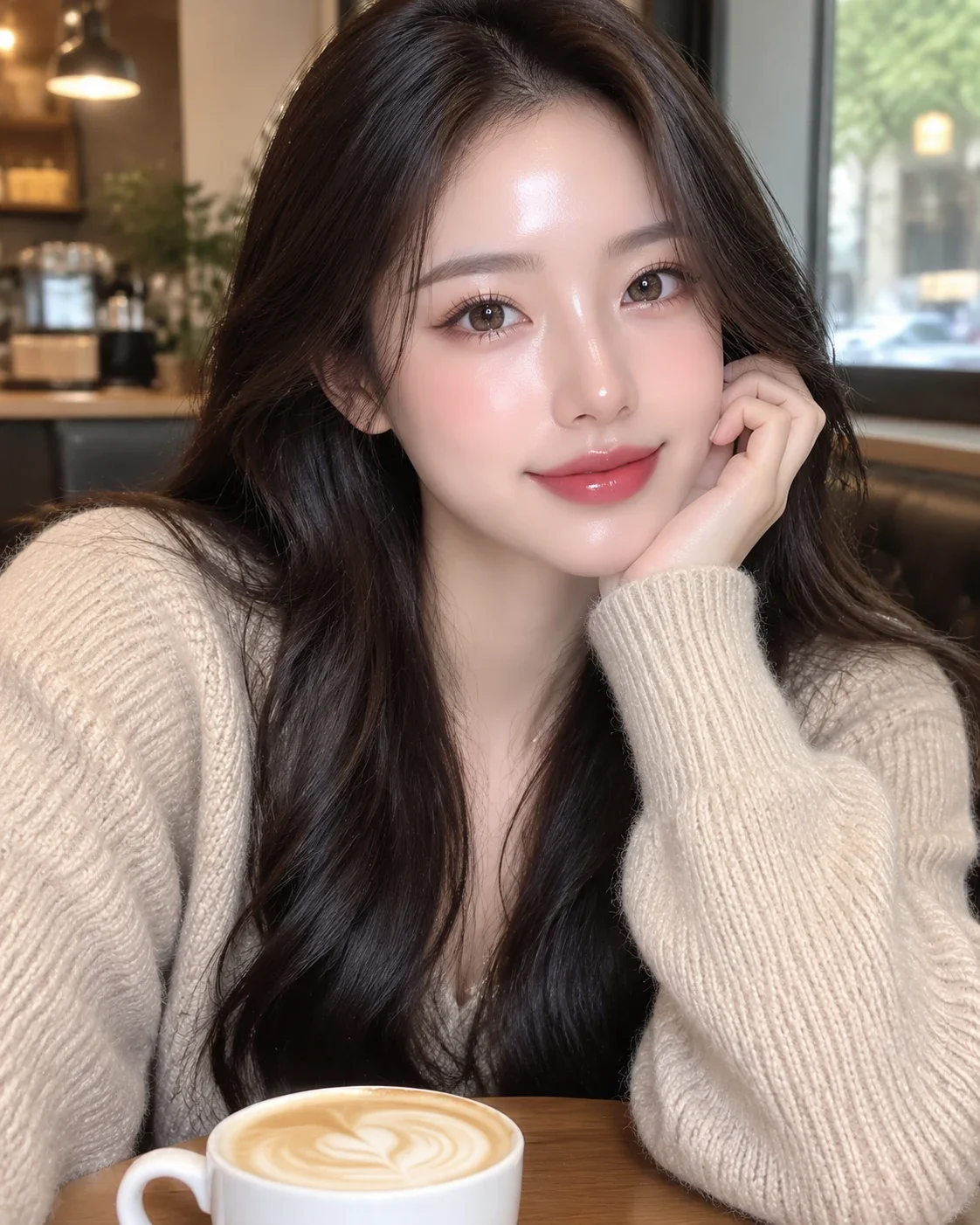
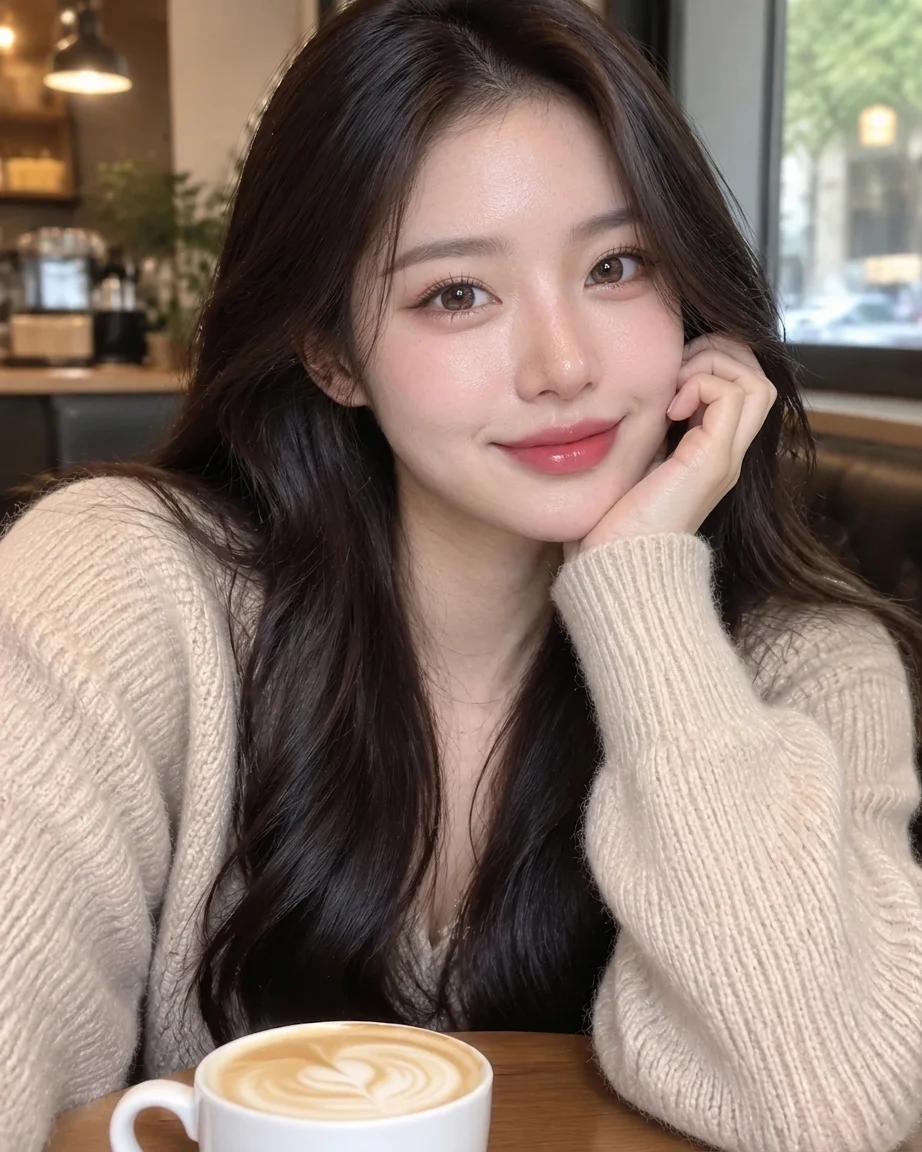
Dewy filter skin to everyday skin
The dewy look — wet shine on the nose and cheeks, a pink glow over everything — is what most beauty filters produce too. One pass leaves her with matte, finely textured skin and a lighter blush, while her hair, hand, sweater and the latte art stay exactly as they were.
 Before
 AI Result
What is an AI skin texture enhancer?
An AI skin texture enhancer is a tool that replaces smooth, waxy or plastic-looking skin with real skin texture, and leaves the rest of the image alone. It adds what airbrushing and image generators remove — pores, fine facial hair, the lines that belong to a person's age, and a soft sheen where there was an oily glare — while the face, the makeup, the lighting and the colours stay as they are.
Plastic skin is the most common reason an AI portrait looks generated. Image models are trained heavily on retouched photography, so their default skin is the retouched kind: one even, polished surface. The eye notices the missing texture before it notices anything else, which is why a skin texture fix alone often changes how the whole image reads.
The enhancer works on the image you already have. It does not generate a new person, re-light the scene or regrade the colours — if those are the problem too, a full realism pass is the better tool, and the related tools below cover it.
Last updated:
What it changes, and what it keeps
Five things are added back to the skin. The sixth card is the rule that makes the result usable.
Pores
Real skin has pores everywhere, larger on the nose and cheeks. Generated skin usually has none, which is the single biggest reason a face reads as rendered at a glance.
Peach fuzz and fine hair
Fine facial hair catches light at the edge of the cheek and jaw. Its absence is subtle, but it is part of why AI skin looks like a surface rather than skin.
Age-appropriate fine lines
A 50-year-old with the skin of a 25-year-old looks wrong even when nobody can say why. The enhancer adds the fine lines around the eyes and mouth that fit the age already in the picture.
Shine turned into sheen
Oily, glossy highlights on the forehead, nose and cheekbones become the slight soft sheen real skin has under the same light, not a matte mask.
Natural variation in tone
Real skin is not one colour. Small shifts in tone across the face make it read as skin; a single even fill reads as paint.
Everything else, kept
Face shape, features, expression, makeup, hair, clothing, lighting, colours and background are held fixed. If something other than skin changed, that is a failed pass, not a feature.
How to fix plastic skin in an AI image
- 1
Upload the image
Any image with plastic-looking skin works: a portrait from an AI generator, an AI headshot, or a real photo that a beauty filter smoothed over.
- 2
Run the default pass
The editor is pre-filled with the instruction every example on this page used. Leave it as it is for the skin-only fix. If you type your own instruction instead, it runs together with a general realism pass, which can also adjust light and colour.
- 3
Check at full size and download
Most passes in our tests came back in 25-40 seconds. Zoom in on the cheeks before you use the result: texture is the point, invented spots are not.
Ways to fix plastic AI skin, compared
Five approaches people use. They differ in whether the texture fits the face, and in what you risk losing.
| Frequency separation by hand | Texture overlay | Upscaler with skin detail | Re-generating | AI skin texture enhancer | |
|---|---|---|---|---|---|
| What you do | Split the image into texture and colour layers, paint texture back | Blend a skin-texture photo over the face | Upscale and let the model invent fine detail | Rewrite the prompt and roll again | Upload, run one pass |
| Texture fits the face | Yes, if done well | Often not — one pattern laid over curves and shadows | Sharpens what is there, including the shine | New face, new texture | Drawn for this face, its age and its light |
| Keeps your image | Yes | Yes | Yes, at a larger size | No — every roll is a new image | Yes — face, light and colours held |
| Time and skill | Often 30 minutes or more; Photoshop skill | Minutes; some Photoshop skill | Minutes; none | Unbounded; prompt-craft | Usually 25-40 seconds; none |
Frequency separation is still the most controllable option for one important portrait when you have the skill and the time. The enhancer is for everything else: the image you like, need today, and do not want to spend half an hour on.
When not to use it
Five cases where this is the wrong tool. Better to know before you spend a credit.
Not a beauty retoucher
It does the opposite of smoothing. If you want blemishes removed, skin evened out or a face slimmed, this tool will not do it, and it is told explicitly not to.
Not a fix for hands, teeth or faces
It works on skin texture only. Extra fingers, warped teeth or a distorted face are structural problems, and a texture pass leaves them where they are.
Illustrations stay illustrations
Anime, cartoons and painted portraits are kept in their own style. It will not turn a drawing into a photograph, and there is little skin texture to add to flat shading.
Real photos that already have texture
An unfiltered photo already has pores and fine lines. Running it through gains little, and each pass re-draws the image, so there is no reason to do it.
Not for hiding AI use
Better skin does not change what an image is. It does not beat AI detectors and is not built to. If a platform requires AI-generated images to be labelled, label them.
Frequently asked questions
What is an AI skin texture enhancer?
An AI skin texture enhancer is a tool that replaces the smooth, waxy or plastic skin in an image with real skin texture — pores, fine hair, age-appropriate lines and a natural sheen — while keeping the face, lighting and everything else as it is. It is the opposite of a beauty filter: it adds the detail that airbrushing and AI generation remove.
Is the AI skin texture enhancer free?
Your first image is free: new accounts get 5 credits on sign-up and one pass costs 5 credits, so you see a full result before paying. After that, credit packs start at $9.99 for 350 credits, which is about 70 images. There is no subscription, and no credit card is needed to try it.
Will it change my face?
It is instructed not to. The prompt holds face shape, features, age, expression, makeup, hair, pose, clothing, lighting, colours and background fixed, and only re-draws the skin surface. In our tests every face stayed recognisably the same person. Still compare the result with the original at full size before using it: any AI pass re-draws pixels.
Why do I see small dots on the cheeks after the fix?
The model sometimes draws pores as fine dots, and on some faces they read as freckles that were not there. In our tests it was most visible on darker skin and older faces. The prompt tells it not to add spots, which made them fainter but did not remove them every time. If it happens, run the pass again: each run draws the texture afresh.
Does it work on real photos ruined by a beauty filter?
Yes. Beauty filters produce the same airbrushed skin as an AI generator, and the pass puts texture back the same way. If the filter also changed colours or face shape, use the filter-removal tool instead: this one only restores skin, it does not undo colour grades or reshaping.
Is a skin texture enhancer the same as an upscaler?
No. An upscaler adds pixels and sharpens what is already there, so it can sharpen the plastic shine along with everything else. A skin texture enhancer changes what the skin looks like at the size it already is. If you need both, fix the skin first, then upscale.
What resolution do I get?
Accounts that have bought credits get 2K output; the free first image is 1K. All the examples on this page are 1K results, the same setting your free image uses.
Will the result pass AI detectors?
No, and it is not built to. Detectors look at metadata, provenance signals and statistical patterns that skin texture does not touch. This tool makes skin look natural to people. If a platform requires AI images to be labelled, label them.
See your portrait with real skin
Upload one image and judge the texture yourself — the first pass is on us.
Related tools
AI Image Humanizer
The full realism pass: skin, light, colour and background together.
Remove AI Look
When the orange grade and glow give the image away too, not only the skin.
Make AI Photo Realistic
Re-render an AI image as an ordinary phone photo.
Remove Filter from Photo
For real photos where a filter changed colours or face shape as well.
Photo Upscaler
The step after the skin fix: resolution for print and large formats.
AI Headshot Generator
Professional headshots made with the same no-plastic-skin standard.
Last updated: 2026-07-25