
FREE
Loading…
Hug your younger self in a real-looking photo: upload a photo of you now and one of you as a child, pick a scene, and the AI puts the two of you together, both faces kept. The Polaroid hug from the trend, a walk in the park, or coffee with your younger self.
Last updated:
Four real results from this tool, unretouched. The two photos that went in, the adult now and the childhood photo, are in a corner of each. All people shown are AI-generated examples, not real customers.
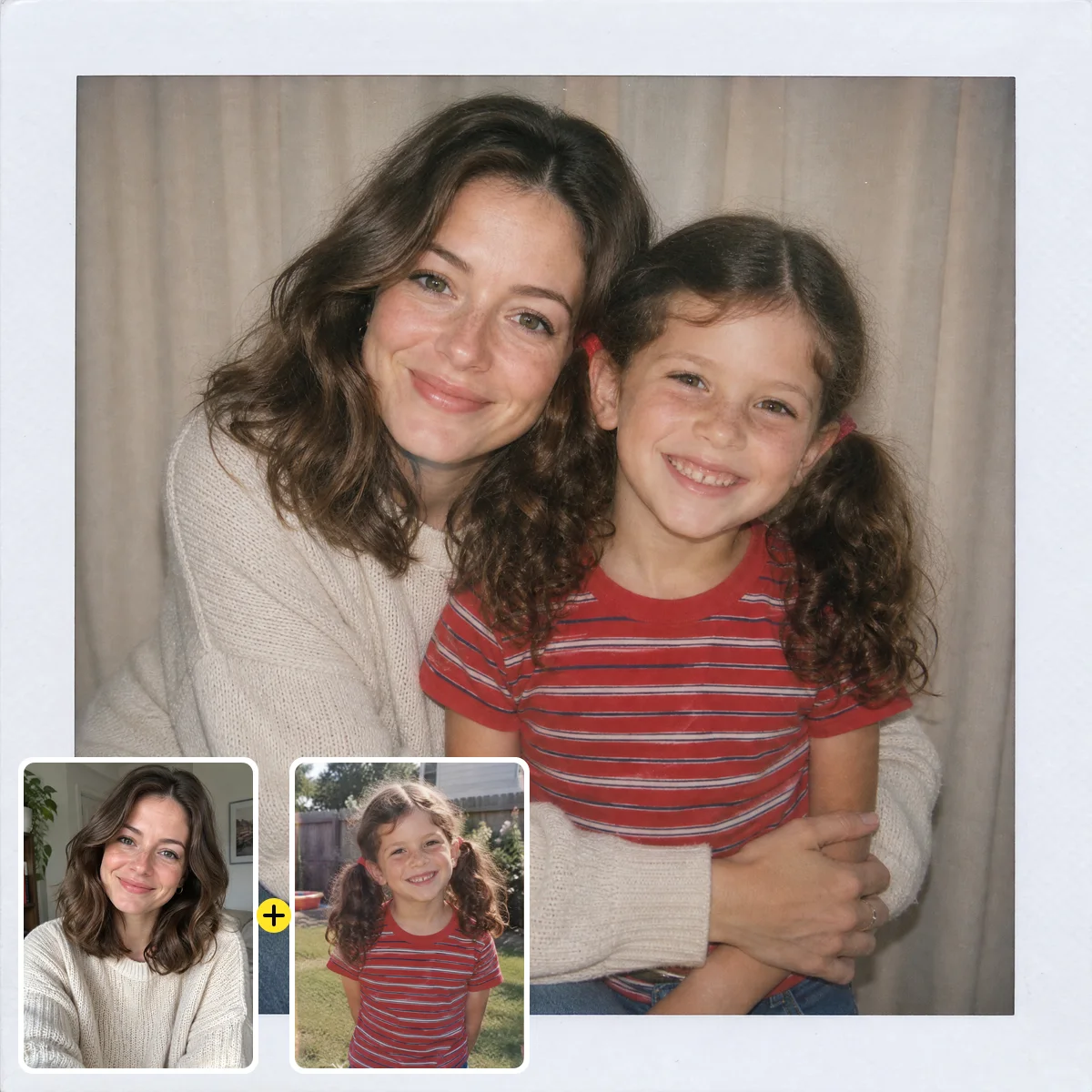
The photo the trend is named after. A woman around thirty, in a cream sweater, hugs her six-year-old self from a 1990s backyard snapshot: same freckles, same wavy brown hair, now in pigtails and a red striped T-shirt. The white instant-film frame and soft flash give it the look people share; the faded colours of the old snapshot were matched to the new photo.
Scene picked
“a vintage Polaroid photo with a white frame and soft on-camera flash, against a plain curtain, the adult kneeling and hugging the child, both smiling”
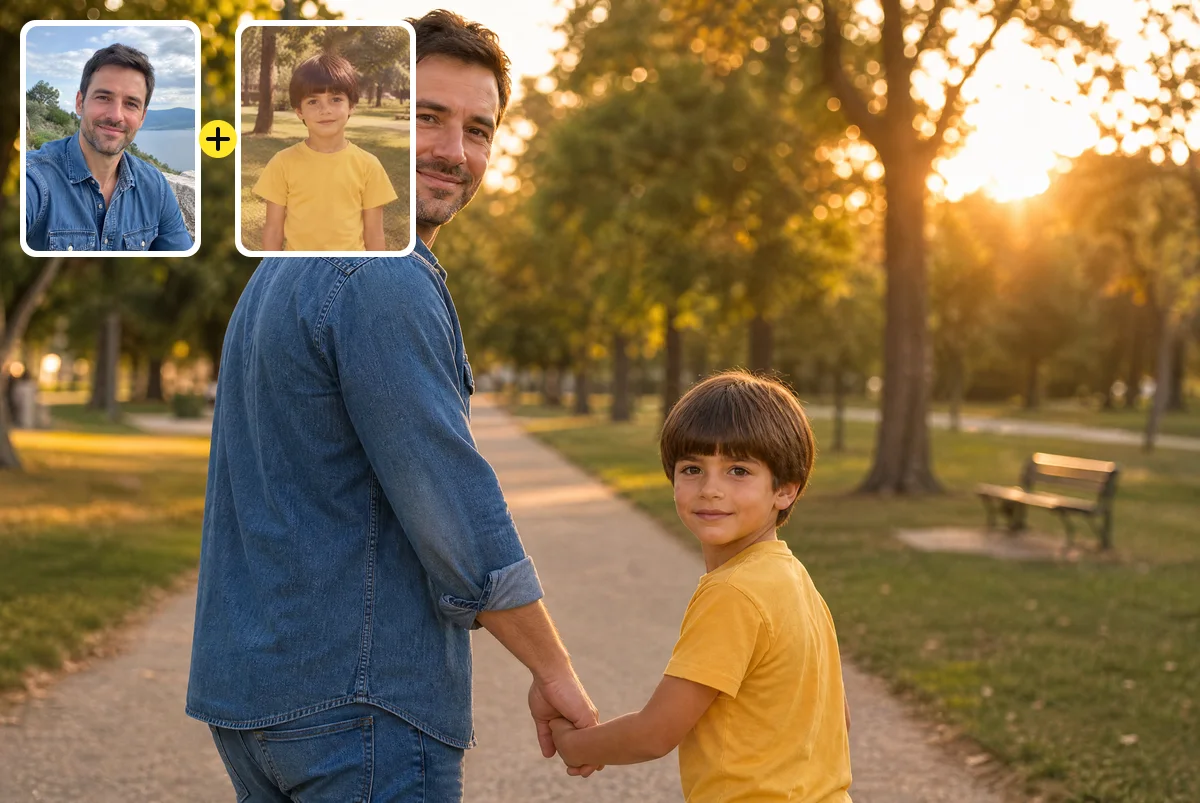
A man around forty walks hand in hand with his seven-year-old self along a park path at sunset, both turning back to the camera. The childhood photo was a faded 1980s print with a warm colour cast; the boy appears in clean colour, in the same yellow T-shirt and bowl haircut, lit by the same low sun as the adult.
Scene picked
“walking hand in hand along a park path at sunset, both turning to smile at the camera”
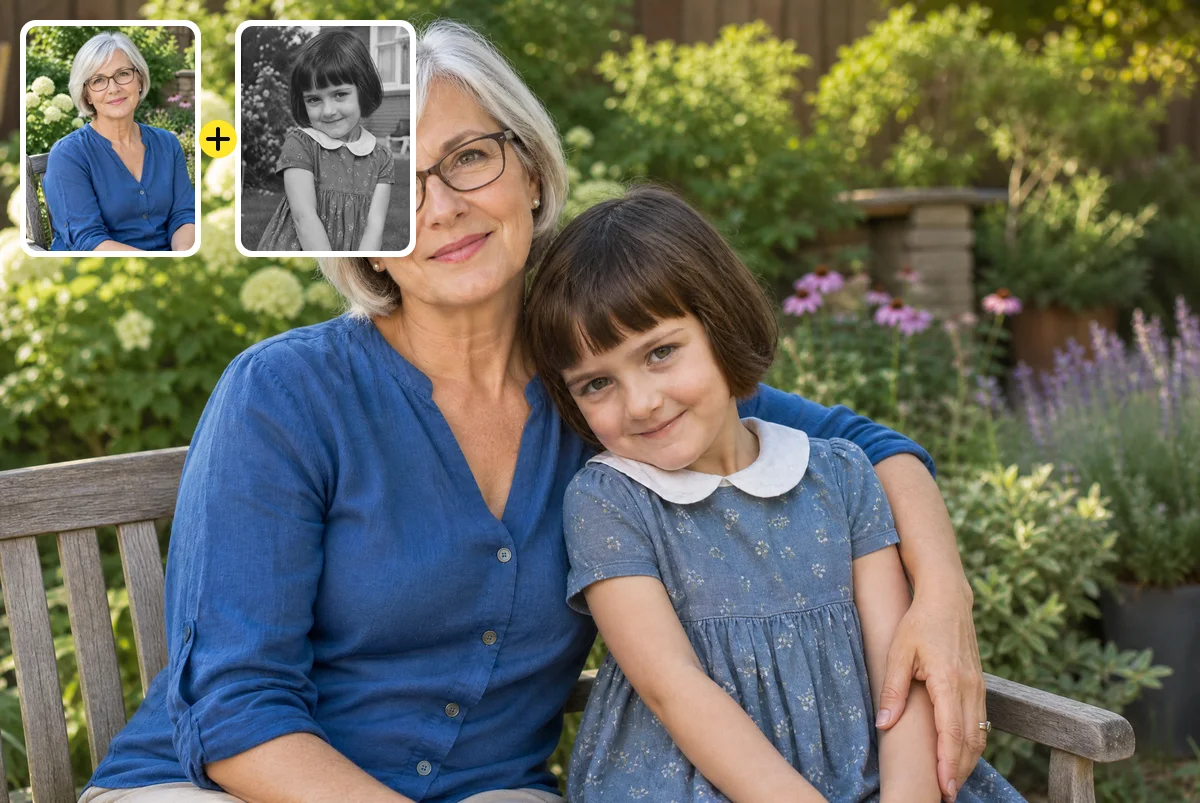
Many childhood photos from before the 1980s are black and white. This woman around sixty sits on a garden bench with her five-year-old self, who comes from a 1970s black-and-white photo. The AI gave the dress, bob and collar natural colour while keeping the shy smile; the colours are a plausible guess, not a recovered record.
Scene picked
“sitting side by side on a garden bench, the child leaning against the adult, the adult’s arm around her, warm afternoon light”
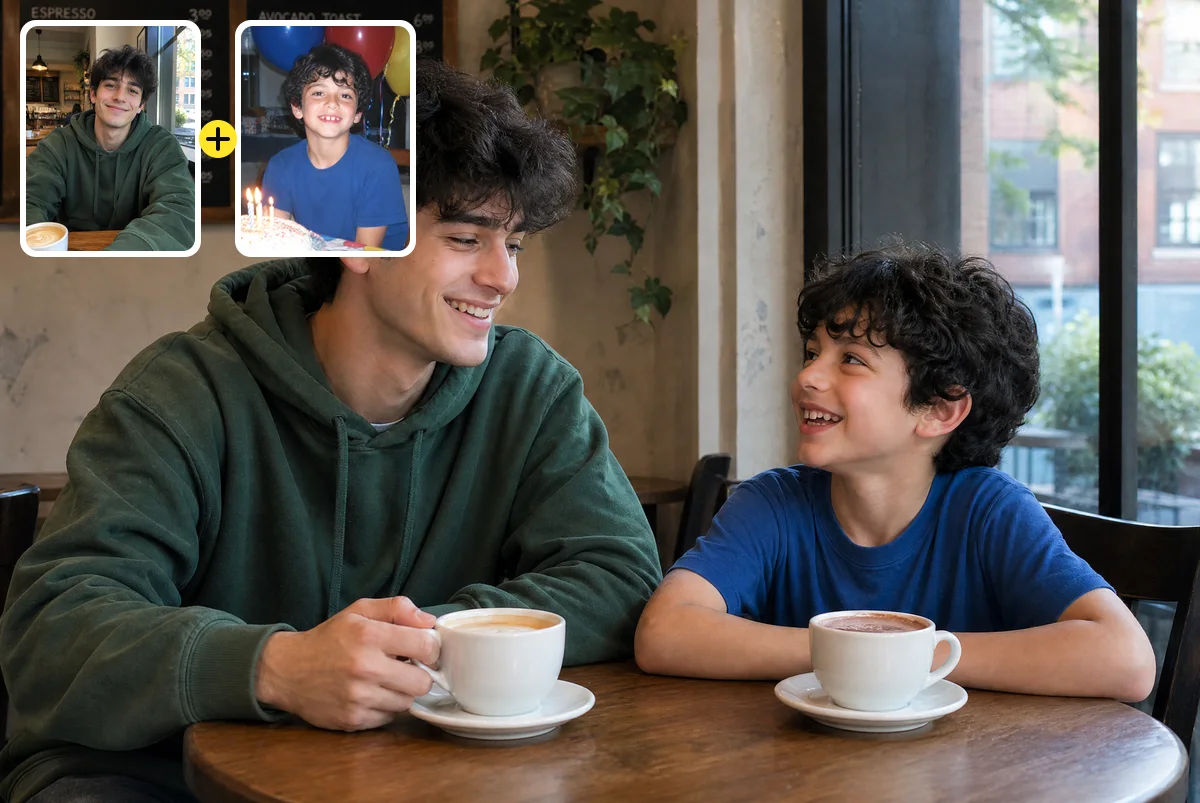
The “meet my younger self” version of the trend: a man around twenty-five in a green hoodie shares a café table with his eight-year-old self from a 2000s birthday photo, coffee for one, hot chocolate for the other. The curly hair and the grin are kept on both, which is what makes it read as one person at two ages.
Scene picked
“sitting across from each other at a small cafe table, the adult with a coffee and the child with a hot chocolate, both laughing”
Hug my younger self is a photo trend where you appear next to, or hugging, yourself as a child. On sparkpix.ai you upload a recent photo and a childhood photo, pick a scene, and the AI creates one realistic photo of you together in about a minute, keeping both faces and turning faded or black-and-white childhood photos into colour. The first photo is free with sign-up credits. Gemini and ChatGPT can do the same with the prompt below; this page builds the prompt in for you.
| This tool | Gemini | ChatGPT | |
|---|---|---|---|
| Upload two photos | Yes, both in one place | Yes | Yes |
| Keeps both faces | Told to, in every run | Depends on your prompt | Depends on your prompt |
| Old or black-and-white childhood photo | Rendered in colour automatically | Only if you ask | Only if you ask |
| Cost | 5 credits; first photo free | Free tier with limits | Free tier with limits |
| Best for | A reliable result without prompt-writing | You already use Gemini | You already use ChatGPT |
This is the prompt the tool uses for the Polaroid scene. Paste it into Gemini or ChatGPT with your two photos attached, in that order, or just use the tool above, which applies it for you. Swap the scene sentence for any of the scenes listed in the editor.
Image 1 is a recent photo of me. Image 2 is a photo of me as a child. Create one new realistic photograph of the adult from Image 1 hugging the child from Image 2, as if I am meeting my younger self. Scene: a vintage Polaroid photo with a white frame and soft on-camera flash, against a plain curtain, the adult kneeling and hugging the child, both smiling. Keep both faces identical to their photos so it is clearly the same person at two ages, and keep the child's age as in Image 2. A warm, everyday moment in ordinary clothes, with consistent lighting and scale. A realistic photograph, not an illustration.
If a chat app refuses because the photo shows a child, keep the scene everyday and both people in ordinary clothes; that is also why the scenes here are all simple family moments.
Photo 1 is you today: a clear photo with your face visible, ideally facing the camera. A selfie is fine.
Photo 2 is your childhood photo. An old print photographed with your phone works; faded and black-and-white photos are turned into colour.
Polaroid hug, a walk in the park, coffee together, or write your own, such as “on the beach where we went every summer”.
In about a minute you get the photo. Check both faces, re-run with another scene if you like, and download it.
Front-facing photos with the face clearly visible
A childhood photo where you are alone, or easy to point out
Old prints photographed flat, in daylight, without glare
Your own photos, or a parent’s for a gift they agreed to
Tiny or blurred faces: the AI would have to invent them
Other people’s childhood photos without their permission
Celebrities and public figures
Videos: this tool makes a still photo
Upload a recent photo of yourself, then a photo of you as a child, and pick a scene such as a Polaroid hug. The AI creates one new photo of the two of you together, keeping both faces, in about a minute.
Your first photo is free: each photo costs 5 credits and every new account gets 5 free credits on sign-up. After that, credit packs start at $9.99. A free account is needed.
The full prompt this tool uses is on this page, ready to copy. Paste it into Gemini or ChatGPT together with your two photos if you prefer to do it there; here the prompt is applied for you on every run.
Yes, both can make this kind of photo from two uploads and a good prompt. The difference here is that the face-keeping rules are built in, old childhood photos are colour-matched automatically, and you pick a scene instead of writing the prompt.
Yes. Photograph the print flat in daylight and upload it. The child is rendered in natural colour at the same quality as the adult, keeping the face. If the face is scratched or blurred, restore the photo first.
Both faces are kept from your photos, so the result is only as good as the photos you upload. Use clear, front-facing photos; tiny or blurred faces give the AI too little to work with.
Use photos of yourself, or of someone who agreed to it, such as a parent you are making a gift for. Do not use other people’s childhood photos without permission, and never public figures.
Uploaded photos are deleted within 3 days. The results stay in your account and can be removed from your history at any time.
Two photos and a scene: you now, and you as a child, in one photo together.
About a minute
First photo free
Add, remove and change anything in a photo by describing it.
Erase any unwanted object from a photo in one click.
Take out tourists, strangers, or anyone you don’t want.
Clear text, watermarks, emojis, and date stamps.
Erase clutter, power lines, fences, reflections, shadows.
Remove or replace any background.