
FREE
Loading…
Just upload and click to process - no prompt needed
Photos Restored
Accuracy
Processing Time
User Rating
Fine lines and scratches from handling, stacking, and aging that obscure image details.
Physical tears, rips, and missing corners that remove portions of the image.
Water damage, tide lines, mold spots, and chemical discoloration from exposure.
Fold marks, creases, and bending damage that create visible lines across the image.
Dust spots, specks, and particle contamination from scanning or aging.
Age-related yellowing, fading, and color shifts that degrade the original tones.
One click. AI detects and removes all damage.
Scan your old photo and upload it. We accept JPG, PNG, and WebP files up to 10MB. Higher scan resolution gives better results.
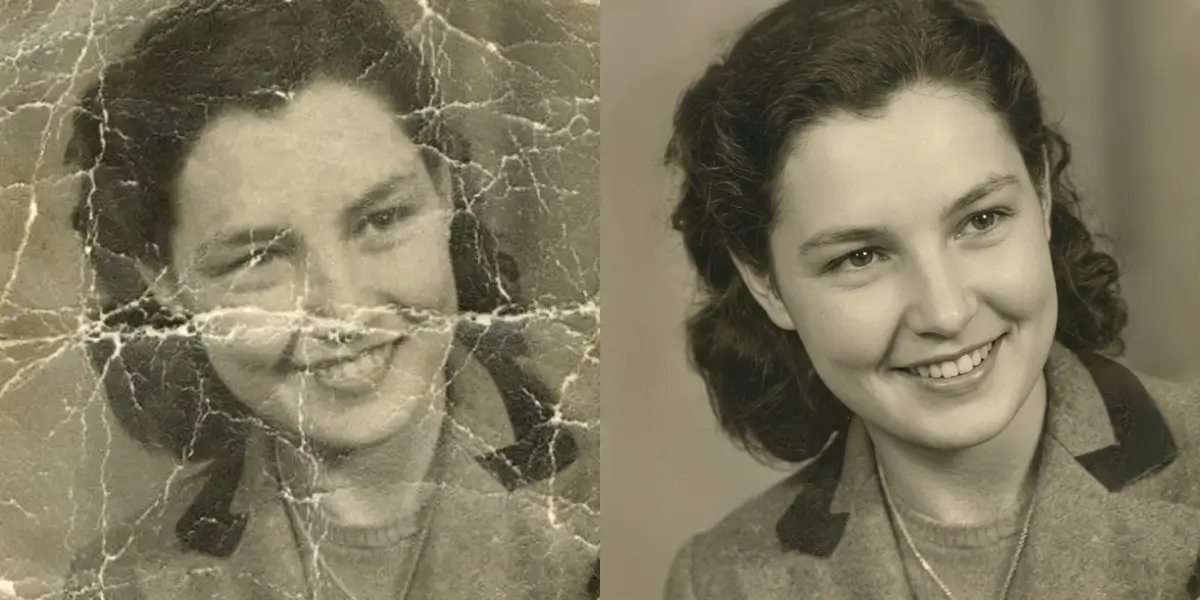
One click starts the AI. It automatically detects and removes scratches, tears, stains, creases, dust spots, and all physical damage.
Download your restored photo with all damage removed. The original content, facial features, and details are preserved.
Our AI uses specialized damage detection algorithms trained on thousands of damaged photographs to remove scratches from photos automatically. It identifies scratches, tears, stains, and other physical damage by analyzing pixel patterns, then applies generative inpainting to reconstruct the original image content beneath the damage. The model distinguishes between intentional image content and damage artifacts with over 95% accuracy.
Yes. Our AI handles everything from minor surface scratches to deep tears, water damage, and heavy creasing. For tears that cross over faces or important details, the AI uses semantic understanding to reconstruct meaningful content rather than just blurring. The results maintain consistency with the surrounding image in terms of tone, grain, and detail.
Yes, scanning is recommended for best results. Use a flatbed scanner at 300 DPI or higher. If a scanner is not available, you can photograph the old photo with a modern smartphone camera in good lighting. Avoid flash, as it can create reflections that the AI might misinterpret as damage.
When you remove scratches from photos with our AI, it preserves the authentic character of the vintage photograph. It maintains the original grain structure, tonal range, and aging characteristics while removing only the physical damage. The goal is a photo that looks undamaged, not one that looks digitally processed.
Stop letting scratches and damage hide your precious memories. Our AI removes all physical damage in seconds. Try it free — no credit card needed.
Comprehensive old photo restoration with AI
Erase unwanted shadows and lighting artifacts from photos with AI
Digitally remove tattoos from photos while preserving natural skin texture
Add realistic color to black and white photos with AI