
FREE
Loading…
Upload a photo of your room, pick a style, and see it redesigned in about a minute: new furniture, colours and finishes, from the same angle, in the same walls, windows and layout. Compare eight styles on one photo before you buy a thing.
Room
Style
Last updated:
Unretouched results from this tool: the room as photographed on the left, the redesign on the right. The rooms are AI-generated stand-ins; we never publish customers’ homes.
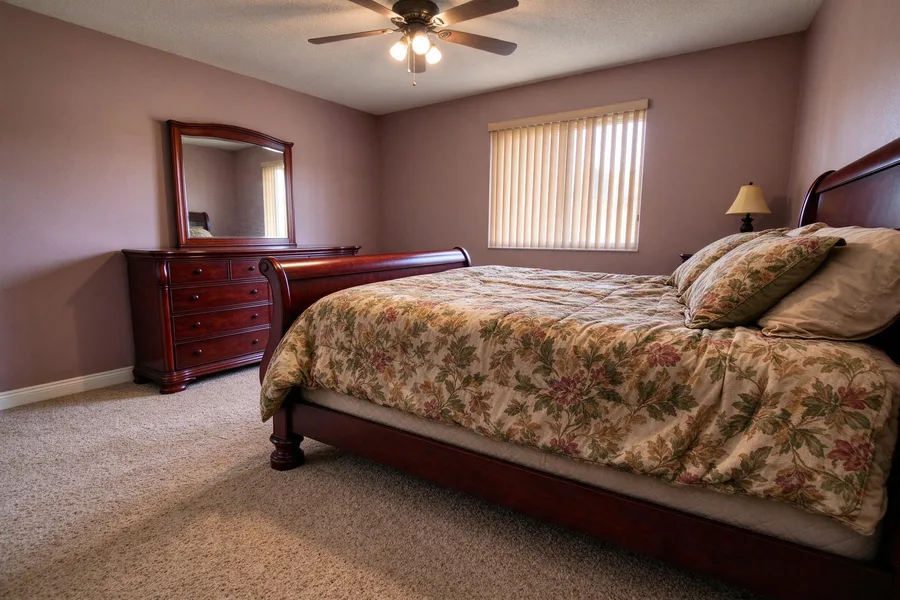
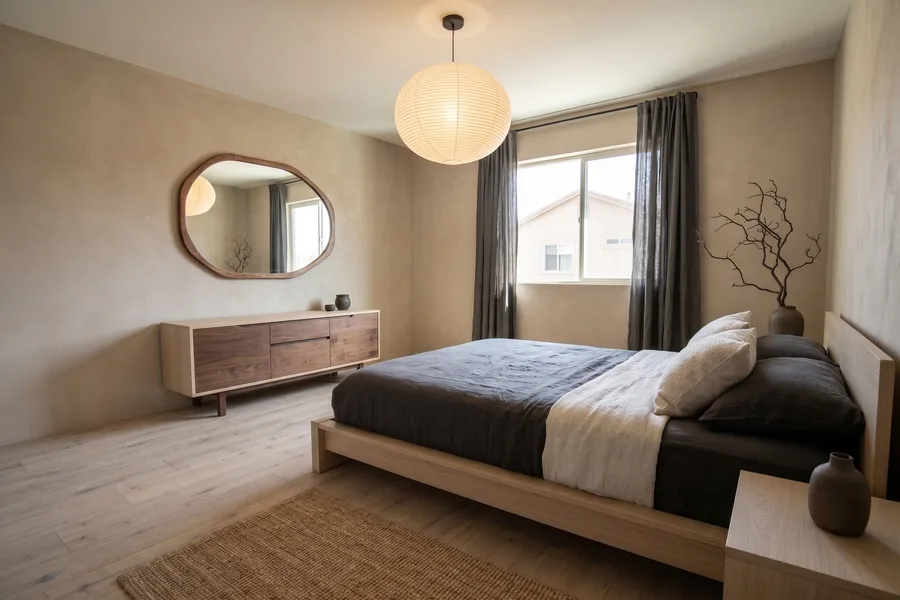
The cherry sleigh bed, the patterned comforter and the matching dresser are gone; a low platform bed, a simple wood console and muted linen take their place.
The window stays where it was, and the mauve walls went warm beige with the style. Lighting counts as decor in a redesign, so the ceiling fan was swapped for a paper pendant; ask to "keep the ceiling fan" if you want it.
In the editor: Room · Bedroom · Style · Japandi
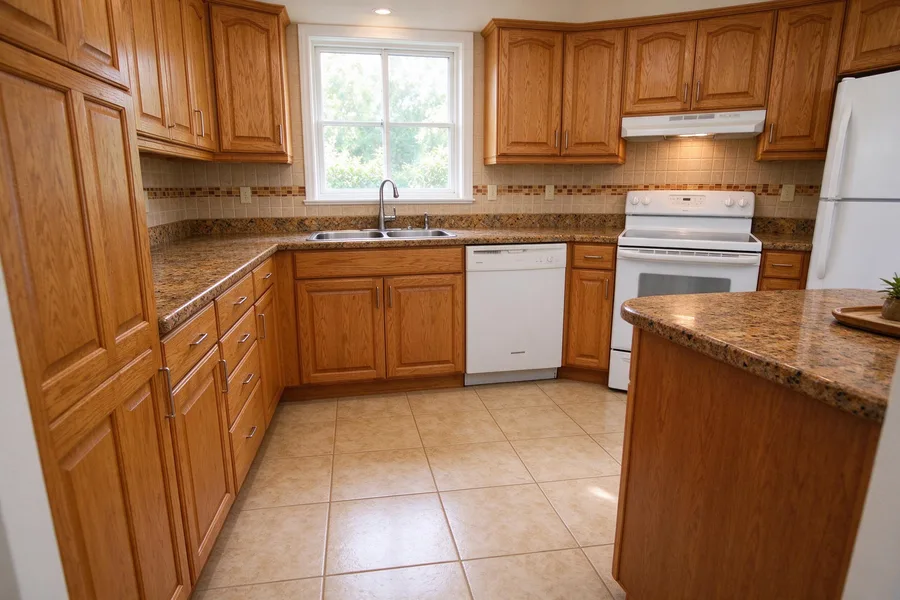
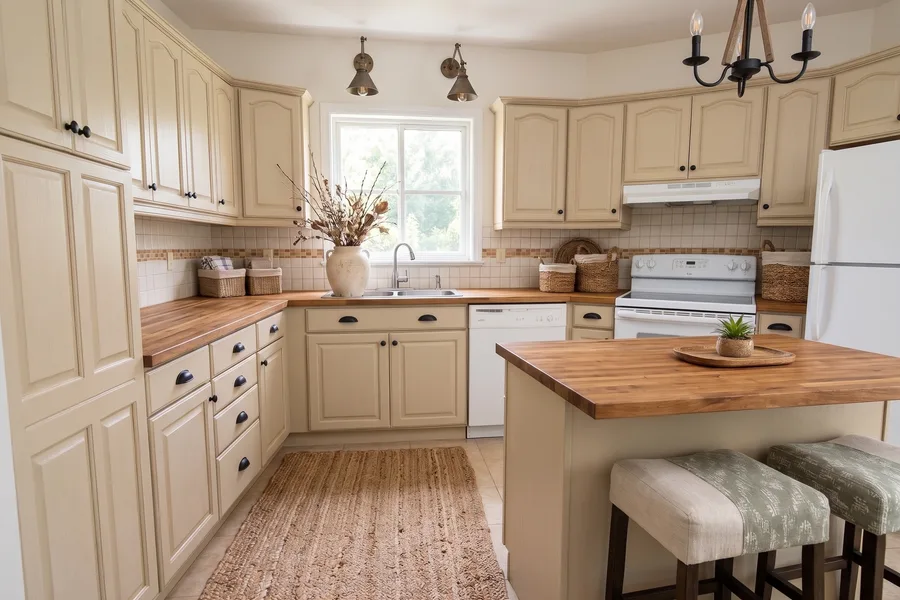
With Room set to Kitchen, the tool may restyle the cabinets, counters and backsplash but not move them. Honey oak and speckled granite became cream paint, black hardware and butcher-block counters.
The sink under the window, the range, the dishwasher, the fridge and the island are where they were, so it shows what a refresh would look like rather than a new kitchen.
In the editor: Room · Kitchen · Style · Modern farmhouse
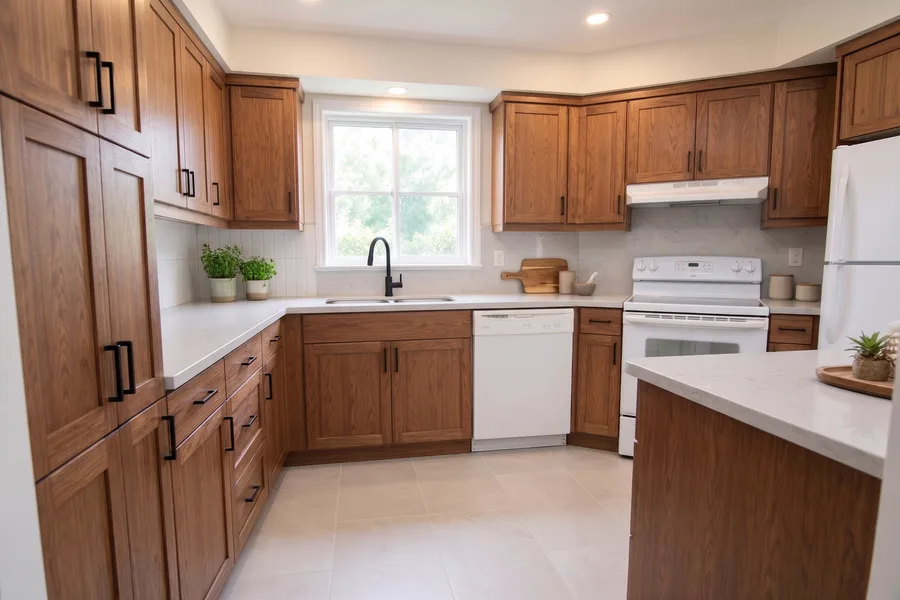
The same photo in Modern style: warm wood doors with long black pulls, white counters, a plain white backsplash and a lighter floor.
Comparing two styles on one photo is the fastest way to decide which direction to take before you talk to a contractor.
In the editor: Room · Kitchen · Style · Modern
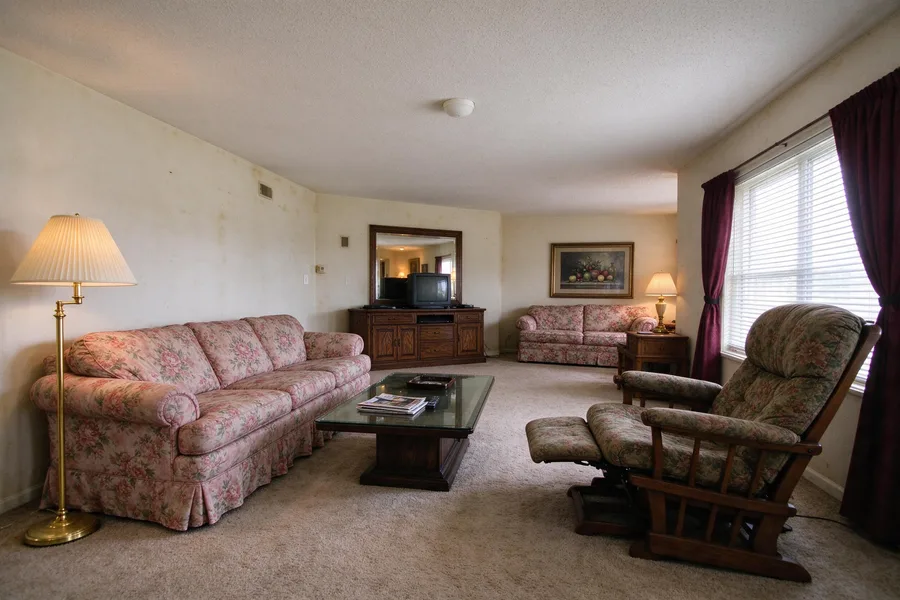
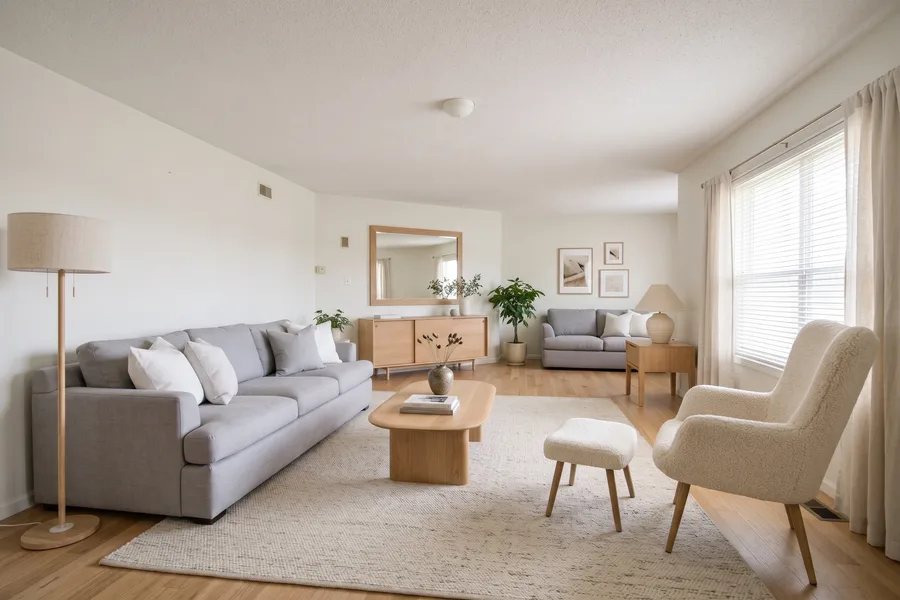
Floral sofas, a recliner, an oak TV cabinet and burgundy curtains, replaced with a light grey sofa, oak pieces, cream accent chairs and linen curtains.
The windows, the mirror on the back wall and the shape of the room are the original. The carpet became a light wood floor because the style called for it; type "keep the carpet" to keep it.
In the editor: Room · Living room · Style · Scandinavian
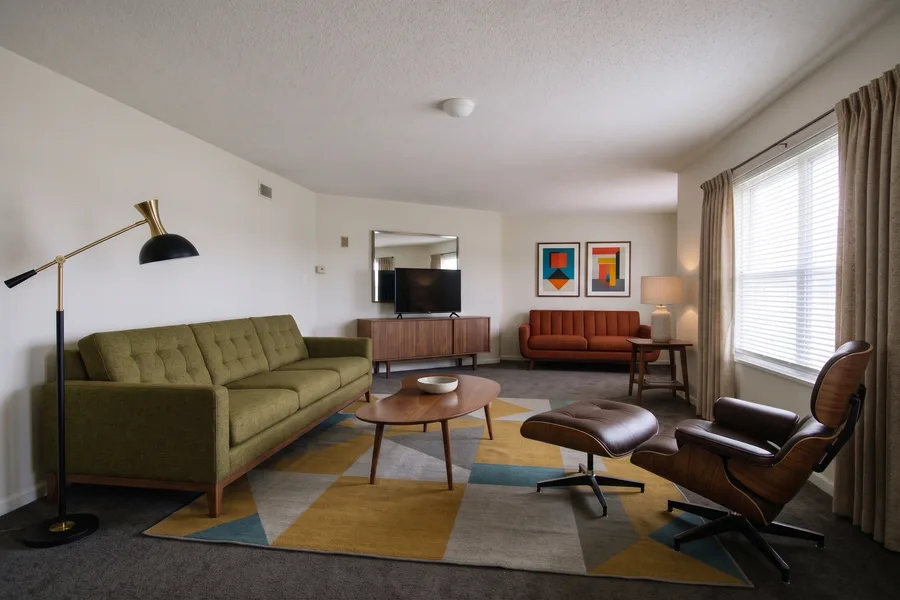
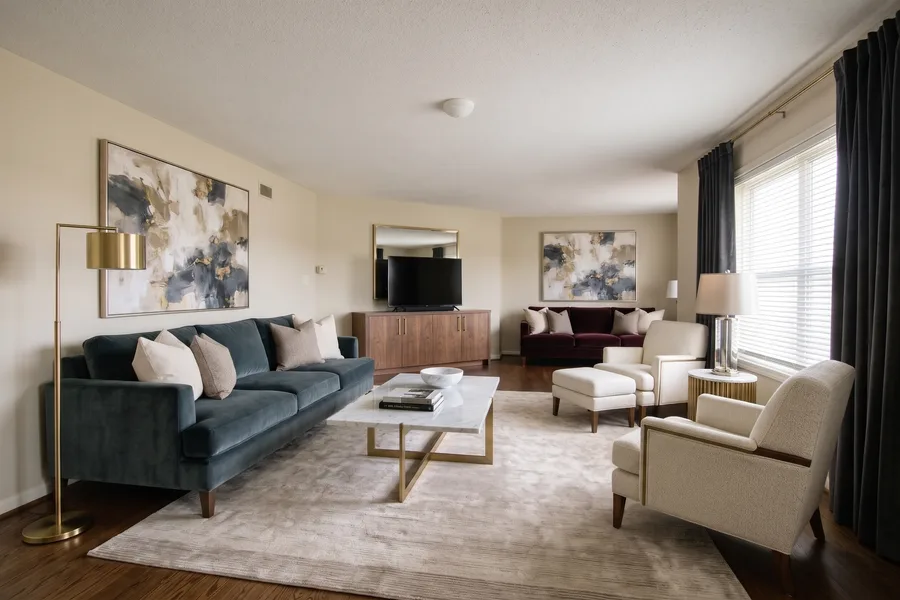
The same dated living room as Scandinavian, Mid-century and Luxury. The windows, the back wall and the shape of the room are the same in all three; only what you would buy or paint changes.
Pick the one you like, then refine it: "Mid-century, but keep a light floor", or "Luxury with a green velvet sofa".
sparkpix.ai AI Interior Design is a browser tool that redesigns a photo of your room. You upload one photo, choose the room and one of eight styles (Modern, Scandinavian, Modern farmhouse, Coastal, Mid-century, Luxury, Japandi, Industrial), and in about a minute you get the same room from the same angle with new furniture, colours and finishes at 2K. Walls, windows, doors, ceiling height and the layout of built-ins are always kept. Each design costs 5 credits, about $0.14 on the $9.99 monthly plan, and the first one is free.
| AI interior design (here) | An interior designer | Pinterest and mood boards | |
|---|---|---|---|
| What you send | One photo of the room; pick a style | Photos, measurements and a brief | A sketch or a mood board you build yourself |
| Time to a first look | About a minute | Days to weeks | Hours |
| Cost | 5 credits, about $0.14 per version | A design fee | Your time |
| Shows your actual room | Yes: your walls, windows and layout | Yes | No, other people’s rooms |
| Exact products and measurements | No, it is a visual concept | Yes | Sometimes |
| Best for | Choosing a direction, comparing styles, showing clients | Full renovations | Collecting ideas |
From a corner, at chest height, with the lights on. Landscape works best.
Kitchen and Bathroom let the tool restyle cabinets, counters and tiles; other rooms change furniture, colours and floors.
In about a minute you see your room in the new style, at 2K.
Run other styles on the same photo, or add a line like "keep the floor" or "use a navy sofa" to the box.
The same rules run on every design, so you get your room in a new style rather than a different room.
| Part of the room | What the tool does | To change that |
|---|---|---|
| Walls, windows, doors, ceiling height | Always kept | — |
| Layout of built-in cabinets and appliances | Always kept | — |
| Camera angle and the view outside | Always kept | — |
| Furniture, rugs, curtains, lamps, art, decor | Replaced in the new style | Name a piece to keep it |
| Paint colour, wallpaper, flooring | May change to suit the style | Type "keep the wall colour and floor" |
| Cabinet colour, counters, backsplash, tiles | Changed only with Kitchen or Bathroom, or when you ask | Describe the finish you want |
Type it after the style line: "keep the grey sectional", "keep the wood floor". The tool redesigns around it.
"Sage green cabinets with brass knobs" gets you closer than "green". Style chips set the mood; your words set the details.
Each run is one photo. For an open-plan space, shoot the part you want to change most.
Turn the lights on and open the blinds. A dark photo comes back as a dark design.
The furniture is drawn to look right in the photo, not picked from a catalogue or measured. Measure before you buy.
For a listing, use virtual staging: it only adds furniture to empty rooms and never changes paint or floors.
Deciding on a style before a makeover
Seeing a paint or cabinet colour in your own room
Showing a client two or three directions
Refreshing a rental or a room you are about to furnish
Moving walls, windows or plumbing (it keeps the layout)
Exact measurements or a shopping list
Listing photos that must show the property as it is
Floor plans and 3D models
AI interior design shows a photo of your own room redesigned in a new style. On sparkpix.ai you upload one photo, pick the room and one of eight styles, and in about a minute you get the same room, from the same angle, with new furniture, colours and finishes, while the walls, windows, doors and layout stay as they are.
Each redesign costs 5 credits, and new accounts get 5 free credits, so your first one is free. After that the $9.99 monthly plan includes 350 credits (70 redesigns), or you can buy 500 credits once for $19.99. No watermark.
Yes. The walls, windows, doors, ceiling height, the layout of built-in cabinets and appliances, and the camera angle are always kept. What changes is everything movable, and with the style, paint and flooring.
Yes. Add "keep the floor and wall colour" (or just one of them) to the line in the box before you press Generate.
Yes. Choose Kitchen or Bathroom as the room: the tool may then restyle cabinet colour, hardware, counters, backsplash, tiles and lighting, while the sink, appliances, toilet and tub or shower stay where they are. It shows a refresh, not a new floor plan.
Not directly. The pieces are generated to fit the photo, not taken from a store catalogue. Use the picture as a reference when you shop, and measure your space first.
Virtual staging furnishes an empty room for a listing and never changes paint, floors or fixtures. AI interior design replaces what is already in a furnished room and may change colours and finishes, which is what you want when you are planning a makeover.
Yes. It is a quick way to show a client two or three directions on a photo of their own room before you spend time on a full concept. The output is a visual, not a specification.
2K, in the same shape as your photo: a 3:2 photo comes back at about 2,500 × 1,690 pixels.
Uploaded photos are deleted within 3 days. Results are saved to your account so you can download them again, and you can delete them at any time.
One photo, one style, about a minute. The first design is free.
About a minute
No watermark
All of these are part of the sparkpix.ai AI photo editor, so one account works across every tool.
Furnish an empty room for a listing.
Clear the mess out of a room photo first.
Erase one thing from any photo.
See the room in evening or morning light.
Redraw a photo as a painting or a sketch.
Enlarge a design to print it big.
Change one thing in a photo by describing it.
Take out tourists, strangers, or anyone you don’t want.
Clear text, watermarks, emojis, and date stamps.
Erase clutter, power lines, fences, reflections, shadows.
Describe any change in words, or draw over the area to edit.
Add a missing friend, a late relative, or your younger self.
All of these are part of the sparkpix.ai AI photo editor, so one account works across every tool.