
Best AI to Real Image Converters in 2026: 8 Tools Compared for AI Photos, Anime and 3D Renders
Best AI to Real Image Converters in 2026: 8 Tools Compared for AI Photos, Anime and 3D Renders
Last updated: October 11, 2026 · Prices checked on each vendor page on October 10, 2026 · By the sparkpix.ai Editorial Team
Quick verdict: for an AI-generated photo in one click with a free first try, sparkpix costs about $0.14 per image, and its median result came back in 28 seconds in our own data. For portrait skin only, Enhancor is about $0.10 per image on its $12 monthly plan. For large, print-size output, Topaz Bloom renders without limits on a $12 monthly web plan. For anime or cartoon art, Upsampler has a free anime to real tool that needs no sign-up. For 3D renders and game assets, Magnific has dedicated presets.
How we compared. Every price, limit and caveat below was read on the vendor's own pages on October 10, 2026, and is linked. We did not run the other seven tools, so there are no test scores for them; where a vendor states a weakness, we quote it. sparkpix is our own product, and we describe it from our own production data. Where a vendor's pages disagree with each other, we say so.
"AI to real" means three different jobs
People search for an AI to real converter with three very different images in hand, and no single tool is best at all three:
| Job | What has to change | What must stay | Tools in this list |
|---|---|---|---|
| AI photo to real photo | Waxy skin, glow, colour grade, empty backgrounds | The same person, pose and scene | sparkpix, Enhancor, Topaz Bloom, NanoPic, Face26 |
| Anime or cartoon to real person | The whole medium: a drawing becomes a photograph | The character's look, roughly | Upsampler, Fotor |
| 3D render or game asset to photo | Materials, light and surface detail | Geometry and composition | Magnific (and Topaz Bloom) |
The trade-off is the same in every job: the more a tool is allowed to redraw, the more of the artificial look it can remove, and the more likely it is to change what was there.
The 8 tools at a glance
| Tool | Job | Cheapest paid option | Approx. cost per image | Free to try | Max output |
|---|---|---|---|---|---|
| sparkpix AI to Real Image Converter | AI photo | $9.99 for 350 credits, no subscription | ~$0.14 (5 credits) | Yes, first conversion (1K) | 2K |
| Enhancor | AI photo (portraits) | $12/month, ~120 images | ~$0.10 | Limited monthly images (number not stated) | 1080p on Basic; 4K-8K on higher plans |
| Topaz Bloom (Realism) | AI photo, 3D renders | $12/month (limited-time, from $19) or $109/year | Unlimited renders | Not stated | 32 MP export |
| NanoPic AI to Real | AI photo | $199 for 16,000 credits | Not published per conversion | "Unlimited free use is not promised" | Not stated |
| Face26 RealAI | AI photo | $72/year (vendor's own FAQ) | ~$0.15 (vendor's figure) | Yes, watermarked | "No limit" stated |
| Upsampler Anime to Real | Anime/cartoon | Free tool (paid plans from $15/month for other tools) | Free | Yes, no sign-up, no watermark | ~1 MP |
| Fotor Anime to Real Life | Anime/cartoon | Not published on the page we could read | Not published | Free credits on registration | Not stated |
| Magnific Creative Upscaler | 3D renders, game assets, AI skin | $14.50/month billed annually | Not published | Free plan, AI credits not stated | 25.3 MP (API) |
Cost per image is the cheapest paid option divided by the images it buys, where the vendor publishes both. Subscriptions and credit packs are priced very differently, so compare the plan you would actually buy.
1. sparkpix AI to Real Image Converter: best one-click converter for AI photos
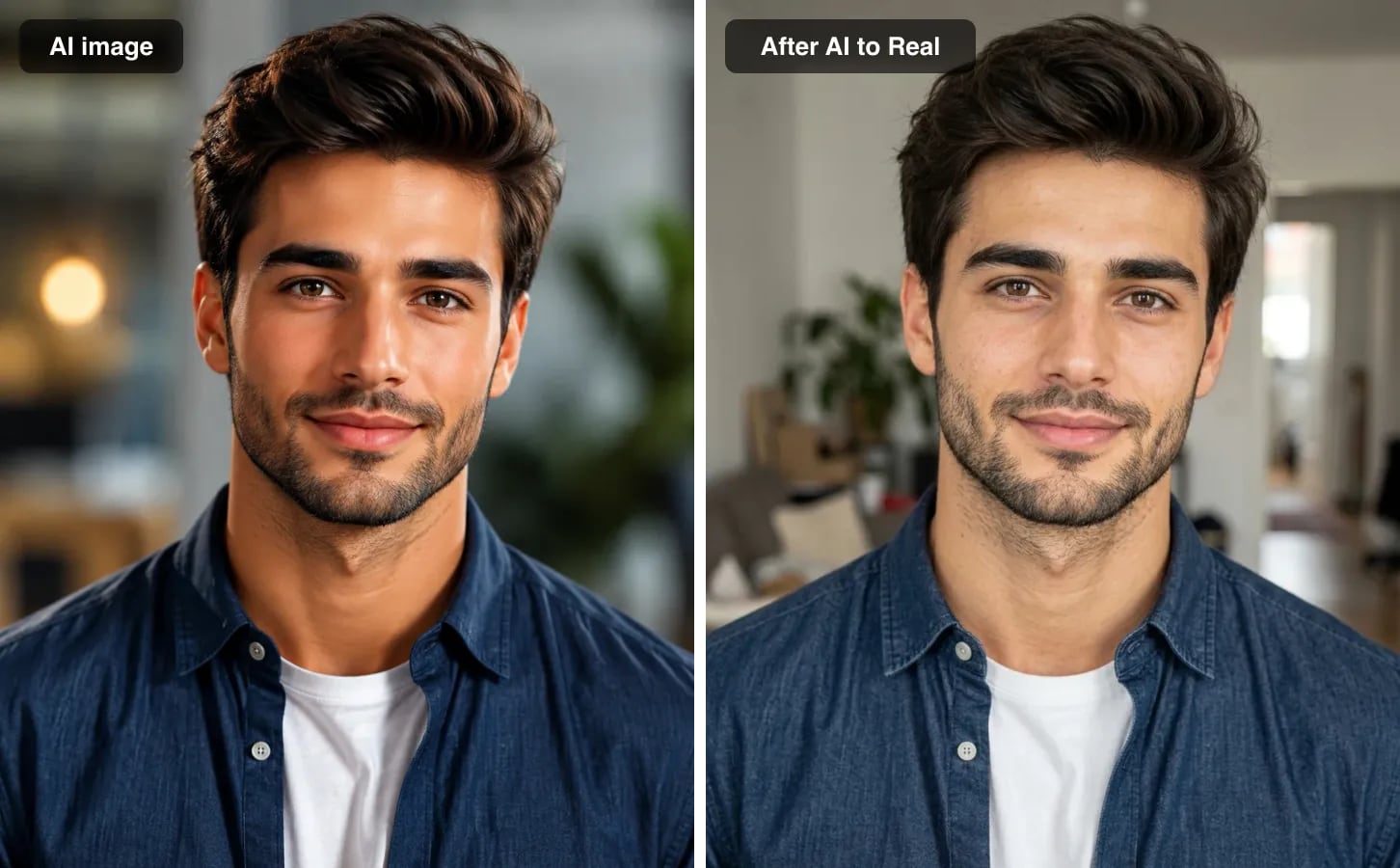
An actual sparkpix conversion at the free 1K setting, unretouched: same man, shirt and framing, with a real room behind him.
What it is. A browser tool that re-renders an AI image the way a phone camera would have captured it: real skin texture, one believable light source, true-to-life colour and background detail. There is nothing to type. It runs the Nano Banana 2.1 image model with an instruction that names each AI tell and keeps the same person, face, expression, pose and composition.
Price. One conversion is 5 credits. New accounts get 5 credits, so the first conversion is free at 1K. Credit packs start at $9.99 for 350 credits (70 conversions, about $0.14 each) with no subscription; paid conversions are 2K.
What we measured across our realism tools in the 24 hours to October 10, 2026: median result in 28 seconds, 90% within 47 seconds, and 1.9% of runs failed, almost all of them safety-filter refusals, with credits refunded automatically.
Weaknesses. Output stops at 2K, so print jobs need a separate upscale. It does not convert anime or drawings: illustrations keep their style and only lose the rendered sheen. There are no sliders for grain or skin strength; for a specific fix, the AI image humanizer takes a written instruction instead.
Best for: a finished AI photo you like, where only the rendering gives it away. For game screenshots, sparkpix has a separate Game Screenshot to Real Photo tool.
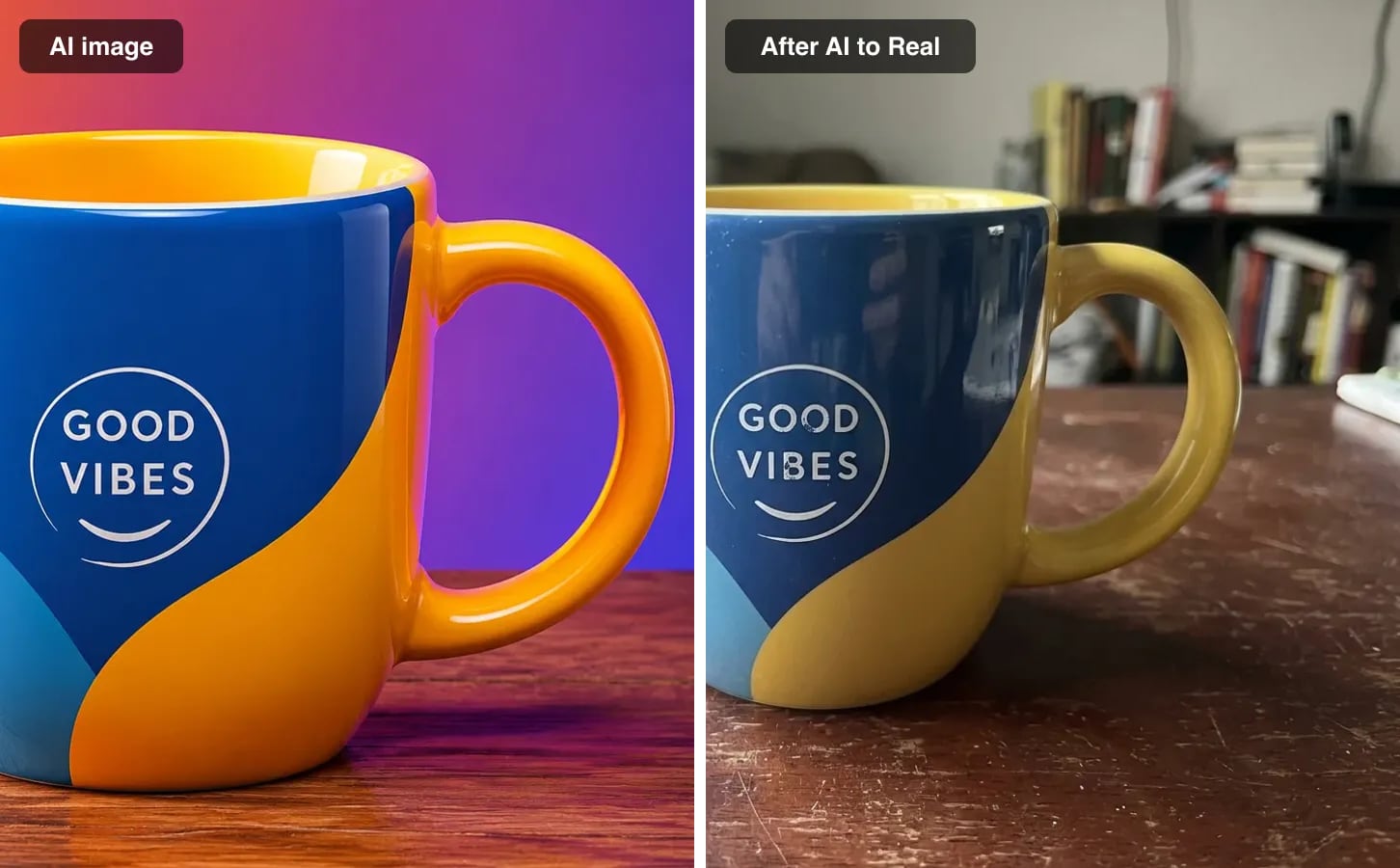
The same converter on a product render: the mug and its design are kept, the neon backdrop becomes a real table.
2. Enhancor: best for portrait skin
What it is. A skin-focused tool. Enhancor says it can "remove the plastic look from AI images" and restore pores and texture, with controls aimed at faces.
Price. Basic is $12 a month for 12,000 credits, about 120 images, so roughly $0.10 each; it is sold monthly only (pricing). Free users can enhance a limited number of images a month; the number is not stated.
Weaknesses. It is built for portraits, not scenes or products. Basic is limited to 1080p ("HD resolution only"); 4K starts on the Creator plan. Basic also excludes refunds on failed generations.
Best for: portrait and model photos where the skin is the only problem.
3. Topaz Bloom (Realism): best for large, print-size output
What it is. Topaz's creative upscaler with a Realism model, which Topaz says can "instantly remove the artificial feel of AI-generated images". It also enlarges AI artwork and CG renders.
Price. Topaz for Web, Image plan: $12 a month (shown as a limited-time offer, struck from $19) or $109 a year, with unlimited image rendering and exports up to 32 MP (pricing).
Weaknesses. Topaz's developer documentation says creative models "can change objects, identity, and stylization". The maximum enlargement differs between Topaz's pages: up to 8x in the developer docs, up to 6x in the web app docs.
Best for: photographers and studios who need realism and very large output from the same tool.
4. NanoPic AI to Real: best for adjustable strength
What it is. A converter running on Nano Banana 2 that "redraws the image toward believable photography", with Strict, Balanced and Strong settings (tool page).
Price. The Starter Pack is $199 for 16,000 credits, which NanoPic puts at "about 4,000 standard images" (pricing). The credits one conversion costs are shown only inside the tool, so the per-image price is not published.
Weaknesses. NanoPic says it "cannot promise a pixel-locked face", and that "unlimited free use is not promised". The entry pack is a large upfront payment.
Best for: heavy users who want to choose how far the redraw goes.
5. Face26 RealAI: free to try, watermarked
What it is. A one-click filter built to turn Midjourney, DALL-E and Stable Diffusion images into photo-style results (page).
Price. The free plan works but adds a watermark and ads; one premium credit removes the watermark from a download. Face26's own FAQ recommends a $72-a-year package at about $0.15 per image for up to 480 images; the pricing table itself sits inside the app and we could not read it directly.
Weaknesses. Face26 says effectiveness "may vary depending on the quality" of the source image.
Best for: trying an AI to real conversion for free when a watermark does not matter.
6. Upsampler Anime to Real: best free anime and cartoon converter
What it is. A free tool that turns "anime, cartoon, and illustrated art into a realistic photograph", including game character renders and 3D cartoon stills.
Price. Free, with no sign-up and no watermark, on a daily allowance per visitor. Upsampler's paid plans (from $15 a month for 1,000 credits) cover its other tools (pricing).
Weaknesses. Output is roughly one megapixel. Upsampler says chibi art with oversized heads gives the loosest results.
Best for: turning an anime or cartoon character into a realistic person at no cost.
7. Fotor Anime to Real Life: anime to real inside a larger editor
What it is. An "Anime to Realistic" style inside Fotor's AI image generator that turns anime art into a realistic image (page).
Price. Fotor describes the tool as partially free, with free credits on registration and daily check-ins, and says results have no watermark. Its pricing page did not show prices without running the app, so we could not verify the paid plans.
Weaknesses. Fotor notes that "some artistic elements from the original anime may still remain".
Best for: people who already edit in Fotor and want anime to real in the same place.
8. Magnific Creative Upscaler: best for 3D renders and game assets
What it is. A creative upscaler with dedicated 3d_renders and videogame_assets presets and Creativity, Resemblance and HDR sliders, up to 16x (API docs). Its Skin Enhancer also has a "transform to real" preset for AI portraits (docs).
Price. Premium is $14.50 a month billed annually, struck from $20, with 240,000 credits a year (pricing). Credits per image are not published.
Weaknesses. Creative upscaling invents detail by design; Magnific offers a separate Precision mode for faithful enlargement without it. The API caps output at 25.3 million pixels.
Best for: turning a low-detail 3D render or game asset into a photographic image, if you are comfortable tuning sliders.
Which one should you use?
| Your image | Pick |
|---|---|
| An AI photo you like, and you want it to look real in one click | sparkpix AI to Real Image Converter |
| A portrait where only the skin looks fake | Enhancor |
| A client or print job that needs 30+ megapixels | Topaz Bloom |
| An anime or cartoon character you want as a real person | Upsampler Anime to Real (free) or Fotor |
| A 3D render or game asset | Magnific Creative Upscaler, or sparkpix Game Screenshot to Real Photo for game screenshots |
| You want to try for free and do not mind a watermark | Face26 RealAI |
Whichever you choose: start from the largest original, keep creativity low when a face matters, convert once rather than repeatedly, and upscale last. For a step-by-step walkthrough, see how to make an AI image look like a real photo; for tools that focus on skin texture, see the best AI image humanizers compared.
Sources: vendor pricing, product and documentation pages linked in each section, read October 10, 2026; sparkpix production data for the 24 hours to October 10, 2026. Prices change often; check the vendor page before buying.
Frequently Asked Questions
What is the best AI to real image converter?
It depends on what you are converting. For an AI-generated photo in one click with a free first try, sparkpix costs about $0.14 per image and returned results in a median 28 seconds in our own data. For portrait skin only, Enhancor is about $0.10 per image on its $12 monthly plan. For anime or cartoon art, Upsampler has a free, no-sign-up anime to real tool. For 3D renders and game assets, Magnific has dedicated presets.
Can AI turn an anime character into a real person?
Yes, with tools built for it. Upsampler offers a free anime to real converter with no sign-up and output of about one megapixel, and Fotor has an Anime to Real Life converter with free credits on registration. Both redraw the character as a person, so expect a new face rather than an exact match. The sparkpix converter does not do this: it keeps illustrations in their own style.
Is there a free AI to real image converter?
Several have a free option. sparkpix gives 5 credits on sign-up, enough for one free conversion at 1K. Upsampler anime to real is free with a daily allowance and no watermark. Face26 RealAI is free to use but watermarks downloads unless you spend a premium credit. Fotor gives free credits on registration.
Will an AI to real converter change the face?
Generative converters can. Topaz says its creative models can change objects and identity, and NanoPic says it cannot promise a pixel-locked face. sparkpix instructs the model to keep the same person, face, expression and pose. Whichever tool you use, compare the result with the original at full size and convert once rather than repeatedly.
What is the difference between an AI to real converter and an AI image humanizer?
For AI-generated photos they do the same job: remove the waxy skin, glow and over-clean colour so the image reads as a real photograph. "Converter" usually means one click with no settings; "humanizer" tools more often add controls for skin texture or creativity. "AI to real" also covers anime and 3D renders, which humanizers usually do not.
Ready to Transform Your Images?
Start creating amazing AI-powered images today with sparkpix.ai
Try It Free