
How to Make Nano Banana Images Look Real: The Tell Is the Style, Not the Skin
How to Make Nano Banana Images Look Real: The Tell Is the Style, Not the Skin
Last updated: October 21, 2026 · Every image generated and fixed on October 21, 2026 · By the sparkpix.ai Editorial Team
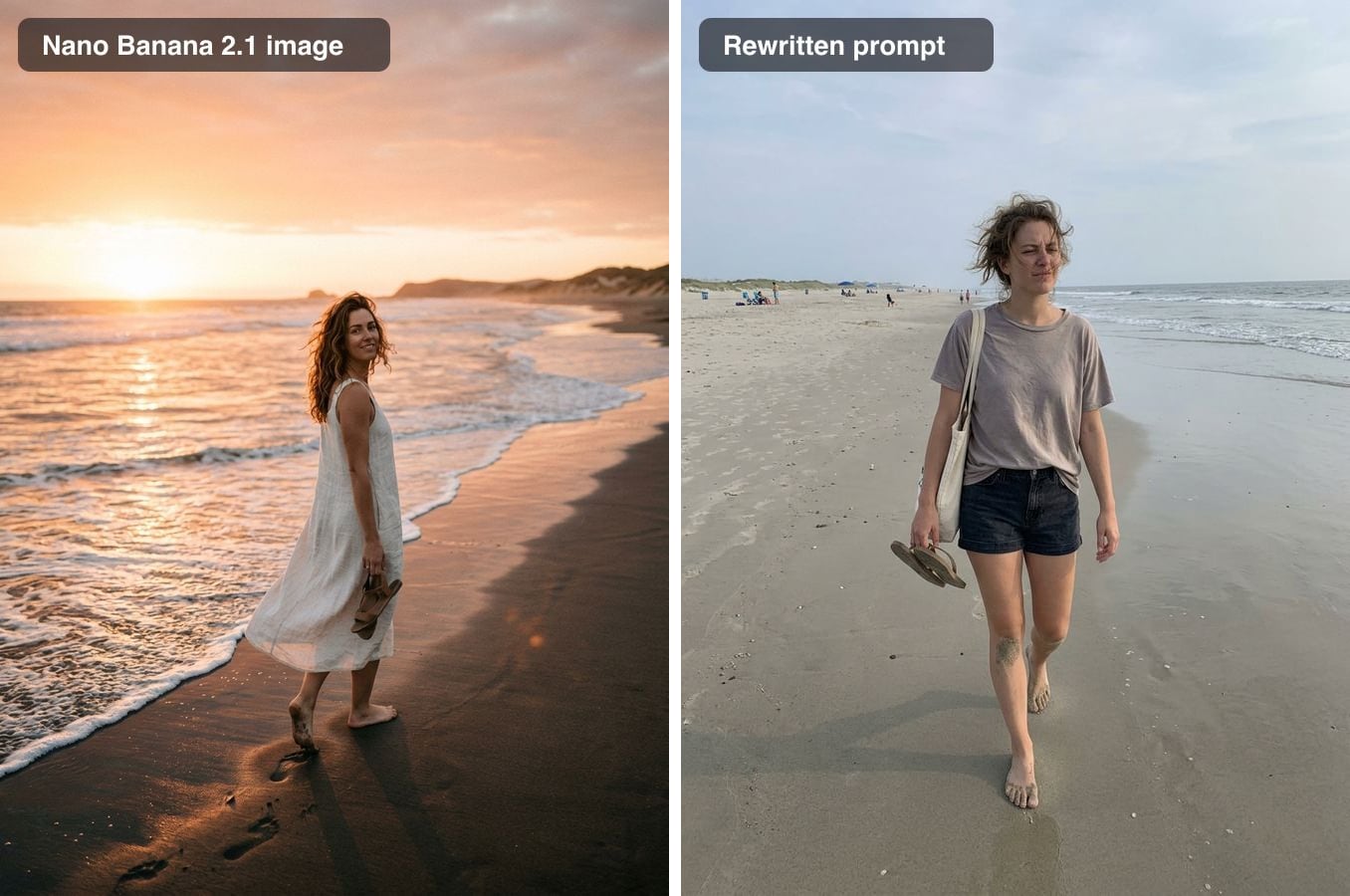
Left: what Nano Banana 2.1 made from a plain prompt. Right: the same idea with a prompt that asks for a snapshot instead of a photo shoot.
Quick answer: Nano Banana images rarely give themselves away through plastic skin. They look like a professional's photo: golden-hour backlight, a background melted into blur, a muted film-style colour grade and scenes that look art-directed, plus small text that turns into nonsense. The fix is mostly in the prompt: ask for a casual phone photo with one ordinary light source, some mess, everything in focus and no colour grading, and quote any text you need. To fix an image you want to keep, name the one thing that is wrong instead of running a general realism pass, which changed little on these images.
Which Nano Banana we tested
Nano Banana is Google's name for its Gemini image models. The current version in the Gemini API is Nano Banana 2.1 (model id gemini-nano-banana-2.1), which Google's API documentation describes as an update to Nano Banana 2 (Gemini 3.1 Flash Image); the page was last updated on October 6, 2026. We could not confirm which version the Gemini app runs, so we generated our test images with Nano Banana 2.1 through the API at 1K resolution.
One disclosure: sparkpix's own realism tools also run on Nano Banana 2.1. That turned out to matter, as you will see below.
What gives Nano Banana images away
We used five plain prompts:
- "A photo of a woman in her 20s on the beach at sunset"
- "A photo of an older man reading a newspaper on a park bench"
- "A photo of two friends laughing while cooking in a small kitchen"
- "A photo of a golden retriever lying on a rug in a living room"
- "A close-up portrait photo of a woman in her 30s"
All five look like photographs. That is the problem: they look like a professional's photographs, not like yours.
- Golden-hour light. The beach came back with the sun on the horizon, flare and a look over the shoulder. The close-up portrait has glowing, backlit hair and sunlit bokeh behind it.
- Shallow focus. Backgrounds dissolve into soft blur, including in scenes that are supposed to be casual.
- A film-style colour grade. The park bench and the dog have muted greens, soft contrast and a warm cast, like a photo shot on film and graded afterwards.
- Art-directed scenes. The kitchen is a lifestyle shoot: a laughing couple in a linen apron, steam rising on cue, chopped peppers in coordinated colours, every shelf styled.
- Garbled small text. The newspaper on the bench looks right from a distance; up close, the headline is nonsense words.
What we did not see was plastic skin. The close-up portrait came back with pores, freckles and fine lines from a plain prompt, and none of the people in the other images were airbrushed.
Fix 1: prompt for a snapshot, not a photo shoot
A realistic Nano Banana prompt switches off the photographer. Say who took the picture and with what, give one ordinary light source, add an imperfection and some mess, and end with "everything in focus, ordinary colours, no colour grading".
The beach
Rewritten prompt: "A casual photo of a woman in her 20s on a beach in the late afternoon, taken by a friend with a phone. Flat, ordinary light under a slightly hazy sky, not golden hour, no sun flare. She is mid-step and squinting a little, with windblown hair, sand on her feet and other people far away on the beach. Everything in focus like a phone camera, no film look, no colour grading."
What happened: see the image at the top of this article. The sunset, the flare and the posed glance are gone; she is squinting into the wind on a plain beach with other people in the distance. It is a different woman in different clothes: a new prompt always means a new image. Time: 27 seconds.
The kitchen
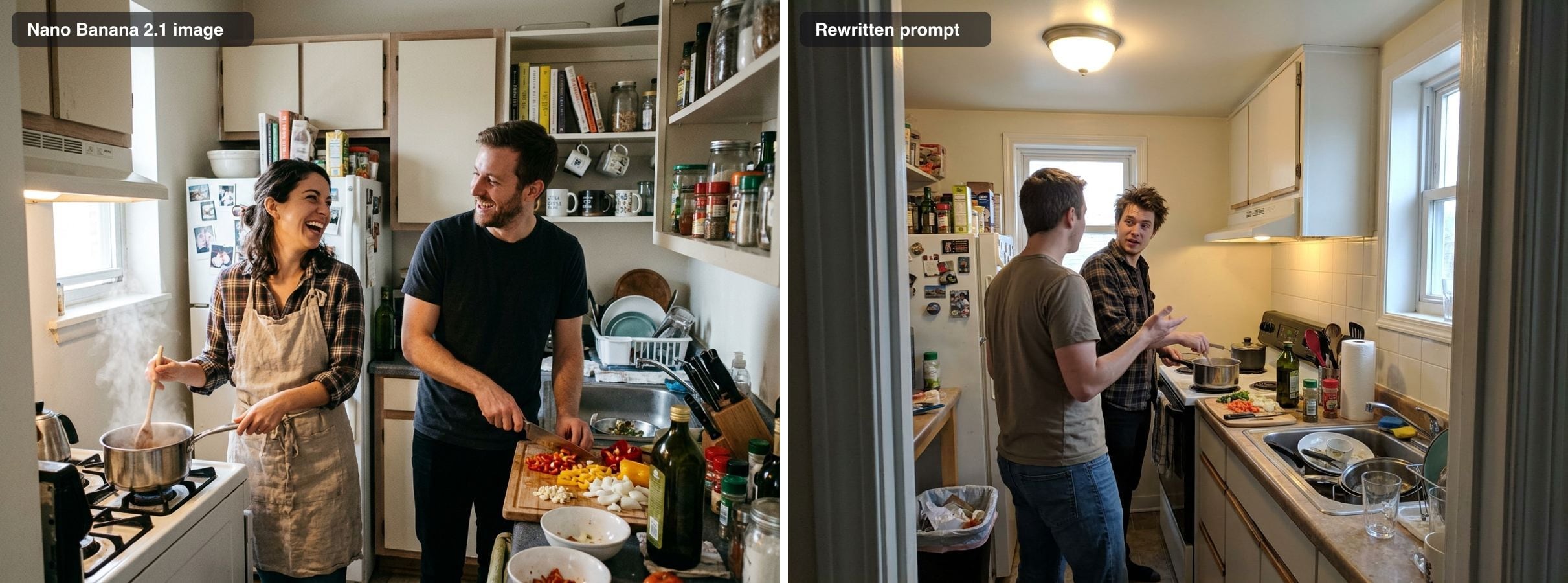
Rewritten prompt: "A phone snapshot of two friends cooking in a small kitchen, taken by someone standing in the doorway. Harsh light from the ceiling fixture mixed with daylight from a small window, with a bit of glare on the counter. One of them is turned away, mid-sentence. Dirty dishes in the sink and a cluttered counter. Normal phone colours and depth of field, not a lifestyle shoot, no colour grading."
What happened: the doorway framing, the ceiling light and the dishes in the sink make it look like someone's actual kitchen on an actual evening. Both people changed, and the woman became a man, because the prompt did not say who they were. Time: 23 seconds.
The dog
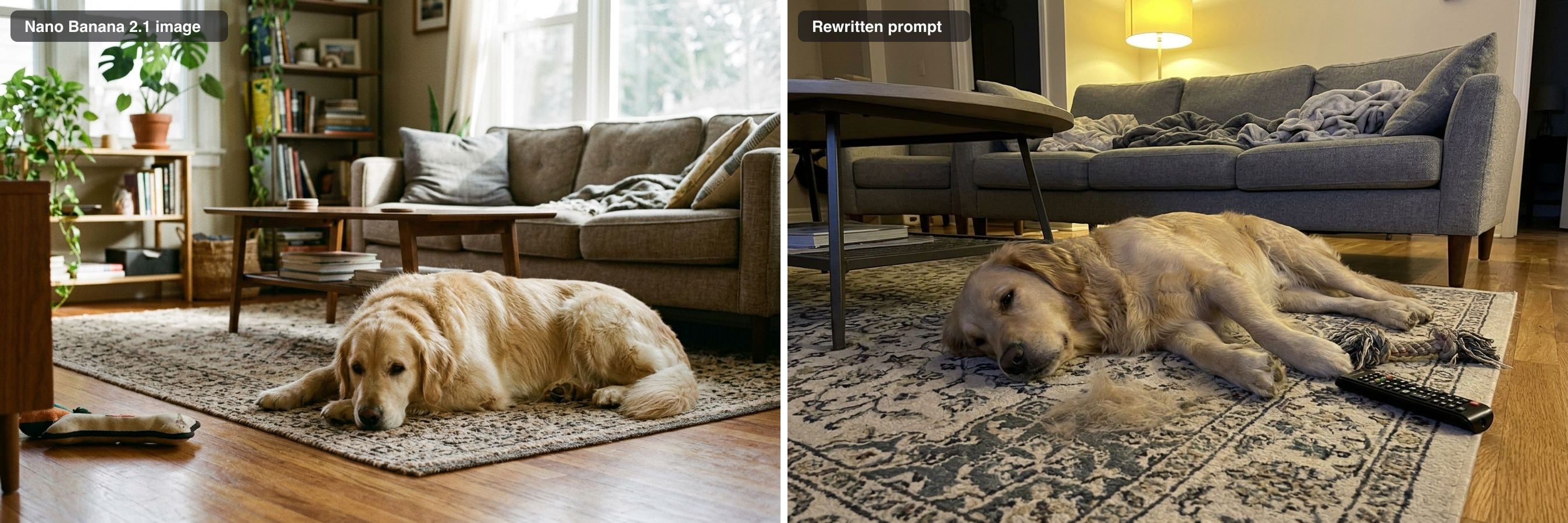
Rewritten prompt: "A phone photo of a golden retriever lying on a rug in a living room, taken from standing height. Evening light from a ceiling lamp, slightly yellow, with some noise in the shadows. Dog hair on the rug, a chewed toy and a TV remote on the floor. Everything in focus, ordinary snapshot colours, not cinematic."
What happened: the film grade became plain lamp light, and a clump of shed fur and a chewed rope toy make it look lived-in. The camera ended up near floor height rather than "standing height", so check that the angle you asked for is the angle you got. Time: 50 seconds.
The park bench
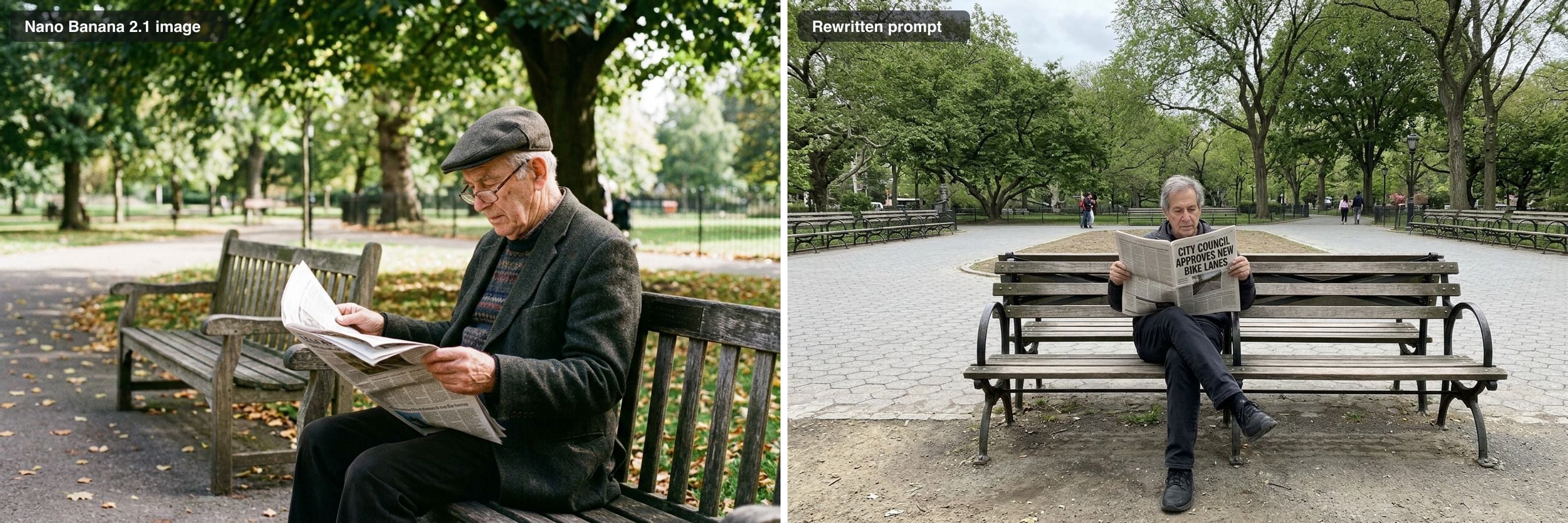
Rewritten prompt: "A photo of an older man reading a newspaper on a park bench, taken with a phone from a few metres away. Midday overcast light. The front page of his newspaper has a clear, correctly spelled headline in English: 'City Council Approves New Bike Lanes'. Normal phone focus with the background still readable, ordinary colours, no film grain and no moody colour grade."
What happened: quoting the headline worked: the front page reads "City Council Approves New Bike Lanes". The film grade is gone too. But the new picture is perfectly symmetrical, with the man in the centre of the bench facing the camera, which looks posed in a different way. Every rewrite can trade one tell for another, so look at the composition as well as the light. Time: 38 seconds.
Fix 2: keep the image and name what is wrong
When you want to keep the image, name the one thing that gives it away and leave the rest alone. We typed this instruction into the sparkpix AI Image Humanizer (our own tool), which adds its realism notes and an instruction to keep everything the text does not mention:
Instruction: "Make the newspaper's front-page headline a clear, correctly spelled English headline that reads 'City Council Approves New Bike Lanes'."
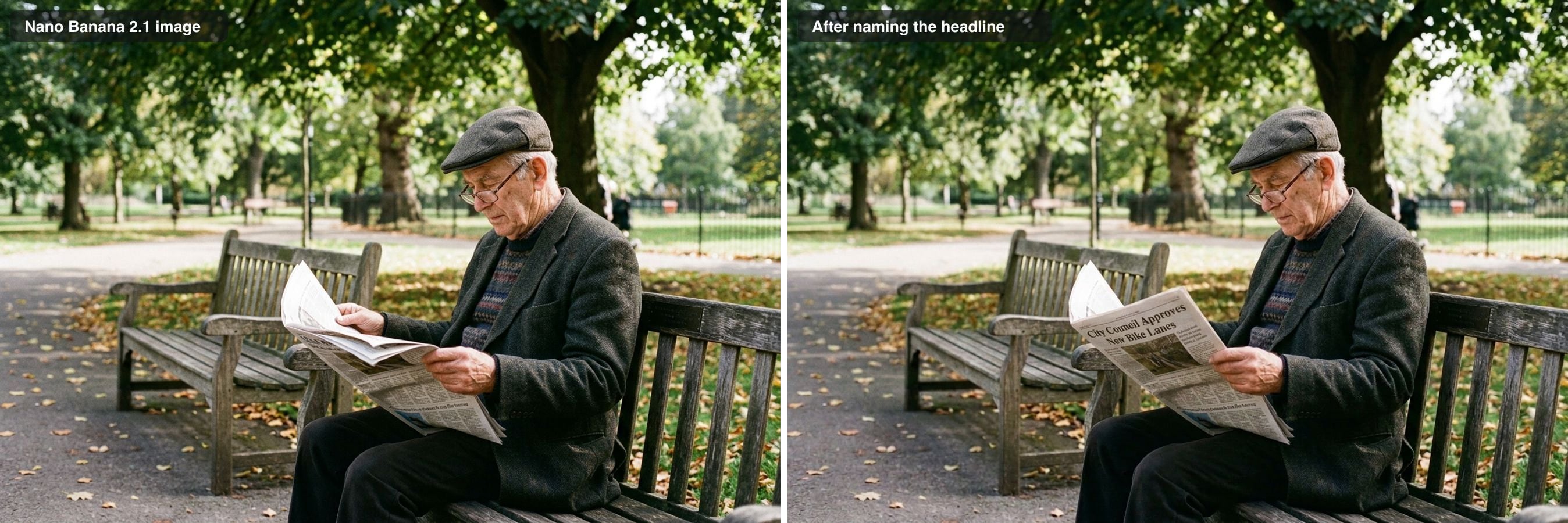
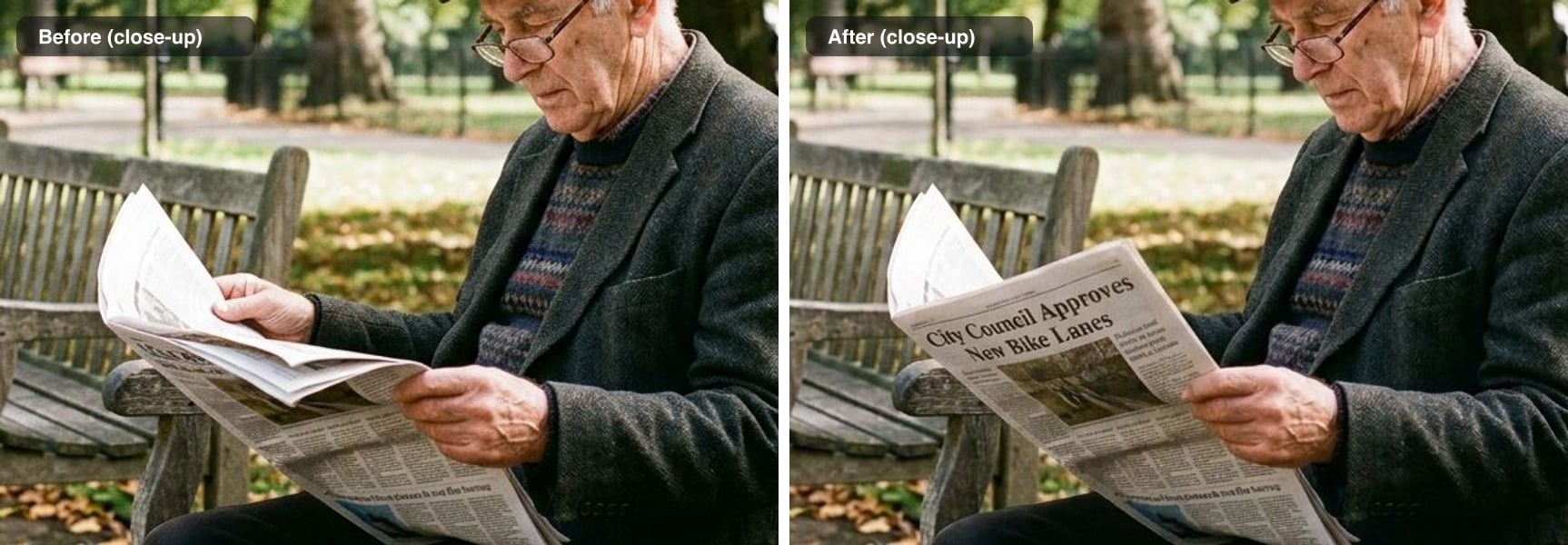
What happened: the headline now reads correctly, with a photo under it, and the man, his cap, glasses, coat, the bench and the park are unchanged. The small column text is still not real words. That is a limit of current image models: keep important text large in the frame. Time: 37 seconds.
What a general realism pass did not do
We also ran all five originals through the humanizer's default realism pass, the one-click instruction built for waxy skin, oily shine, glow and colour grading. On these images it changed very little.
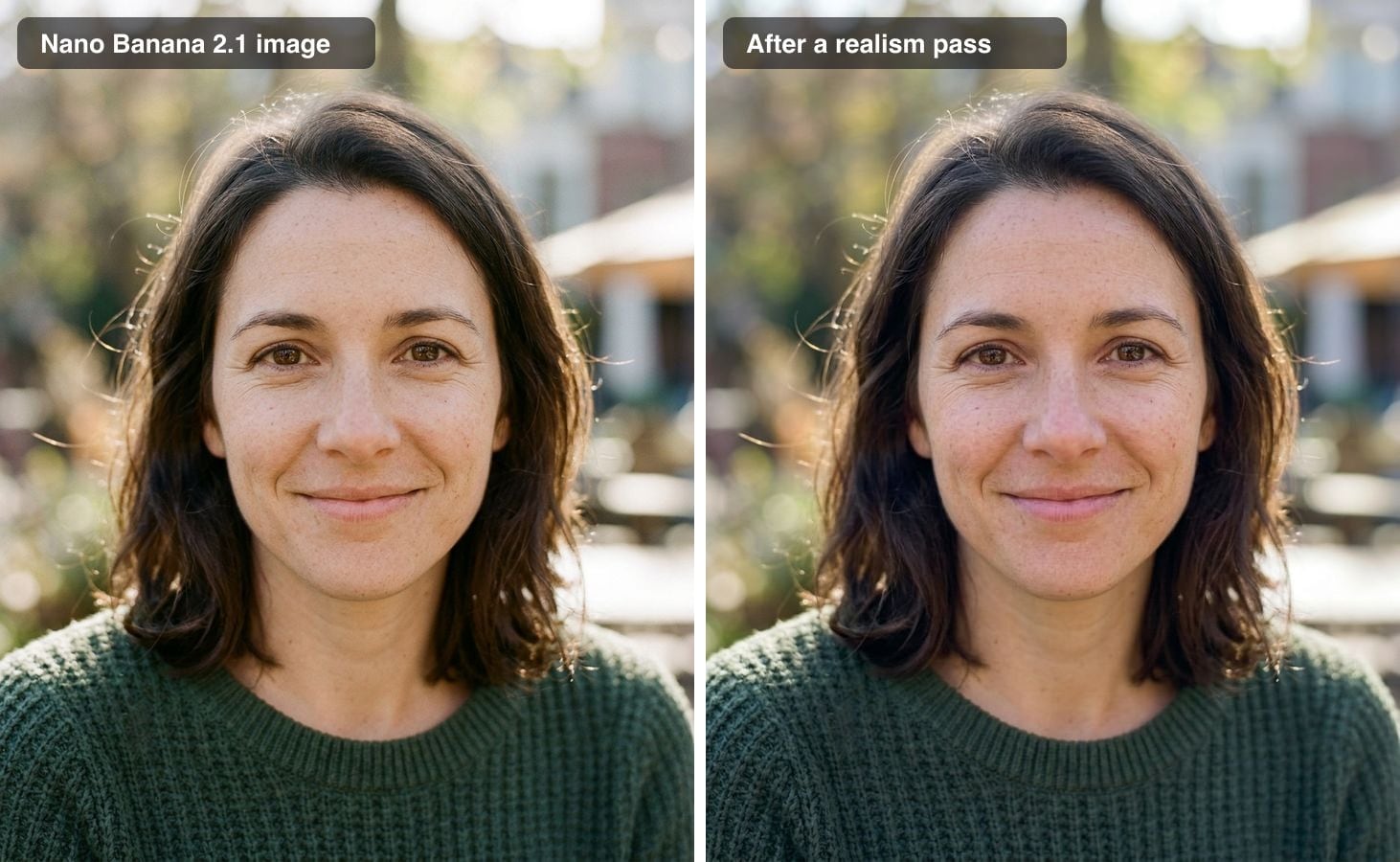
The portrait already had real skin texture, so there was nothing for the pass to add. The beach kept its sunset, because a realism pass keeps the scene and its light source. The garbled headline stayed garbled, because the default pass does not know which words you want. Times: 29 to 47 seconds.
So for most Nano Banana images, a general realism pass is the wrong tool. It earns its place on images that have the classic tells, such as airbrushed skin or oily highlights, which in our tests showed up in ChatGPT images rather than in Nano Banana's.
A realistic prompt template for Nano Banana
Fill in the brackets:
"A casual phone photo of [subject], taken by [who] from [where]. [One ordinary light source, e.g. overcast daylight, a ceiling light, a window]. [One imperfection, e.g. squinting, mid-sentence, a little motion blur]. [Everyday mess, e.g. dishes in the sink, a remote on the floor]. Everything in focus like a phone camera, ordinary colours, no film look, no colour grading. [Any text: the sign reads 'exact words']."
If people come out looking alike or not as you intended, describe them (age, build, clothes); the model will otherwise choose for you.
How to make a Nano Banana image look real, step by step
- Find the tell: golden-hour light, blurred background, film-style grade, an art-directed scene, or garbled text.
- Ask for a snapshot, not a photograph: who took it, with what, and from where.
- Switch off the photographer's look with "everything in focus like a phone camera, ordinary colours, no film look, no colour grading".
- Quote any text you need in the image.
- To keep an image you like, run an edit that names the one thing that is wrong instead of a general realism pass.
When this won't help
- Hands, fingers and faces that are wrong. Rewrite the prompt or run an edit that names the problem; a realism pass keeps them.
- Small text. Body text in a newspaper column or on a label still comes out unreadable, even when the headline is right.
- You need to pass the image off as a real photo. Don't. Making an image look natural does not change what it is, and sparkpix does not claim to beat AI detectors. Disclose AI images where a platform, client or contest asks you to.
- You want the same person in a new scene. A rewritten prompt makes a new person every time. Use an edit on the original image instead.
Related guides and tools
- How to Make ChatGPT Images Look Real tests OpenAI's model, where airbrushed skin is a real tell and a realism pass helps more.
- How to Make an AI Image Look Like a Real Photo: 4 Methods Compared covers every generator.
- Realistic AI Image Prompts has more prompts that start out looking like real photos.
Methodology: all five images were generated once on October 21, 2026 with Nano Banana 2.1 through the API at 1K resolution, then fixed once by each method; nothing was re-run to get a better result or retouched afterwards. Edits and realism passes used the sparkpix AI Image Humanizer's instructions on Nano Banana 2.1 at 1K. Times are wall-clock times from submitting the job to receiving the image.
How to make a Nano Banana image look real
- 1
Find the tell
Check the light (golden hour, flare, glowing backlight), the focus (a background melted into blur), the colour (a muted film-style grade), the scene (does it look art-directed?) and any text in the image.
- 2
Ask for a snapshot instead of a photograph
Say who took the photo and with what, give one ordinary light source, and add an imperfection and some everyday mess.
- 3
Switch off the photographer's look
End the prompt with "everything in focus like a phone camera, ordinary colours, no film look, no colour grading".
- 4
Quote any text
Write the exact words of a headline, sign or label in quotes so the model renders them instead of inventing letters.
- 5
Fix a kept image by naming the problem
If you want to keep an image, run an edit that names the one thing that is wrong, such as the headline, instead of a general realism pass.
Frequently Asked Questions
Why do Nano Banana images look AI-generated?
In our tests they looked too professional rather than artificial: golden-hour backlight and sun flare, a background melted into blur, a muted film-style colour grade and scenes that look art-directed, like two friends laughing in a lifestyle shoot. Small text such as a newspaper headline came out as nonsense. Skin was not the problem; a close-up portrait came back with pores and freckles.
What is a good Nano Banana prompt for realistic photos?
Ask for a casual phone photo and switch off the photographer's look: name who took it, give one ordinary light source ("overcast", "ceiling light", "not golden hour"), add an imperfection and some everyday mess, and end with "everything in focus like a phone camera, ordinary colours, no film look, no colour grading". If the image contains text, write the exact words in quotes.
Does Nano Banana make skin look plastic?
Not in our tests. A plain prompt for a close-up portrait of a woman in her 30s came back with visible pores, freckles and fine lines, and none of our other test images had waxy skin either. That is why a general realism pass changed so little on them: the tells it removes were not there.
How do I fix garbled text in a Nano Banana image?
Name the text you want. Writing the headline into the prompt produced a readable front page in a new image, and an edit instruction that quoted the headline fixed it on the original image while keeping the man, his cap and the bench. Small body text in columns still came out unreadable, so keep important words large in the frame.
Is the Nano Banana in the Gemini app the same as Nano Banana 2.1?
Not necessarily. Nano Banana 2.1 (model id gemini-nano-banana-2.1) is the current version in the Gemini API, documented on October 6, 2026 as an update to Nano Banana 2 (Gemini 3.1 Flash Image). We could not confirm which version the Gemini app runs, so images from the app may look a little different from our API tests.
Ready to Transform Your Images?
Start creating amazing AI-powered images today with sparkpix.ai
Try It Free