
How to Restore Old Photos: The Complete Guide to Fixing Every Type of Damage

How to Restore Old Photos: The Complete Guide to Fixing Every Type of Damage
Last updated: March 2026
There is a box in almost every family home. Sometimes it lives under a bed. Sometimes in a closet shelf, or the back of a wardrobe, or tucked behind holiday decorations in the attic. It is a shoebox, or a biscuit tin, or an old envelope held shut with a rubber band that snapped years ago.
Inside are photographs.
Some of them are fine — a little dusty, a little curled at the corners, but otherwise intact. Others are not. There is the portrait of your grandparents on their wedding day with a crease running straight through their faces. There is a photo of your father as a child, the image so faded it looks like he is disappearing into fog. There is the military photo of a great-uncle no one talks about much anymore, the surface eaten by rust-colored spots you later learn are called foxing. There is your mother's favourite photo of herself — young, laughing, standing in front of a car you don't recognize — bisected by a tear that has been carefully taped back together, the tape now brown and brittle.
You pick them up one by one and feel the weight of something that has no good name. Not quite grief. Not quite joy. Something in between.
This is the guide for that moment. Not just a tool tutorial — a genuine, comprehensive answer to every question you might have about restoring old photos: what can be fixed, what cannot, how to do it yourself for free without Photoshop, and how to make sure these images survive for the people who come after you.
Why Old Photos Deteriorate — And Why It Happens Faster Than You Think
Understanding what goes wrong helps you fix it. Old photographs are chemically and physically fragile objects, and they begin degrading the moment they are made.
The chemistry of fading. Traditional photographic prints rely on silver halide crystals or dye layers suspended in gelatin. Both are reactive. Silver tarnishes on contact with sulfur compounds in the air — the same chemical that yellows rubber bands also attacks your photographs. Dyes bleach when exposed to UV light and acidic storage environments. A photo stored in a non-archival album or envelope sits in contact with acids that slowly migrate into the paper and attack the image layer.
Temperature and humidity. The Image Permanence Institute at RIT has published data showing that a print stored at 75°F and 50% relative humidity will last approximately 100 years before significant fading. The same print stored at 85°F degrades in roughly 25 years. Most attics exceed 100°F in summer. Most basements run humid. Neither is where your photos should be.
Physical damage. Photographs were handled, folded into letters, tucked into wallets, dropped, stepped on, soaked in floods, and stored under heavy books for decades. The paper and emulsion layers crack, crease, and separate. Tape applied decades ago — meant to hold a torn photo together — becomes brittle, stains the image, and makes the damage worse.
The result is a spectrum of deterioration that ranges from mild yellowing to complete image loss. The good news is that modern AI restoration can recover far more than most people expect — including from photos that look almost beyond saving.
What Professional Photo Restoration Used to Cost
Before AI tools existed, restoring a single damaged photograph meant hiring a professional retoucher. Rates varied, but a realistic breakdown looked like this:
| Damage type | Professional cost | Turnaround |
|---|---|---|
| Minor scratches / dust | $50–$100 | 3–5 days |
| Moderate damage (tears, fading) | $100–$250 | 1–2 weeks |
| Severe damage (water, missing sections) | $250–$500+ | 2–4 weeks |
| Full colorization of B&W photo | $150–$400 | 1–3 weeks |
For a family with an entire box of damaged photos, professional restoration was financially impossible. Most people simply didn't do it, and the photos continued to deteriorate.
AI tools have changed this entirely. The same repairs that once cost hundreds of dollars and weeks of waiting now take 30 seconds and cost nothing beyond a free account.
Before You Restore: How to Digitize Your Old Photos Properly
The quality of your restoration depends entirely on the quality of your scan or photograph. A blurry, poorly lit capture of a damaged photo gives the AI less information to work with. Take 10 minutes here and it will make a meaningful difference.
Option 1: Flatbed scanner (best quality)
A flatbed scanner at 600 DPI is the gold standard for prints. For photos you want to print large after restoration, scan at 1200 DPI. Most photo centres (Walgreens, CVS, Costco) offer scanning services if you don't own a scanner, typically at $0.10–$0.30 per scan.
Option 2: Phone camera (surprisingly good)
Modern smartphones at 12+ megapixels are genuinely adequate for AI restoration purposes. The key variables:
- Shoot in bright, even light — overcast daylight from a north-facing window is ideal
- Lay the photo flat. Curl and shadow at the edges reduce detail at the corners
- Avoid flash — it creates reflective hotspots that obscure damage
- Fill the frame with the photo, leaving a small border
Option 3: Document scanner apps
Apps like Adobe Scan, Microsoft Lens, and Google PhotoScan use multiple captures to reduce glare and correct perspective distortion. Google PhotoScan specifically is designed for glossy photos and worth the extra minute it takes.
Save your file as JPG or PNG. Most AI restoration tools accept both. PNG retains more quality but produces larger files — either works for restoration purposes.
The 8 Types of Photo Damage — And Exactly How to Fix Each One
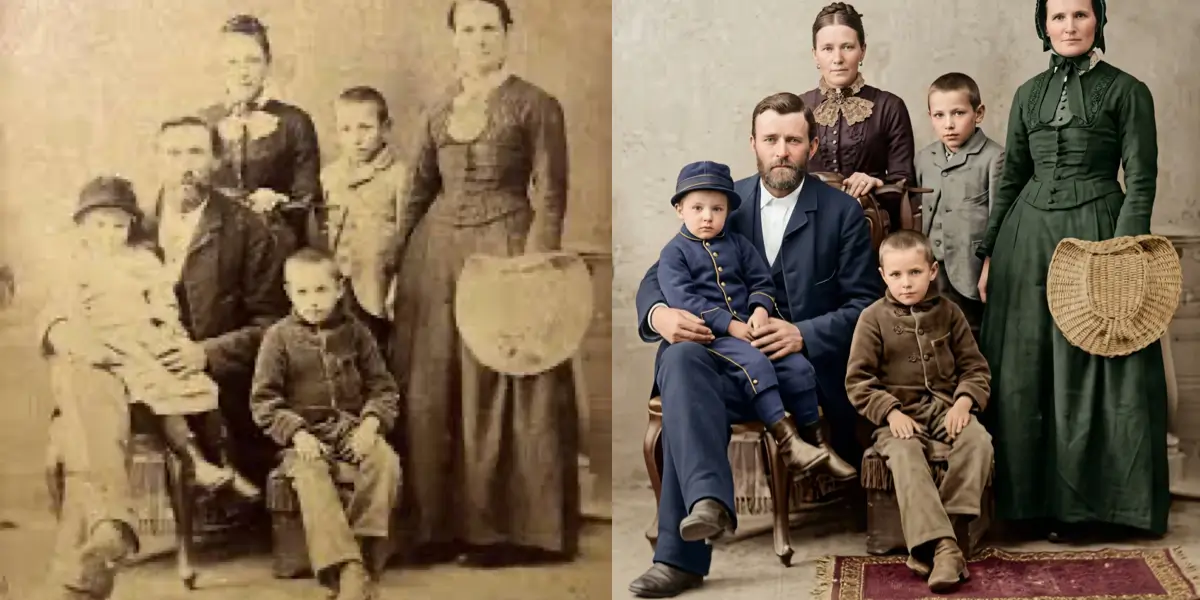
1. Fading and Color Loss
What it looks like: The image appears washed out, bleached, or uniformly pale. Colours that were once vibrant — a red dress, green grass, a blue sky — have drifted toward beige and grey. In black-and-white photos, fading produces a milky flatness where contrast once existed.
Why it happens: UV exposure bleaches dye layers; silver tarnishes. Photos stored near windows or in humid environments fade fastest.
How severe fading gets: A 2019 study by Kodak Alaris found that untreated colour prints fade to approximately 50% of their original density within 15 years of display under normal household lighting conditions. Under ideal dark storage, the same print lasts 100+ years.
How to fix faded photos with AI:
Upload your faded photo to sparkpix.ai/aitools/restore-faded-photos. The AI analyses the remaining tonal information — even in heavily faded images, there is almost always enough structure for the model to reconstruct what the original looked like. It rebuilds contrast, recovers colour channel separation, and restores shadow depth without guessing or fabricating detail.
You can also type a specific instruction in the main editor: "Restore the faded colours in this old photo and bring back the original contrast" — the AI will apply targeted correction based on your description.
2. Scratches, Scuffs, and Surface Abrasion
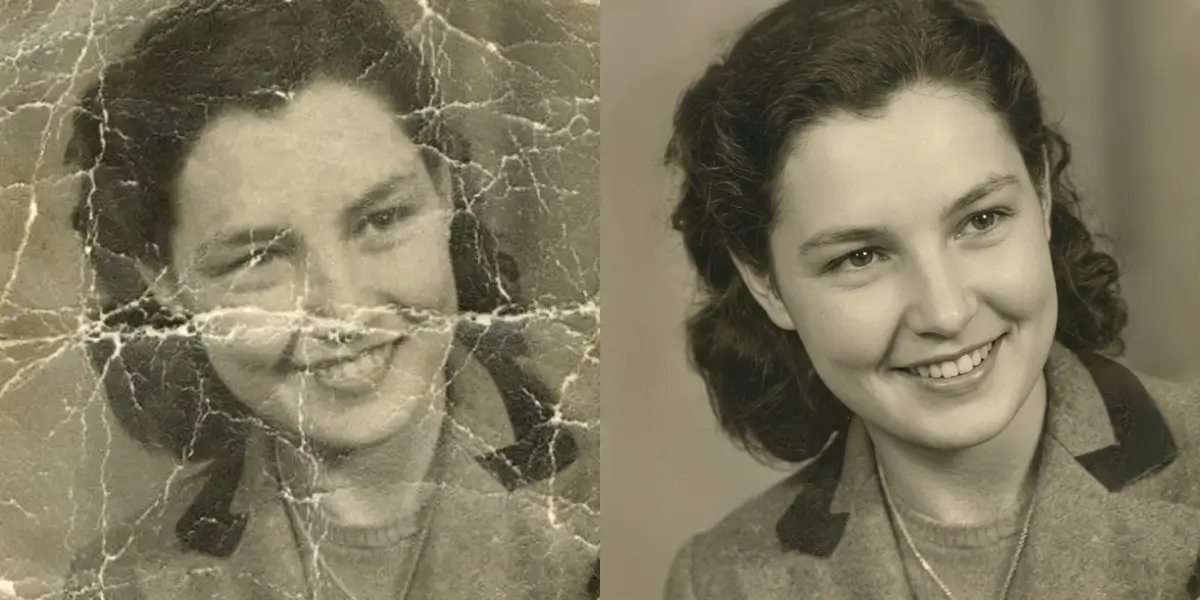
What it looks like: Linear marks across the image surface, white or dark depending on whether the emulsion or base was damaged. Fine networks of craze marks (spider-web cracking) appear when gelatin dries out and contracts.
Why it happens: Physical contact with objects during storage — stacked prints rubbing together, coins, keys in the same drawer, albums with abrasive pages.
How to fix scratched photos:
Go to sparkpix.ai/aitools/fix-scratched-photos. For scattered surface scratches, the AI identifies the linear anomalies — which don't match the underlying image structure — and fills them with locally appropriate texture and tone. Results are typically indistinguishable from an undamaged print for scratches up to approximately 3–4mm wide.
For heavier abrasion covering larger areas, describe what you need: "Remove all scratches and surface damage from this old photo while preserving the original details underneath."
3. Tears and Physical Rips
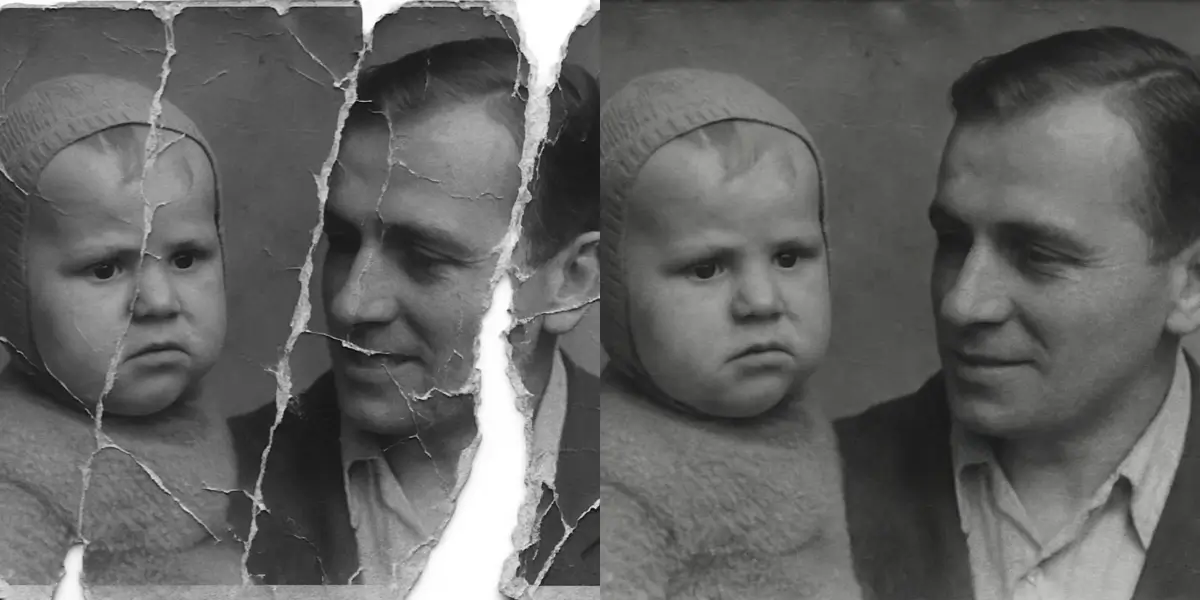
What it looks like: The print is physically separated along one or more lines. Sometimes the pieces are still together (held by tape or just laying in alignment). Sometimes a corner or strip is missing entirely.
Why it happens: Removal from albums, storage accidents, deliberate removal of a person from a group photo, or simply age-related brittleness.
The difficult truth about missing sections: AI restoration can reconstruct missing content by inferring from surrounding context — but it is generating plausible content, not recovering what was actually there. For a torn sky or background, this works invisibly. For a missing face, the result is a plausible face, not the specific person's face.
How to fix torn photos:
For tears where all the pieces are present: photograph the pieces laid in alignment and upload to sparkpix.ai/aitools/restore-torn-photos. The AI identifies the tear line and seamlessly heals it.
For photos with missing sections: upload to sparkpix.ai/photo-restoration and describe: "Restore this torn photo — fill in the missing areas naturally to match the surrounding content."
4. Water Damage and Stains
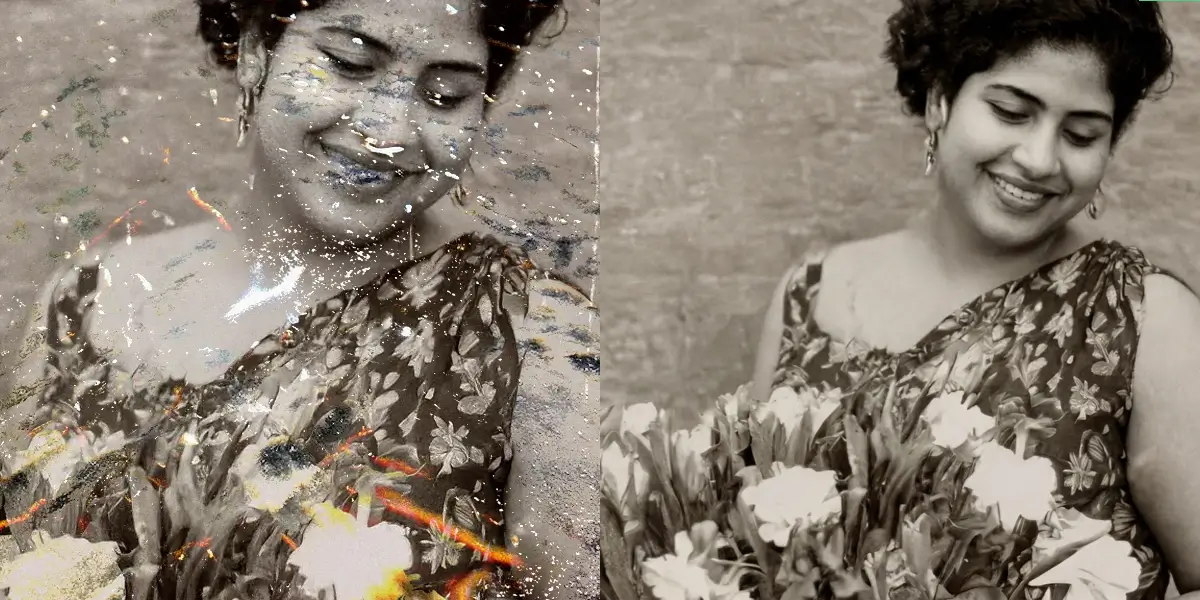
What it looks like: Tide marks — dark rings where water evaporated and left mineral deposits. Brown or rust-coloured patches. Mould growth appearing as fuzzy spots or diffuse discolouration. Sections where the emulsion has lifted or washed away entirely.
Why it happens: Flooding, leaking roofs, burst pipes, basements. Water damage is the most common cause of catastrophic photo loss — and the hardest to prevent once it begins, because wet photos stick together and trying to separate them damages them further.
If your photos are currently wet: Do not try to peel them apart. Place them face-up on a clean surface and let them air dry. Freeze them if you need time (wrap in wax paper first) — freezing halts fungal growth and gives you time to plan your approach.
How to fix water damaged photos:
Upload to sparkpix.ai/aitools/fix-water-damaged-photos. The AI distinguishes between the photographic image layer and the overlaid staining, then removes stains while preserving the image beneath. Tide marks and mineral deposits disappear. Mould spots are removed. Colour casts introduced by the damage are corrected.
5. Yellowing and Brown Tinting
What it looks like: The entire print or specific areas have shifted toward yellow, amber, or brown. Often concentrated in highlight areas (faces, skies, light backgrounds). Sometimes accompanied by a musty smell, indicating active chemical breakdown.
Why it happens: Paper acid migration. Most photo paper manufactured before the 1980s was not acid-free. Over time, the acid in the paper migrates into the image layer and oxidises the silver or dyes, producing the characteristic yellow-brown cast.
The difference between yellowing and sepia: True sepia photos were intentionally toned with sulfur compounds for archival reasons — they were never "white" and shouldn't be treated as degraded. Random yellowing of a print that was originally neutral-toned is deterioration and can be corrected.
How to fix yellowed photos:
Upload to sparkpix.ai/aitools/fix-yellowed-photos. The AI identifies the original neutral tones beneath the yellow cast and restores white balance and colour accuracy. For prints that are both yellowed and faded, combine the instruction: "Remove the yellow tinting and restore the original colours and contrast of this old photo."
[IMAGE PLACEHOLDER: Before — portrait with heavy amber/yellow cast, faces appearing orange-toned. After — neutral, natural skin tones restored, background whites correct]
6. Creases, Folds, and Crinkles
What it looks like: The photo has been folded — sometimes intentionally (tucked into a letter or wallet) and sometimes by accident. The crease creates a white line (where the emulsion cracked) or a dark shadow (where the paper fibres compressed). In severe cases, sections of the image on the crease have completely flaked away.
Why it happens: Photos tucked into wallets for years. Photos stored folded in half. Photos removed from their frames and bent. Children.
How to fix creased photos:
Upload to sparkpix.ai/aitools/fix-creased-photos. For crease lines where the image is still present beneath the damage, the AI heals the line and reconstructs the texture. For severe fold lines where the emulsion has flaked away, the model infers from surrounding content — most effective on backgrounds and clothing, less perfect on facial features directly on the crease.
7. Blurry or Soft Facial Features
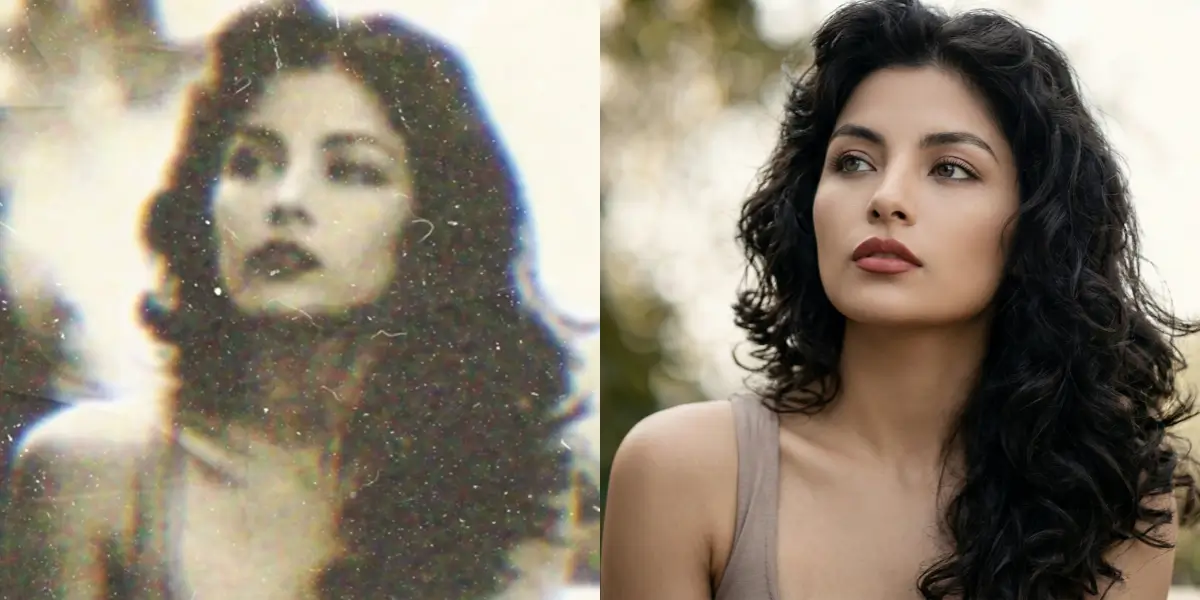
What it looks like: Faces appear smeared, soft, or featureless — even when the background is sharp. Common in fast-moving subjects (children), long-exposure situations (early film cameras requiring stillness), or simply early camera technology with limited resolving power.
Why it happens: Camera shake, motion blur, or the fundamental resolution limits of early photographic processes. A 4x6 inch print scanned and displayed at modern screen sizes reveals softness that was never visible on the original small print.
The most emotionally important problem: Blurry faces in old photos are particularly painful because they prevent you from seeing the person clearly. A grandparent's expression. A parent's young face. The only photo that exists of someone who is gone.
How to fix blurry faces in old photos:
Upload to sparkpix.ai/unblur-image. The AI uses face-aware deblurring — it specifically identifies facial structure and applies targeted reconstruction to restore eyes, skin texture, hair definition, and expression detail. Results on portrait blur are typically the most striking of all restoration types, because the before/after difference is so meaningful.
8. Black-and-White Photos: Adding Color
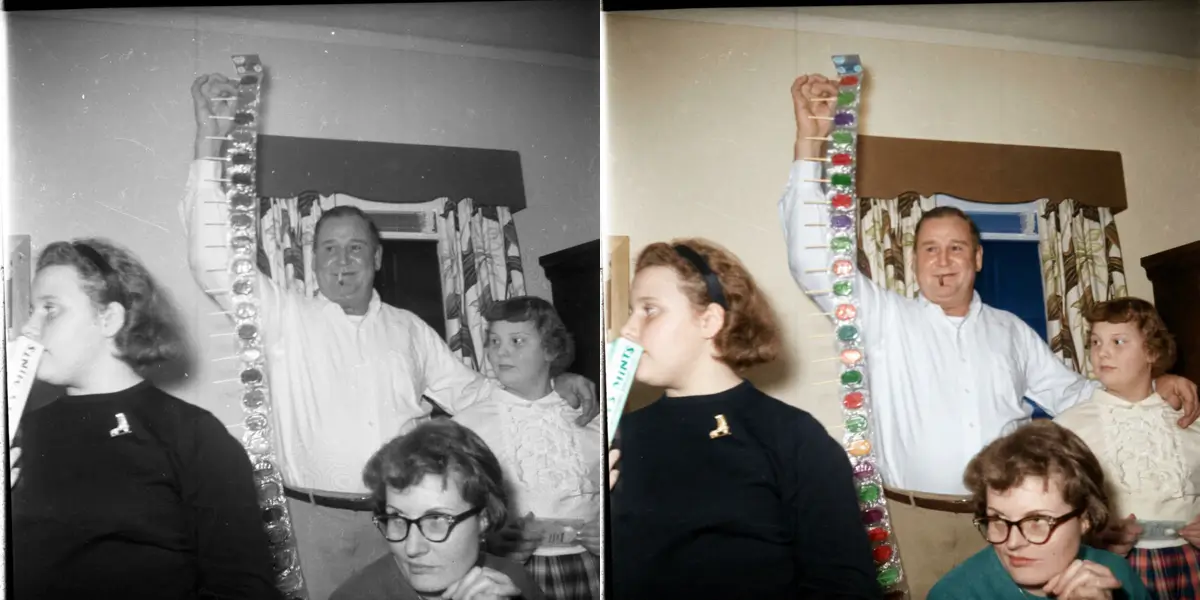
What it looks like: Technically, this is not damage — it is simply the limitation of the photography of the era. But for many people, colorizing a black-and-white photo of a grandparent is the most emotionally resonant restoration they will ever do.
How AI colorization works: The model has been trained on millions of photographs and has learned what colours typically correspond to what subjects — skin tones, grass, sky, wooden furniture, fabric patterns, military uniforms, 1950s car colours. It applies probabilistic colour assignments based on context. The result is not a guess — it is a statistically informed reconstruction of what the photo likely looked like in colour.
Limitations: AI colorization cannot know the colour of a specific dress or the exact shade of someone's eyes. It produces plausible colour, not verified colour. If you have other colour references (a sibling's photo from the same era, a known uniform colour), you can describe them in the prompt to guide the AI.
How to colorize old black-and-white photos:
Upload to sparkpix.ai/aitools/colorize-photo. The AI automatically assigns natural, realistic colours. For specific guidance, type your instructions: "Colorize this 1940s family photo. The woman is wearing a floral dress. The car in the background is a dark green."
Special Photo Types: Extra Care, Extra Meaning
Restoring Wedding Photos
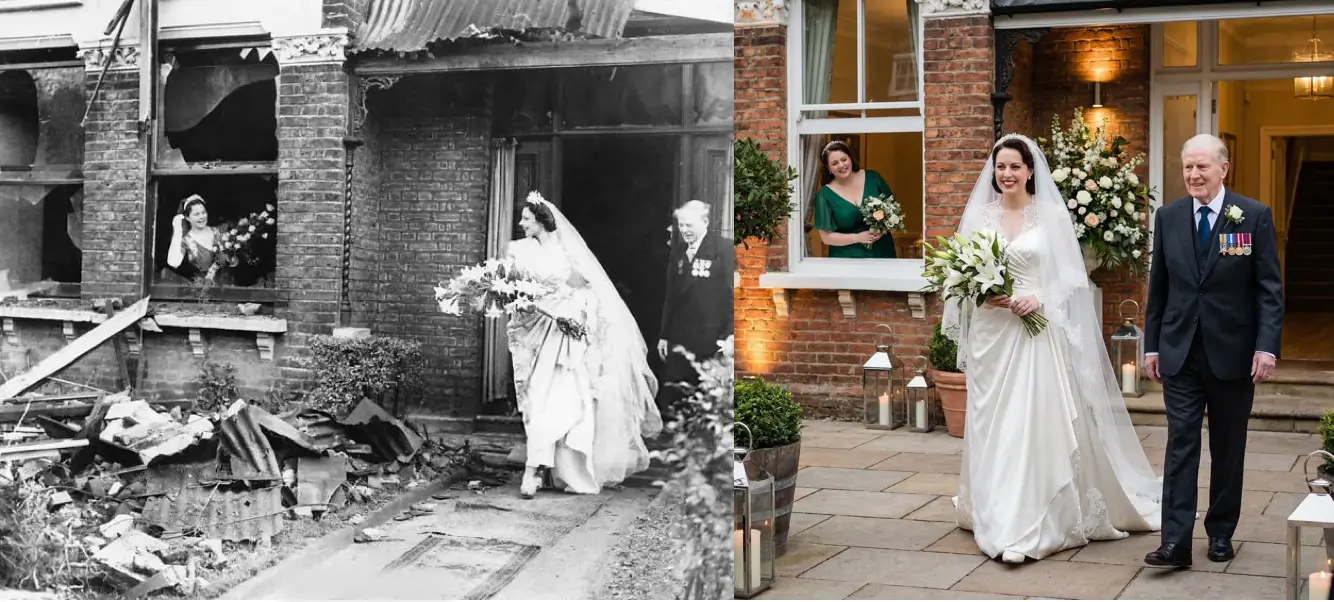
Wedding photos carry a specific weight. They are often the only professional portraits ever taken of the couple — formal, deliberate, irreplaceable. Damage to a wedding photo feels like damage to the memory of the marriage itself.
The most common issues with old wedding photos: fading (the bright white of a wedding dress bleaches the image in highlight areas), yellowing (formal prints were often displayed in light, accelerating deterioration), and physical damage from being moved between albums over decades.
Upload your wedding photos to sparkpix.ai/aitools/restore-wedding-photos for targeted restoration. The AI understands the specific context — lace detail on dresses, floral arrangements, formal portraiture — and applies appropriate correction.
Restoring Military Photos
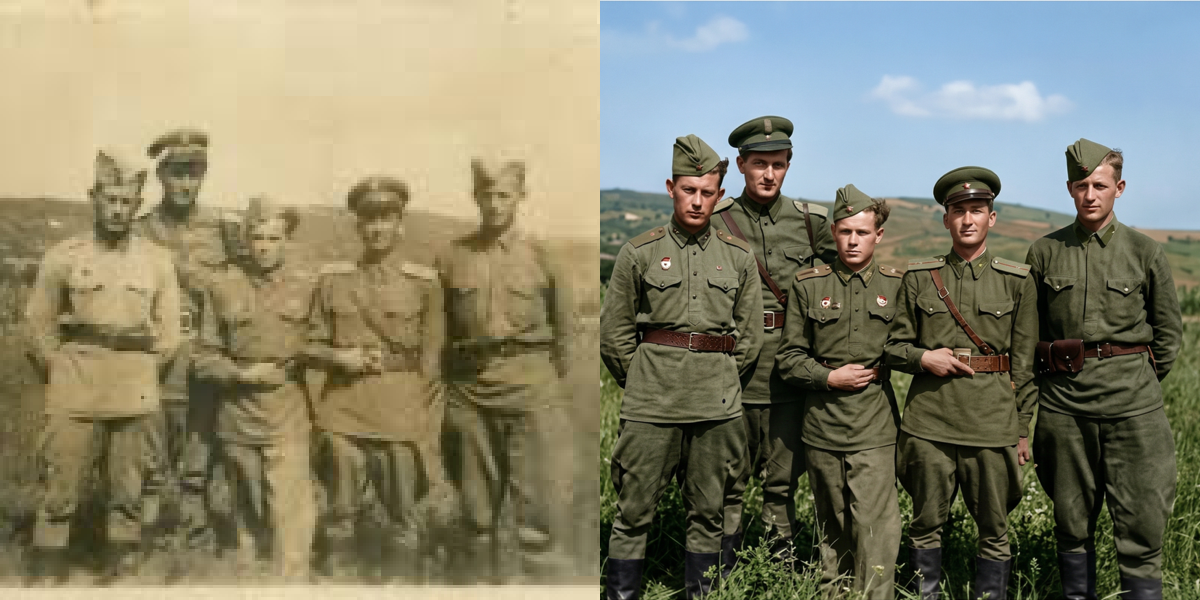
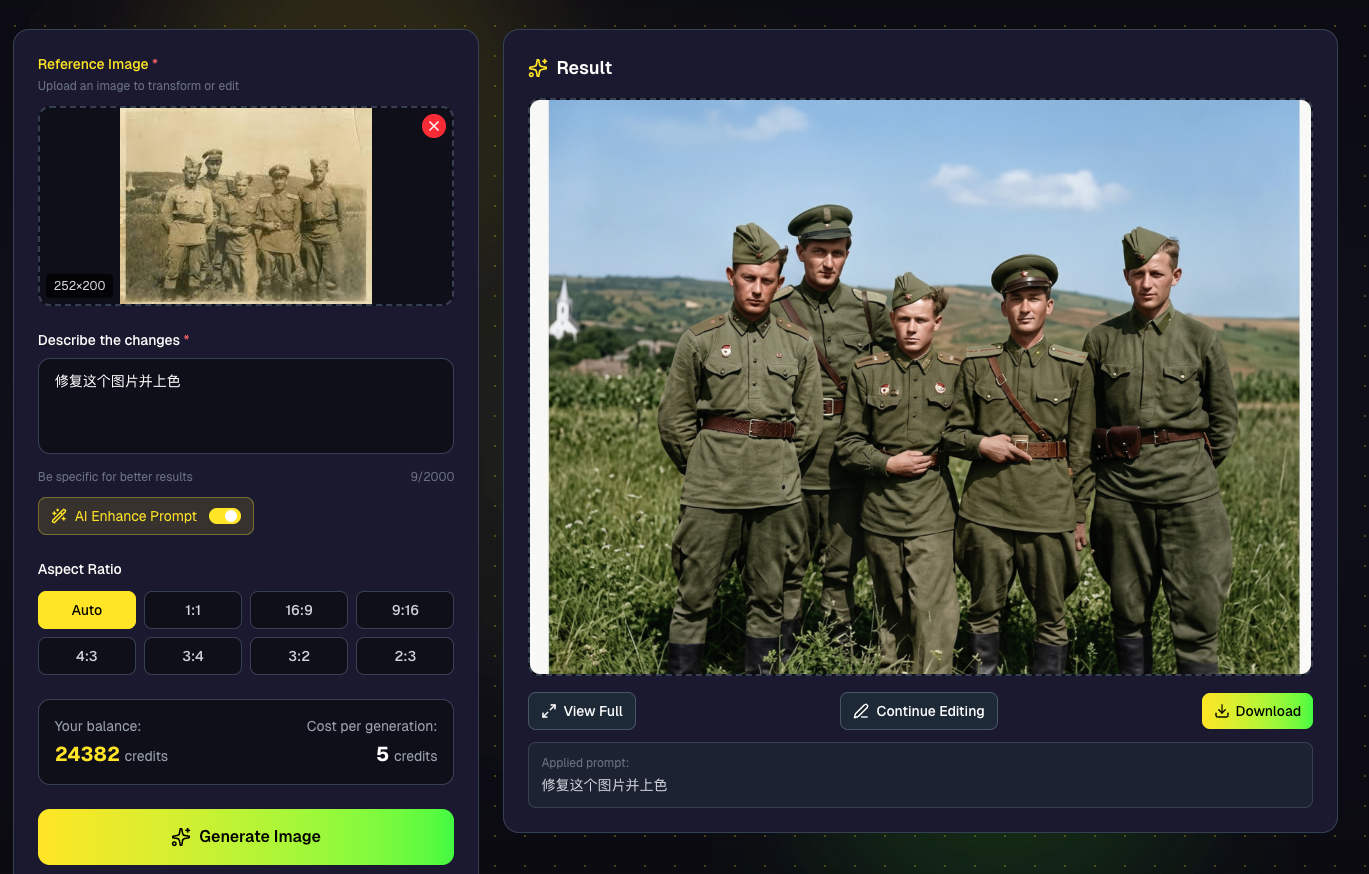
Military photographs are among the most requested restoration projects — and among the most emotionally significant. A grandfather in uniform. A great-uncle who didn't come home. A parent's service portrait displayed for decades until the image itself began to fade.
Military photos often have unique challenges: they were frequently small (wallet-sized prints were common), taken in difficult field conditions, and have spent decades in storage that wasn't designed for preservation.
Upload to sparkpix.ai/aitools/restore-military-photos. The AI applies resolution enhancement alongside damage repair, recovering rank insignia, unit patches, and facial detail that may have been lost to softness and age.
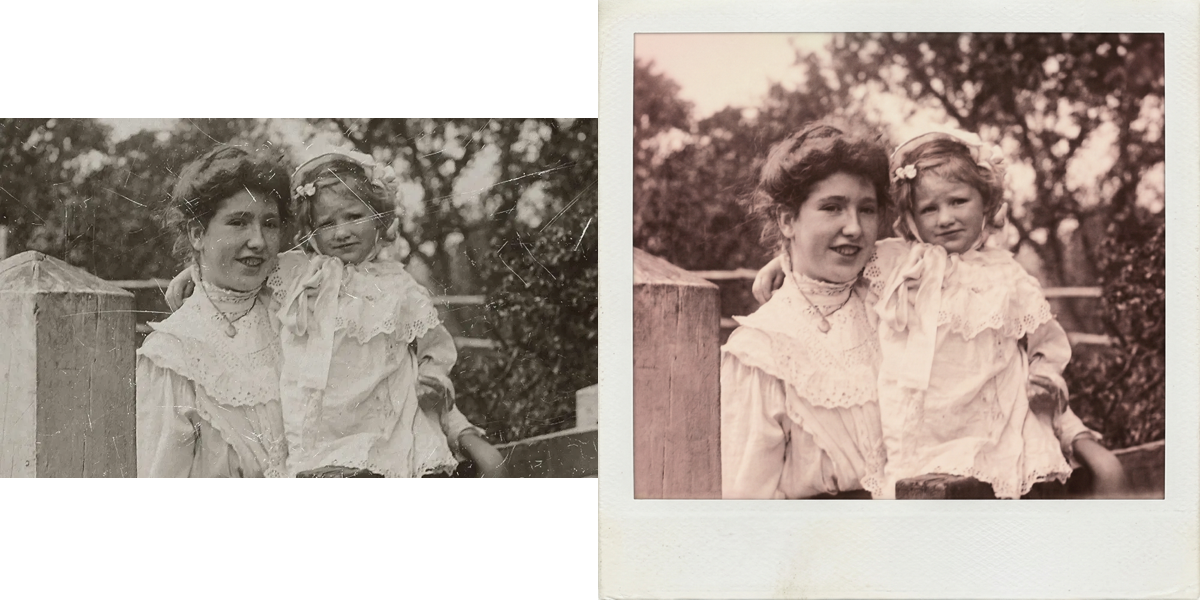
Restoring Polaroid Photos
Polaroid photos deteriorate in a specific and recognisable way: the image fades from the edges inward, leaving a darker central area surrounded by an increasingly blank border. Colours shift toward red and yellow as the cyan dye layer fades fastest. The surface develops a waxy, uneven sheen.
Polaroid restoration requires understanding the original image format — the distinctive square frame, the thick white border — and working within those constraints.
Upload to sparkpix.ai/aitools/restore-polaroid-photos for specialised Polaroid restoration that accounts for the format's specific deterioration patterns.
Restoring Photos for Memorial Services
When someone dies, photographs become the primary material connection to their life. Families searching for photos to display at memorial services often find that the best available images — the most characteristic, the most beloved — are also the most damaged.
We built a dedicated restoration tool for this specific need at sparkpix.ai/aitools/restore-photo-for-funeral. Processing is fast — typically under a minute — because we understand that time is often short in these moments.
The Complete Restoration: When You Need Everything at Once
Most damaged photos don't have just one problem. The wedding photo that's faded is also yellowed and has a crease. The military portrait is blurry, scratched, and missing a corner. The Polaroid has edge fading, a water stain, and colour drift.
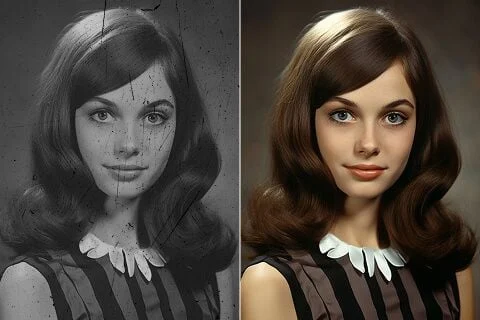
For comprehensive restoration that addresses multiple damage types simultaneously, use sparkpix.ai/photo-restoration. Describe everything you want fixed: "Restore this old damaged photo — remove scratches, fix the fading, correct the yellowing, and sharpen the faces."
The AI processes all damage types in a single pass, producing a comprehensive restoration without the need to chain multiple edits together.
Step-by-Step: How to Restore an Old Photo with sparkpix.ai
Here is the complete workflow for any photo restoration:
Step 1: Digitize your photo
Scan at 600 DPI minimum, or photograph with a smartphone in bright even light. Avoid flash.
Step 2: Choose your tool
- Single damage type? Use the specific tool (scratches, water damage, yellowing, etc.)
- Multiple damage types? Use the main photo restoration page
- Blurry faces? Start with the unblur tool, then address other damage
Step 3: Upload your photo
Drag and drop, or click to browse. Supports JPG and PNG up to 20MB.

Step 4: Describe what you need (optional but powerful)
The text prompt lets you guide the AI precisely: "Restore this 1940s family photo. Remove the scratch across the left side, fix the yellowing, and sharpen the faces. The background was originally a medium grey studio backdrop."
Step 5: Process and review
Results appear within 30 seconds. Review the output — most restorations require no further adjustment.
Step 6: Download and save
Download the restored image as a high-quality JPG or PNG. Save the original scan separately — never overwrite it.
After Restoration: Preserving Your Photos for the Next 100 Years
Restoration gives your photos a second chance. Preservation ensures they don't need a third.
Digital preservation:
- Store restored files on at least two separate drives (one kept offsite or cloud-backed)
- Use TIFF format for archival storage (lossless compression)
- Keep JPG or PNG for sharing and display
- The 3-2-1 rule: 3 copies, 2 different media types, 1 offsite
Physical storage for original prints:
- Archival-quality (acid-free) storage boxes and envelopes
- Store in a cool, dark location — interior closets are better than attics and basements
- Keep relative humidity between 30–40% if possible
- Never store photos in plastic bags — they trap moisture
Sharing restored photos:
Print restored photos using a professional print service (not home inkjet) on archival paper. Share digitally with family members so copies exist across multiple households.
Frequently Asked Questions
Can AI really restore old photos?
Yes — with important caveats. AI restoration tools in 2026 can remove scratches, repair tears, fix fading, correct yellowing, remove water stains, sharpen blurry faces, and colorize black-and-white photos with results that professional retouchers a decade ago could not match. The technology works best on photos where some image information is still present. Complete image loss in large areas (where the emulsion has physically washed away) can be inpainted, but the AI is generating plausible content rather than recovering what was actually there.
How much does photo restoration cost?
At sparkpix.ai, new users receive 5 free credits with no credit card required. Each restoration costs 5 credits. Additional credits start at $9.99 for 350 credits — enough for approximately 70 restorations. This compares to $50–$500 per photo for professional human retouchers.
Can I restore a photo that is torn in half?
Yes. If both halves are present, photograph or scan them laid side by side in alignment and upload the result. The AI identifies the tear line and heals it seamlessly. If one half is missing, the AI can reconstruct the missing side by inference from context — effective for backgrounds and clothing, less precise for faces.
What is the best way to photograph old photos for restoration?
Use a flatbed scanner at 600+ DPI if available. If using a smartphone: lay the photo flat, use diffuse natural light (avoid flash), fill the frame, and ensure the photo is not curved or curled. The higher the input resolution, the more detail the AI has to work with and the better the restoration result.
Can AI colorize black-and-white photos accurately?
AI colorization produces statistically plausible colour assignments based on what it has learned from millions of photographs. Skin tones, grass, sky, and many clothing types are colorized with high confidence. Specific colours (the exact shade of someone's eyes, the pattern on a specific dress) cannot be verified and will be the AI's best approximation. You can guide the output with text prompts if you have additional context.
How do I restore photos that are stuck together?
Do not force them apart — this will cause irreversible damage to both prints. For photos stuck face-to-face: place them in a container of distilled water (not tap water) for 30–60 minutes, then gently separate them from one corner. Let both dry face-up on a clean surface. For photos stuck to album pages: carefully peel from the corner using a thin palette knife or dental floss held taut. Once digitized, the adhesive marks and damage can be addressed through AI restoration.
Is it better to restore the physical print or just work digitally?
For most families, digital restoration is the right choice — it is immediate, free or very low cost, and produces a high-quality result. Physical restoration by a conservator is worth considering only for extremely high-value items (significant historical photographs, daguerreotypes, or irreplaceable formal portraits) where the original object itself has material value. For family photos, the goal is the image, not the physical object — and AI digital restoration delivers the image better and faster than physical restoration.
Can I restore a photo I only have a digital copy of (a photo of a photo)?
Yes. AI restoration tools work on any image file, regardless of how the original was captured. A smartphone photo of a photo is less ideal than a flatbed scan, but the AI will work with what it has. The main limitation is resolution — the lower the input resolution, the less detail available for reconstruction.
A Final Thought
The photos in that box are not just images. They are evidence — evidence that these people existed, that these moments happened, that the people you love had entire lives before you knew them. Every photo you restore is one more piece of that evidence preserved.
The technology available right now — free, fast, requiring nothing but an internet connection — is genuinely extraordinary by the standards of any previous generation. Photographs that would have cost hundreds of dollars to restore, or been judged beyond saving, can be fixed in under a minute.
The box in the attic is waiting. Start with the one that matters most.
Frequently Asked Questions
Can AI really restore old photos?
Yes — with important caveats. AI restoration tools in 2026 can remove scratches, repair tears, fix fading, correct yellowing, remove water stains, sharpen blurry faces, and colorize black-and-white photos. The technology works best on photos where some image information is still present. Complete image loss in large areas can be inpainted, but the AI is generating plausible content rather than recovering what was actually there.
How much does photo restoration cost?
At sparkpix.ai, new users receive 5 free credits with no credit card required. Each restoration costs 5 credits. Additional credits start at $9.99 for 350 credits — enough for approximately 70 restorations. This compares to $50–$500 per photo for professional human retouchers.
Can I restore a photo that is torn in half?
Yes. If both halves are present, scan or photograph them laid side by side in alignment and upload the result. The AI identifies the tear line and heals it seamlessly. If one half is missing, the AI can reconstruct the missing side by inference from context — effective for backgrounds and clothing, less precise for faces.
What is the best way to photograph old photos for restoration?
Use a flatbed scanner at 600+ DPI if available. If using a smartphone: lay the photo flat, use diffuse natural light (avoid flash), fill the frame, and ensure the photo is not curved. The higher the input resolution, the more detail the AI has to work with.
Can AI colorize black-and-white photos accurately?
AI colorization produces statistically plausible colour assignments based on millions of photographs. Skin tones, grass, sky, and many clothing types are colorized with high confidence. Specific colours (the exact shade of someone’s eyes, a specific dress pattern) cannot be verified and will be the AI’s best approximation. You can guide the output with text prompts if you have additional context.
How do I restore photos that are stuck together?
Do not force them apart — this causes irreversible damage. For photos stuck face-to-face: soak in distilled water (not tap water) for 30–60 minutes, then gently separate from one corner and dry face-up. For photos stuck to album pages: peel carefully from a corner with a thin palette knife or taut dental floss. Once digitized, the marks can be addressed through AI restoration.
Is it better to restore the physical print or just work digitally?
For most families, digital restoration is the right choice — immediate, free or very low cost, and high quality. Physical restoration by a conservator is worth it only for extremely high-value items (historical photographs, daguerreotypes, irreplaceable formal portraits) where the original object itself has material value. For family photos, the goal is the image, not the object.
Can I restore a photo I only have a digital copy of (a photo of a photo)?
Yes. AI restoration works on any image file regardless of how it was captured. A smartphone photo of a photo is less ideal than a flatbed scan, but the AI will work with what it has. The main limitation is resolution — the lower the input resolution, the less detail available for reconstruction.
Ready to Transform Your Images?
Start creating amazing AI-powered images today with sparkpix.ai
Try It Free